ENGLISH
4
Basic operations
Using the control panel
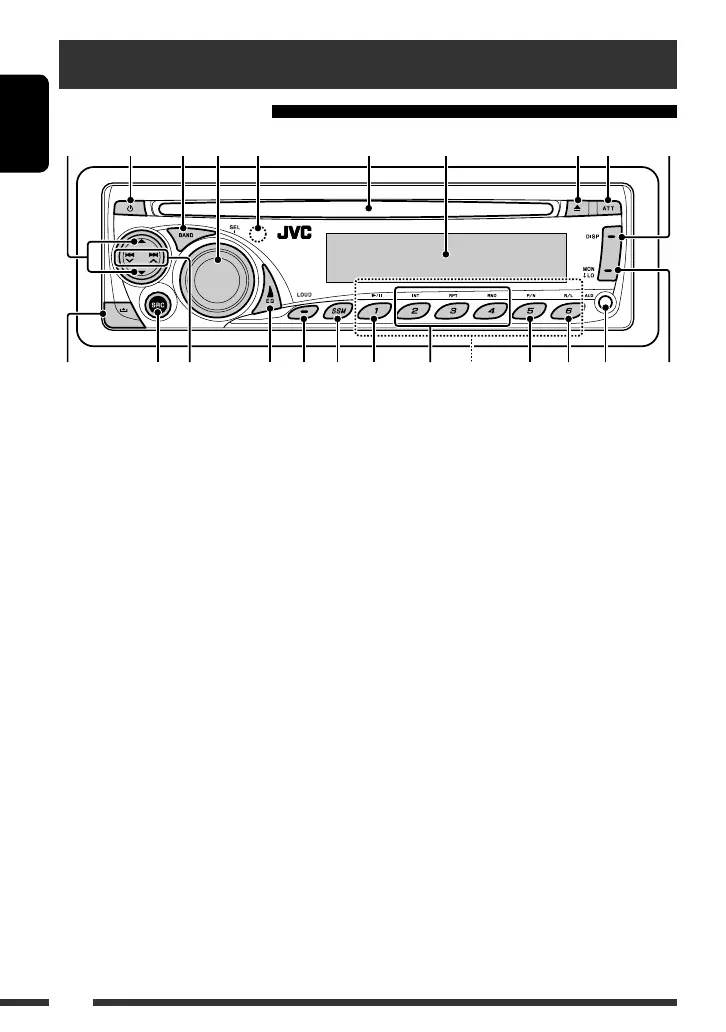
t Activate/deactivate the loudness setting.
y Preset the station automatically [Hold].
u Plays/pauses.
i Change playback mode—INT, RPT, RND.
o • Select preset station.
• Preset a station manually [Hold].
; Change the color system.
a Change the VCD audio channel.
s AUX (auxiliary) input jack
d Change the tuner reception mode.
• Select stereo or monaural reception.
• Select local or distance-extreme reception
[Hold].
*
1
While the sound is attenuated, no operations are
available. To operate the unit, deactivate the sound
attenuation by pressing ATT again.
*
2
You cannot select this source if no disc is inserted.
1 Select folder.
2 • Turn on the power.
• Turn off the power.
3 Select the FM/AM band.
4 • Control the volume or select items [Turn].
• Confirm the selection.
• Adjust the sound settings.
5 Remote sensor
6 Loading slot
7 Display window
8 Eject disc.
9 Attenuate the sound.*
1
p • Change the display information.
• Enters the clock setting mode [Hold].
q Detach the panel.
w Select the source.
Tuner = Disc *
2
= AUX IN = (back to the
beginning)
e • Tuner: Search for station.
• Disc: Select track.
r Select the sound mode.
67 89p
o; sadwe tryuiq
12345
EN_KD-SV3706[US].indb 4EN_KD-SV3706[US].indb 4 08.12.11 3:09:58 PM08.12.11 3:09:58 PM



 To Next Page