ENGLISH
3
CONTENTS
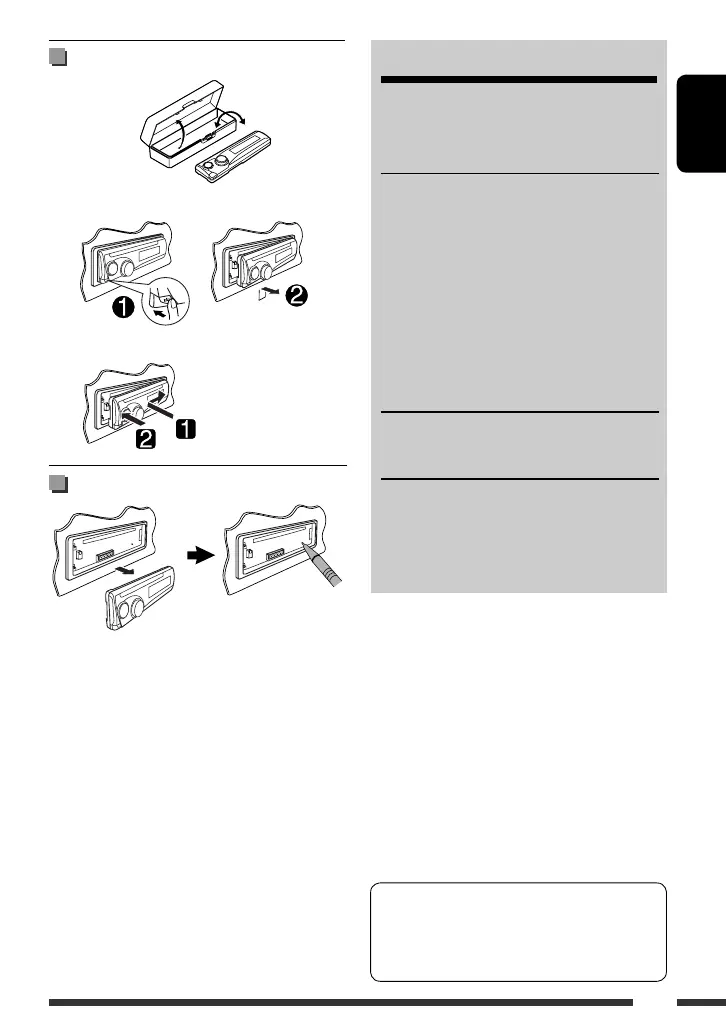
Detaching/attaching control panel .............. 3
How to reset your unit ................................. 3
OPERATIONS
Basic operations ........................................... 4
• Using the control panel ............................... 4
• Using the remote controller (RM-RK121) .... 5
• Changing the display information .............. 7
Preparation .................................................. 7
Listening to the radio ................................... 8
Disc operations ............................................. 9
Listening to the other external components
... 14
SETTINGS
Sound and monitor settings ......................... 15
REFERENCES
More about this unit .................................... 16
Troubleshooting ........................................... 18
Maintenance ................................................ 20
Specifications ............................................... 21
Detaching/attaching control panel
Detaching...
Attaching...
How to reset your unit
• Your preset adjustments will also be erased.
In this manual, operations using the control panel
are mainly explained; however, you can use the
buttons and controls on the remote control if they
have the same (or similar) name and marks.
EN_KD-SV3706[US].indb 3EN_KD-SV3706[US].indb 3 08.12.11 3:09:57 PM08.12.11 3:09:57 PM



 To Next Page