ENGLISH
6
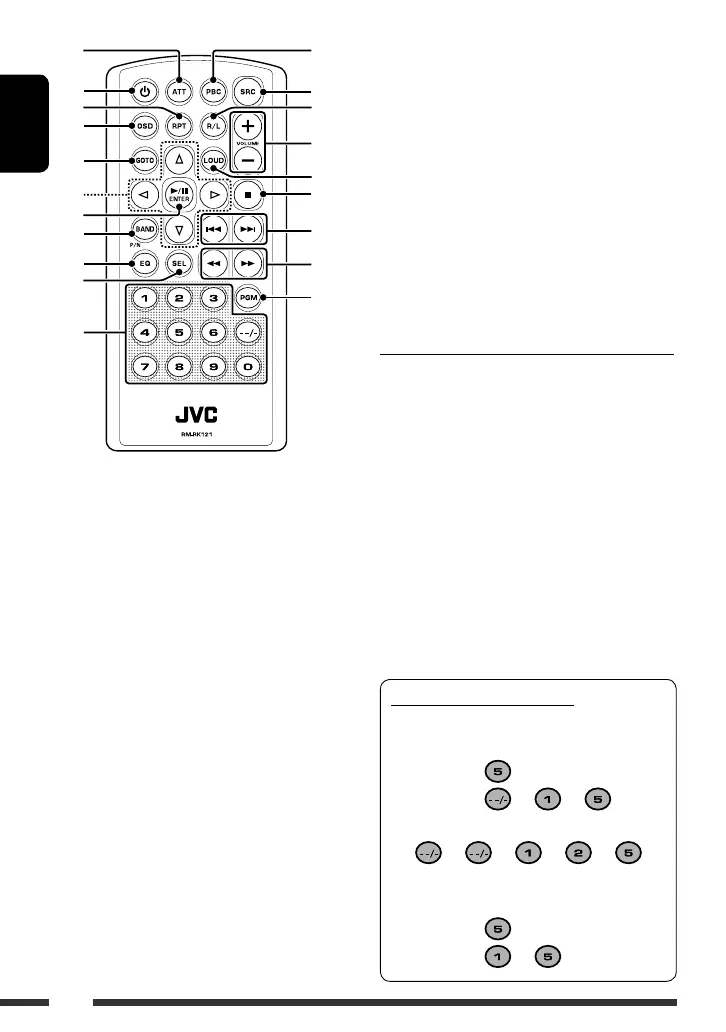
1 Attenuate the sound.
2 • Turn on the power.
• Turn off the power.
3 Play repeatedly.
4 Turn on and off the OSD (On-Screen Display) on the
monitor.
5 • Audio CD/VCD: Select a track.
• VCD: Select the desired position.
6 Make selection/settings.
7 • Play/pause.
• Confirm the selection.
8 • Tuner: Select the FM/AM band.
• VCD: Change the color system.
9 Select the sound mode.
p Select the sound setting item .
q • Enter numbers . (See also “How to use number
buttons” on the right column.)
• Tuner:
– Select preset station (1 – 6).
– Preset a station manually (1 – 6) [Hold].
w Activate/deactivate the PBC (Playback Control)
function.
e Select the source.
Tuner = Disc * = AUX IN = (back to the
beginning)
r Change the VCD audio channel.
t • Adjust the volume level.
• Adjust the sound settings.
y Activate/deactivate the loudness setting.
u Stop playback.
i • Tuner: Search for station.
• Disc: Select track.
o Reverse/Forward search.
; Display the program screen.
* You cannot select this source if no disc is inserted.
Warning (to prevent accidents and damage):
• Do not install any battery other than CR2025 or its
equivalent.
• Do not leave the remote controller in a place (such
as dashboards) exposed to direct sunlight for a long
time.
• Store the battery in a place where children cannot
reach.
• Do not recharge, short, disassemble, heat the battery,
or dispose of it in a fire.
• Do not leave the battery with other metallic
materials.
• Do not poke the battery with tweezers or similar
tools.
• Wrap the battery with tape and insulate when
throwing away or saving it.
6
7
8
9
p
q
o
;
e
r
t
y
u
i
w
1
2
3
4
5
How to use number buttons
• For selecting track number/item number on PBC
menu:
To select 5:
To select 15:
= =
To select 125:
= = = =
• For selecting program number and specifying
time to start playback:
To select 5:
To select 15:
=
EN_KD-SV3706[US].indb 6EN_KD-SV3706[US].indb 6 08.12.11 3:10:00 PM08.12.11 3:10:00 PM



 To Next Page