38
ENGLISH
Using information service from HD Radio or iHeartRADIO
On the map
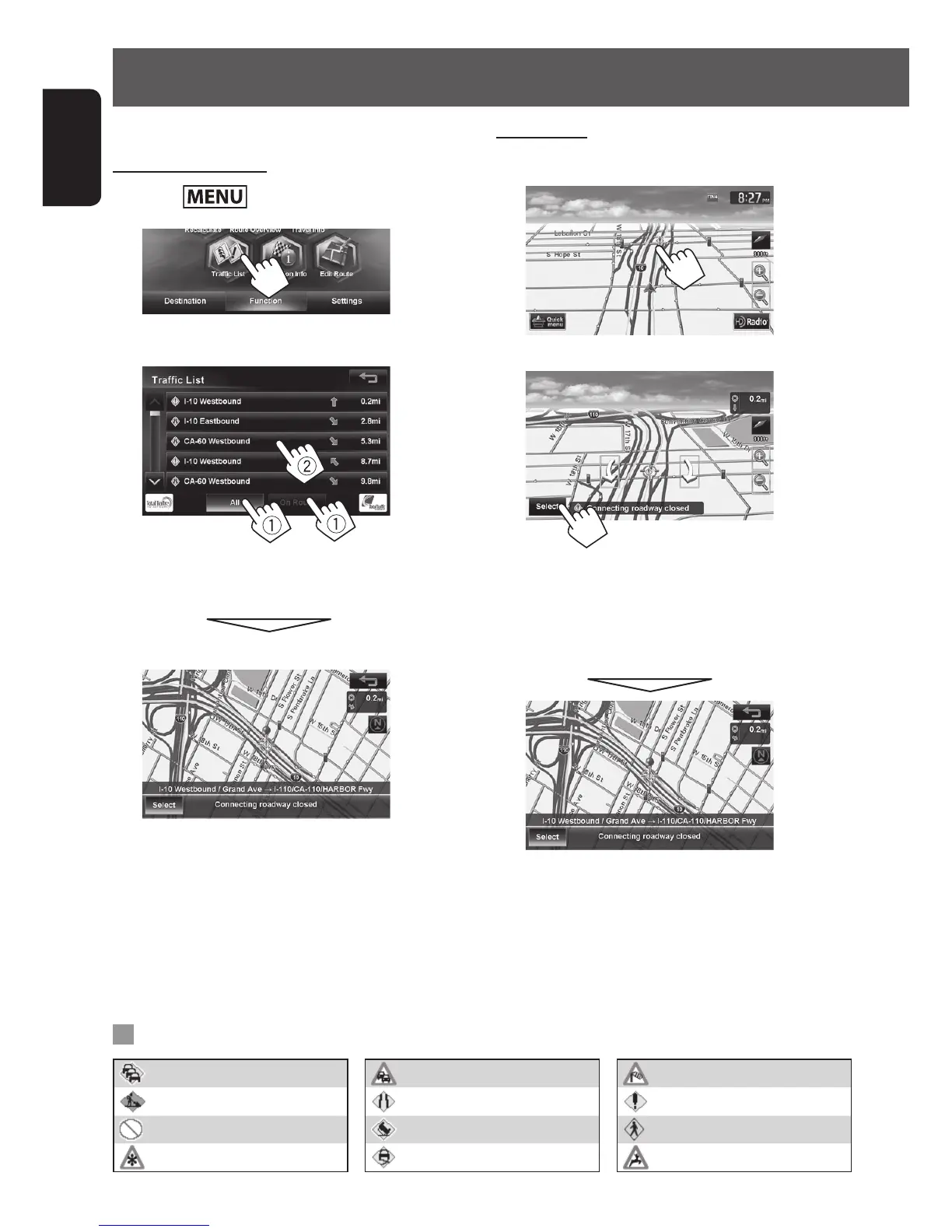
1 Touch the traffic icon.
2
• If there are several POIs on the selected position,
select one from the list.
– The list appears only when <Traffic Icon> is
set to [Show]. (☞ page 37)
Checking the traffic information
From <Traffic List>
1 Press - <Function>.
2
3 Select a list (1), then a traffic alert (2).
[All]: Lists all the information.
[On Route]: Lists the information on your route.
Details of the selected alert are displayed.
List of traffic icons
Traffic jam Light Traffic Windy
Roadworks Narrow lanes Other caution event
Road is blocked or closed Accident People on Roadway
Snow Slippy Animals on roadway
EN_KW-NT810HDT[J].indb 38 11/8/2012 2:51:15 PM



 To Next Page