61
ENGLISH
SD/USB operations
This unit can play the MP3/WMA/AAC/FLAC/MPEG4/MPEG4-AVC H.264/WMV files stored in SD card/USB mass
storage class device.
• All tracks in the SD card/USB device will be played repeatedly until you change the source.
• Make sure all important data has been backed up.
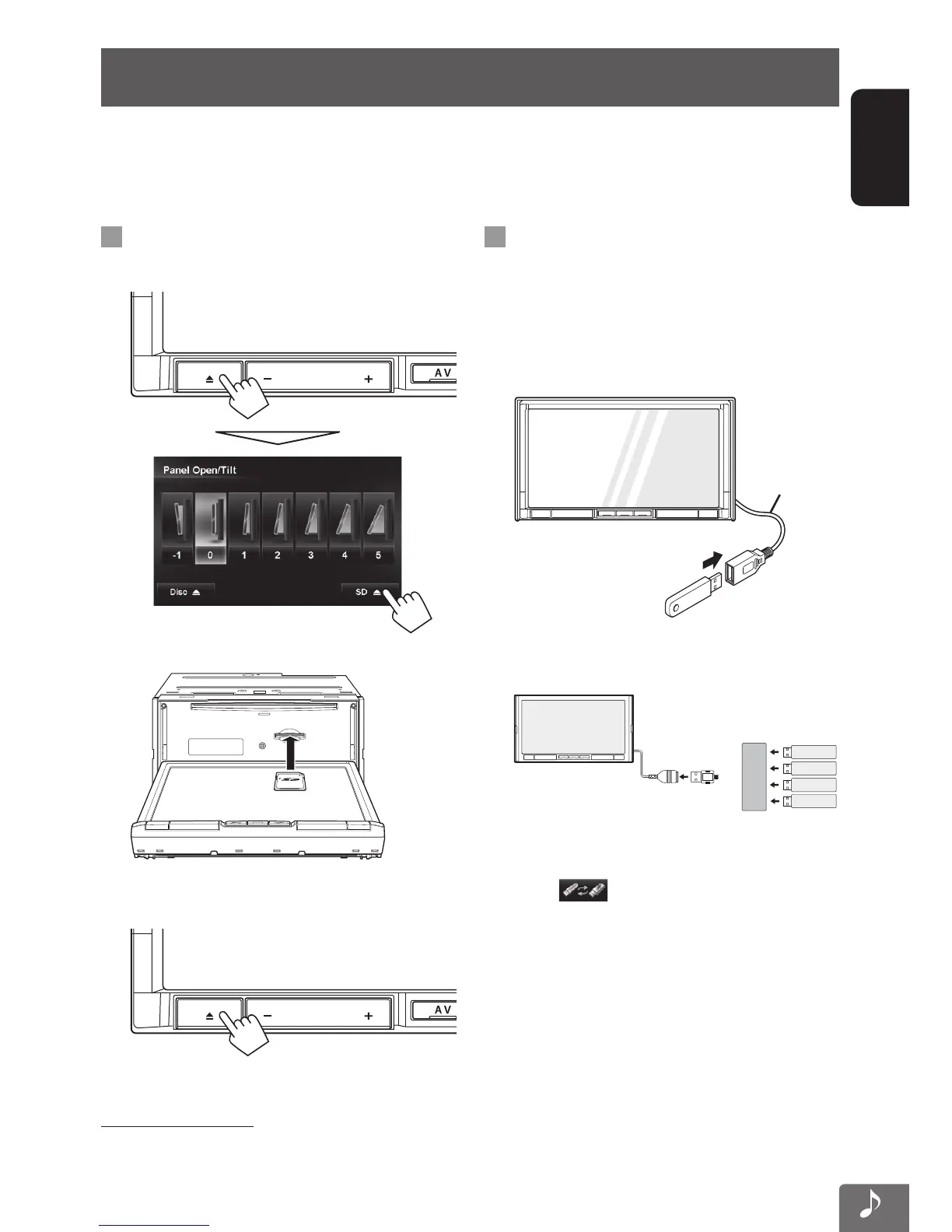
Playing back SD card
1
Open the monitor panel.
2 Insert an SD card.
Push in the SD card until you hear a clicking sound.
3 Close the monitor panel.
4 Select “SD” as the source.
To eject the SD card
Open the monitor panel (step 1 above), then push in the
SD card lightly.
Playing back USB device
You can connect a USB mass storage class device such as
a USB memory, Digital Audio Player, etc. to the unit.
• When connecting a USB device, refer also to its
instructions.
1 Connect the “USB” device.
USB cable
• Up to 4 USB devices can be connected to the USB
cable of this unit via a USB hub.
HUB
USB
USB
USB
USB
• When multiple USB devices are connected, you
can select the USB device to play by pressing
the [
] on the USB playback screen.
(☞ pages 63, 64)
2 Select “USB” as the source.
EN_KW-NT810HDT[J].indb 61 11/8/2012 2:51:18 PM



 To Next Page