68
ENGLISH
iPod/iPhone operations
* To cancel random or repeat mode, press the button repeatedly until the indicator disappears.
• Resume play for video is not supported.
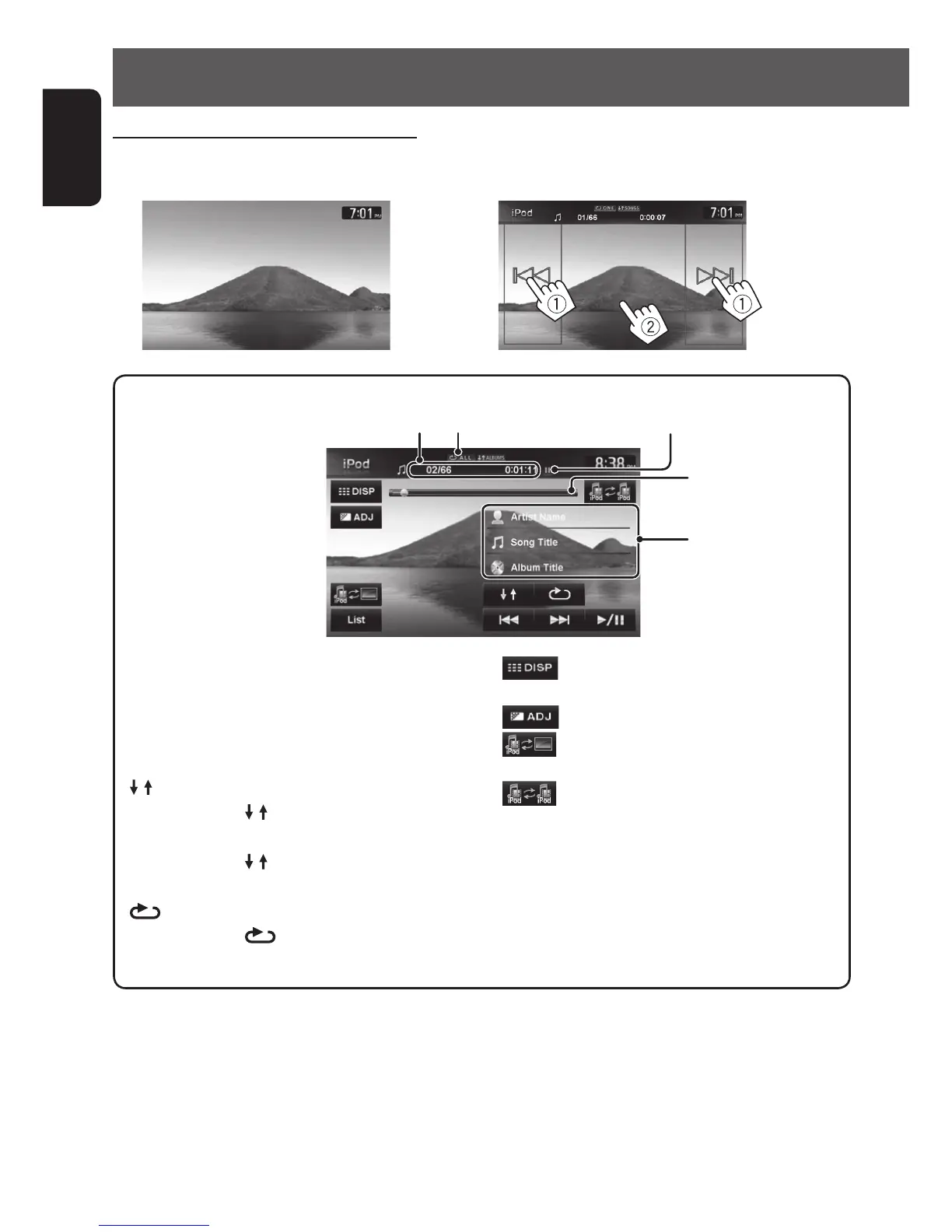
Track no./Total track number/Playing time Playback mode
[3 / 8] Starts playback/pauses.
[4] [¢] Press: Selects video.
Hold: Reverse/forward search.
[List] Displays the Video menu on the iPod/
iPhone. (☞ page 69)
[
] Selects Random playback mode. *
•
SONGS: Functions the same as
“Shuffle Songs (Videos)”.
•
ALBUMS: Functions the same
as “Shuffle Albums”.
[
]
Selects Repeat playback mode. *
•
ONE: Functions the same as
“Repeat One”.
[
]
Hides the operating buttons on the
screen.
[
]
Adjusts the picture. (☞ page 84)
[
]
Changes the iPod control mode.
(☞ page 66)
[
]
Selects the iPod/iPhone to play
when multiple iPods/iPhones are
connected.
Seek bar
Tag data appears only
when it is recorded
Watching the video in the iPod/iPhone
To watch the video, select an item from the list. (☞ page 69)
(iPod/iPhone playback screen)
(Skipping/searching (1), shows the operating buttons (2))
Playback status (8: pause)
EN_KW-NT810HDT[J].indb 68 11/8/2012 2:51:19 PM



 To Next Page