8
Connection
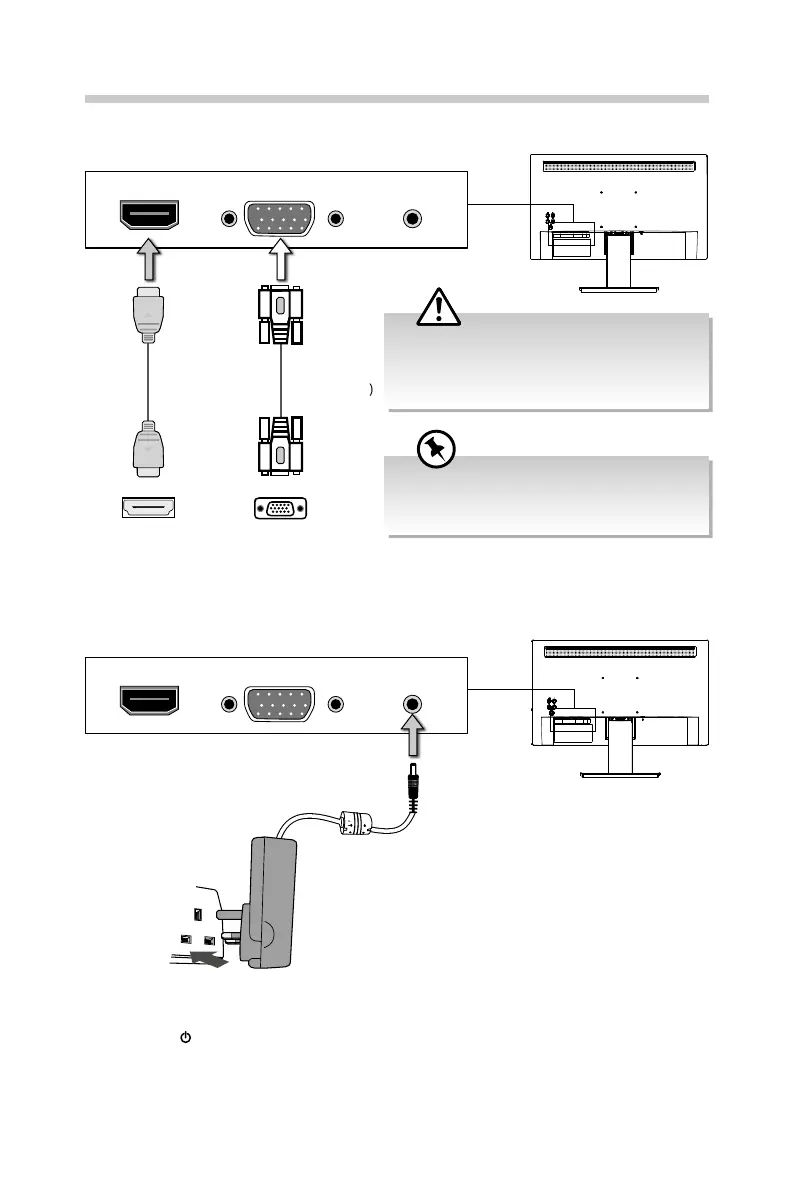
1. Insert the desired cable into the matching connector on your computer.
HDMI VGA DC
HDMI VGA DC
HDMI Cable
(included)
HDMI Socket
2. Connect the power cord from the monitor DC power supply to a mains socket.
VGA Cable
(not included)
VGA Socket
3. Press the button to turn on the monitor. The LED light at the side of monitor will
light up. If there’s no signal received after few seconds, a pop up message will be
displayed and the LED light will ash.
If you are using an Apple® computer, an
Apple® adapter is required. The adapter can be
purchased at an Apple® store.
Connect the input signal cable and tighten it
by turning the screws clockwise. To prevent
disconnection secure the cable rmly, do not
over tighten.


 To Next Page