9
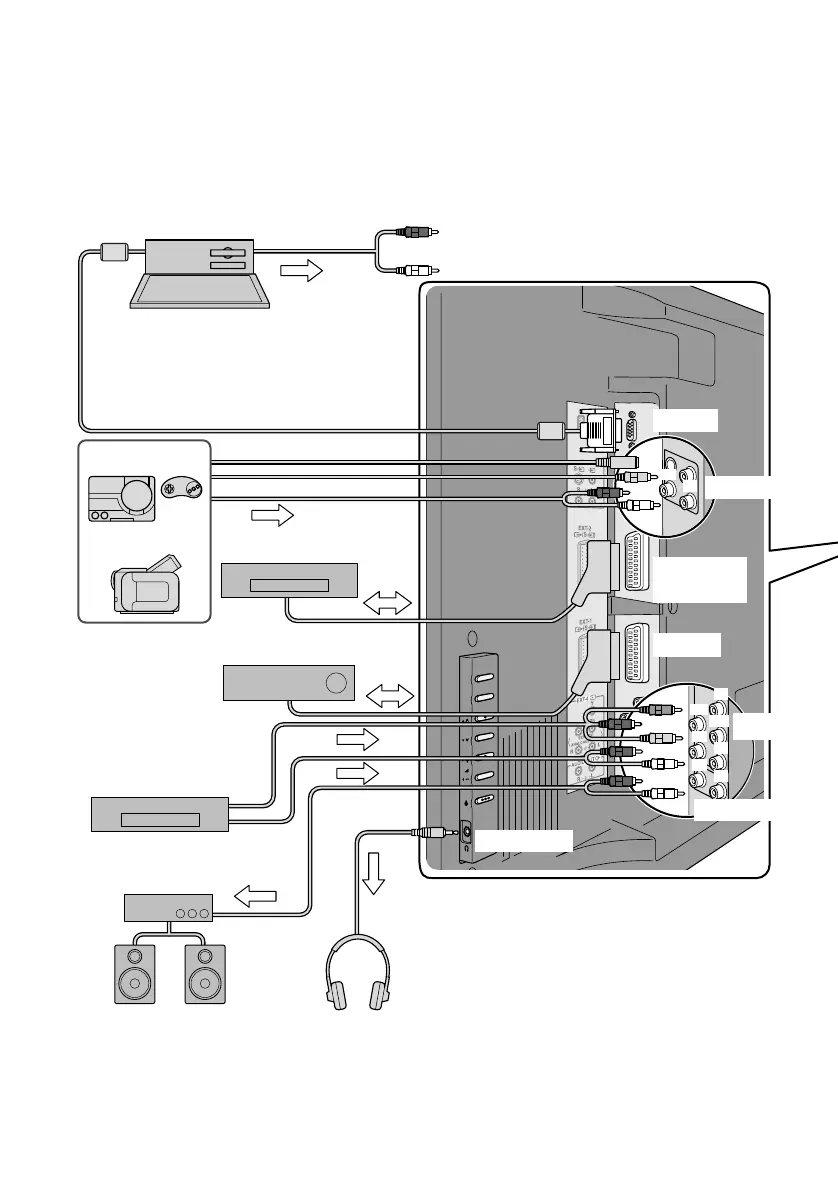
You can connect many different devices to the rear panel of the TV.
Please read the user manuals of each device before setting up.
(Connecting cables are not supplied with this TV.)
Connecting external
EXT-4
EXT-1
EXT-2
(T-V LINK)
EXT-3
PC IN
Headphone
Headphones
z Audio signals received from
EXT-5, EXT-6 and EXT-7
cannot be sent to the
AUDIO OUT terminal.
DVD player
Satellite broadcast / Digital
broadcast tuner
VCR / DVD recorder
(“T-V LINK” compatible)
Video camera
Game consoles
To “EXT-3”
R / L (PC IN)
z Check for PC compatibility
g“PC signals that can be displayed” (P. 42)
z Use cable with ferrite cores and no longer than
of 3 m to avoid electromagnetic disturbance.
Amplifier
(L) (R)
PC
AUDIO OUT
(R)
(L)
(Pr)
(Pb)
(R)
(L)
(R)
(L)
(Y)
LT-42DV8BJ.book Page 9 Friday, July 6, 2007 11:23 AM



 To Next Page