23
Watching videos / DVDs
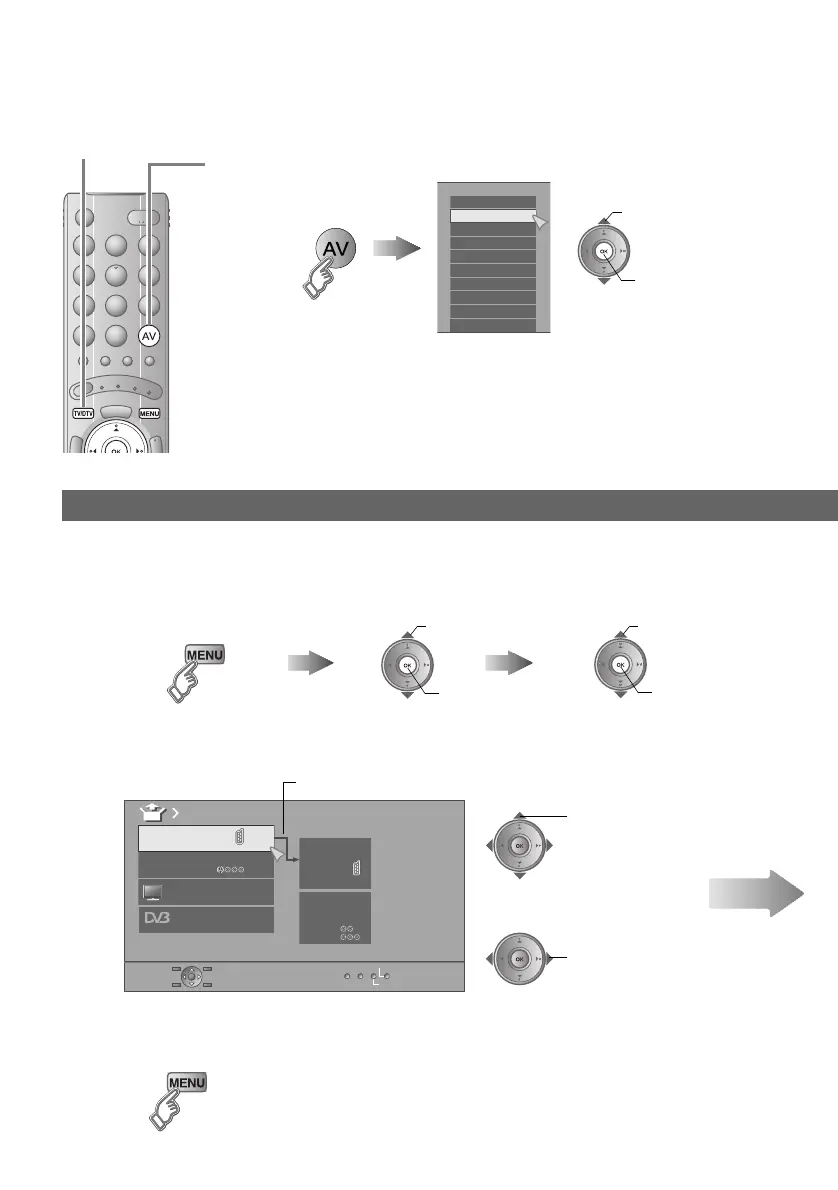
To T V
Setting external terminals
1
Display the “EXT Setting” menu
Display the menu bar Select “Set Up” Select “EXT Setting”
2
Select an “EXT” or arrow, and then proceed with setting
3
Finish
z Adjust the position of the PC image g “PC Position” (P. 38)
z HDMI terminal setting g “HDMI Setting” (P. 38)
A select
B next
B next
A select
DTV
EXT Setting
EXT- 1
EXT- 2
Dubbing
EXT- 4
EXT- 3
TV
ID List
S-In
Arrow
Select an “EXT”
Select the arrow
select
select
Next
A
Select the video source
B
Operate the connected device and play a video
Operate JVC recorders and other devices (P. 29)
E.g. For EXT-1
B watch
A select
EXT Mode
0AV
1
EXT- 1
2
EXT- 2
3
EXT- 3
4
EXT- 4
5
HDMI1
6
HDMI2
7
HDMI3
8
PC
9
DTV
LT-42DV8BJ.book Page 23 Friday, July 6, 2007 11:23 AM



 To Next Page