28
IMPORTANT PREPARE USE SETTING TROUBLE?
z For more functions g “Customising your TV” (P. 31 - 38)
Take
snapshots of
the screen
(Not available for digital
channels and PC)
Cancel
gPress “ ” again, or change the channel
z Not available in the following cases:
- when the SUB-PICTURE is displayed
- when watching digital channels
- when in PC mode
- when 1080p (1125p) signal is received
z You cannot save or export the snapshot.
FREEZE
Still picture
Current programme
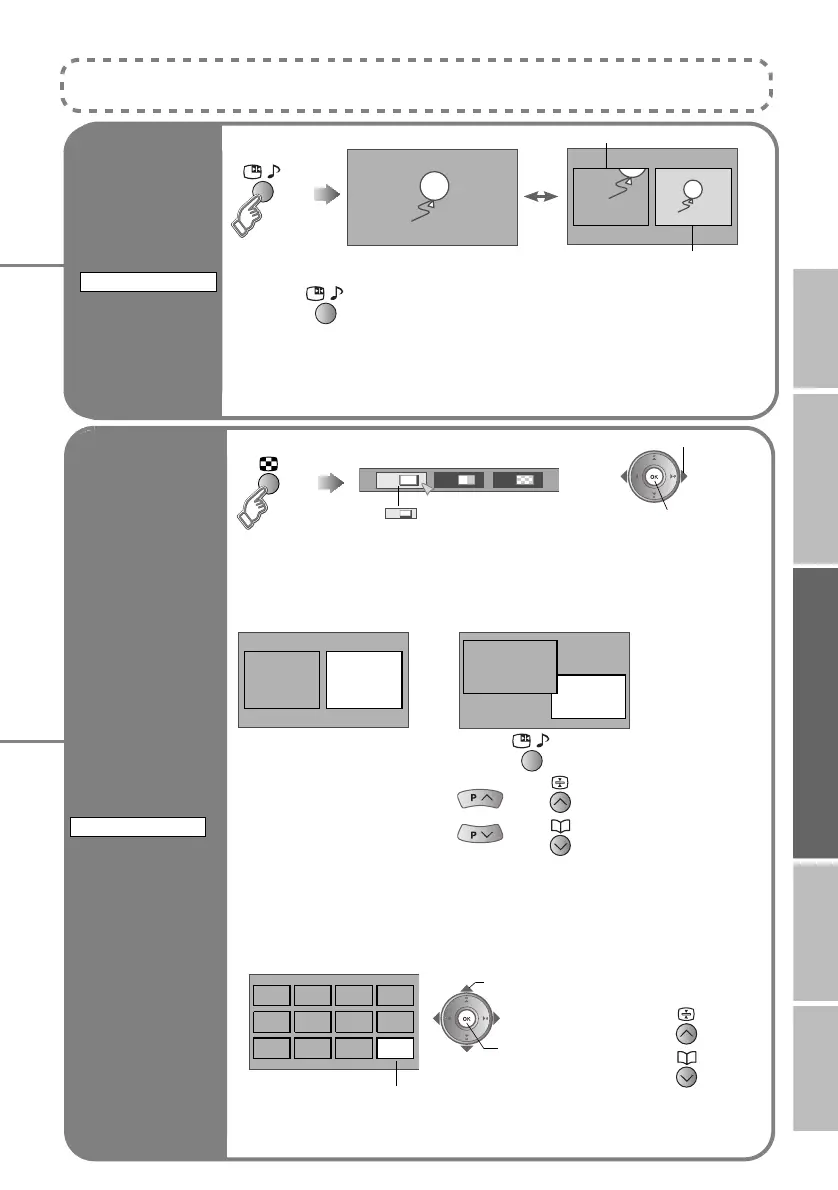
Watch in
multi-picture
mode
Watch in dual-picture mode
E.g. You can watch TV and video at the same time.
z Switch between the sound sources g
z Change the channel g (Main) , (Sub)
z When watching digital channels, there may be occasions where the aspect
ratio changes, for example during commercials. In this case, the layout of the
screen in dual-picture mode changes automatically according to the aspect
ratio signal.
Select an analogue channel in 12-screen mode
All registered analogue channels are displayed as still images.
MULTI-PICTURE
B set
1 212
Select the number of screens
Selecting “ ” returns to normal viewing mode
z Not available in the following cases:
- when in PC mode
- when 1080p (1125p) signal is received
1
Main Sub
Main
Sub
(For wide aspect ratio signals)
B watch
A select a channel
Main
z Move up or
down a page
A select
Only the selected frame has a moving picture.
z Not available for digital channels, EXT-5, EXT-6 or EXT-7 input.
LT-42DV8BJ.book Page 28 Friday, July 6, 2007 11:23 AM



 To Next Page