4
Connecting the Projector to a PC directly
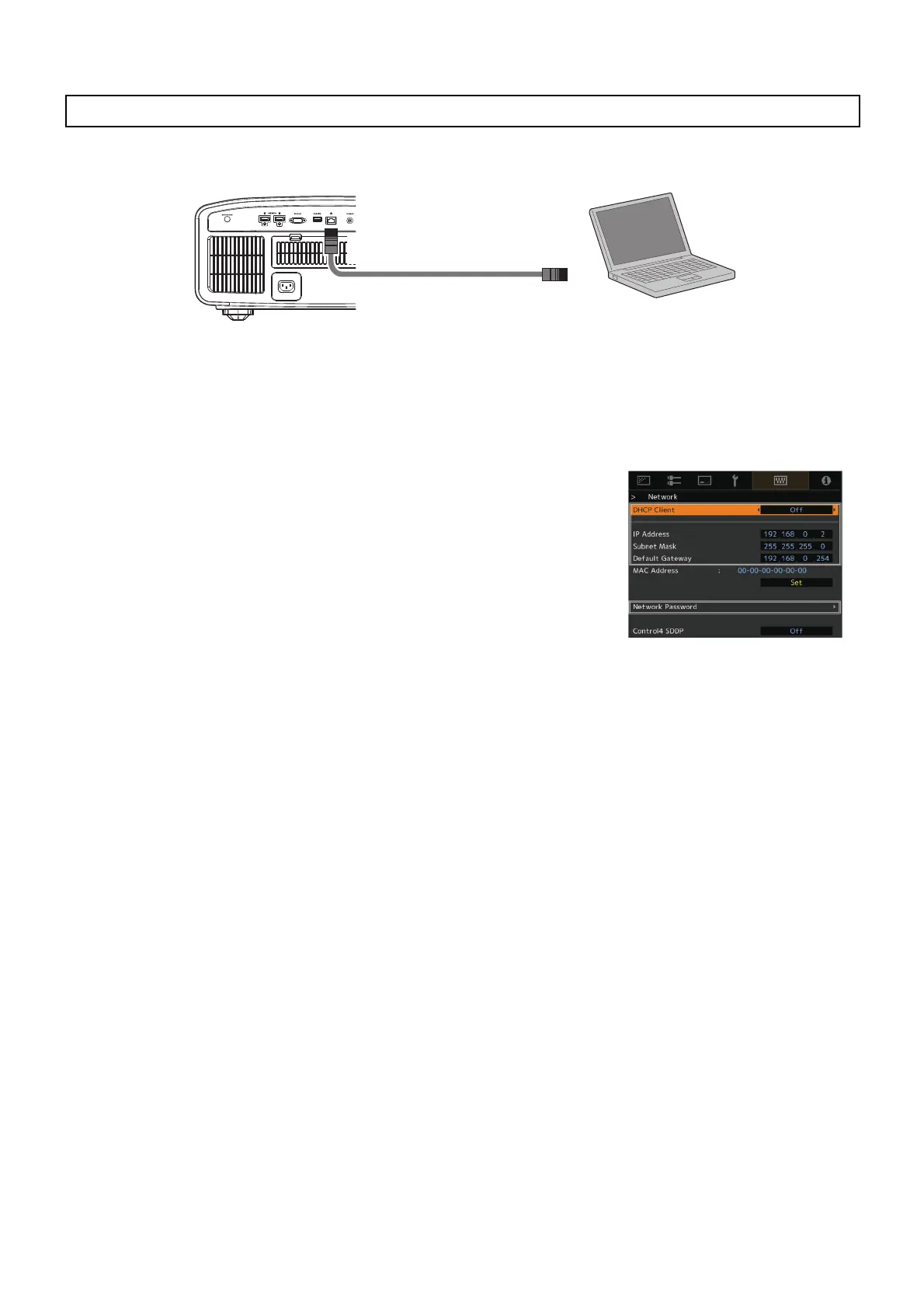
Connect the projector to a PC via LAN cable.
Set the TCP/IP for the PC and “Network” of the projector.
● Network Settings of the Projector
Open the “Network” item under the “Function” tab in the menu.
Set “DHCP Client” to “Off”.
Set the “IP Address” of the projector to an address different from that of the
PC.
Example: PC [192 168 0 1 ]
Projector [192 168 0 2 ]
Set “Subnet Mask” and “Default Gateway” of the projector to the same
values as the PC.
Example: Subnet Mask [255 255 255 0 ]
Default Gateway [192 168 0 254 ]
After pressing “Set”, press OK to apply new settings.
Your model supports the setting of Network Password if you see “Network
Password” in the menu. In that case, set the password from “Network Password”.
* For details on the PC settings, refer to the instruction manual of the PC. Procedures for setting up Windows10 are
described in P. 17.
* If the DHCP server is running on the PC that is directly connected to the projector, set “DHCP Client” to “Off”, and
then press “Set”.
Projector and PC Setup
Laptop, etc.
Connection Cable
(Sold Separately)
Projector
To [ L A N ] Te r m i n a l



 To Next Page