EasyManua.ls Logo

JVC RC-X3 - Page 11

JVC RC-X3
41 pages
Print Icon
To Next Page IconTo Next Page
To Previous Page IconTo Previous Page
Loading...
RC-X3
B/E/G
H@
Removal
of
the
button
ass’y
from
the
mechanical
chassis.
e
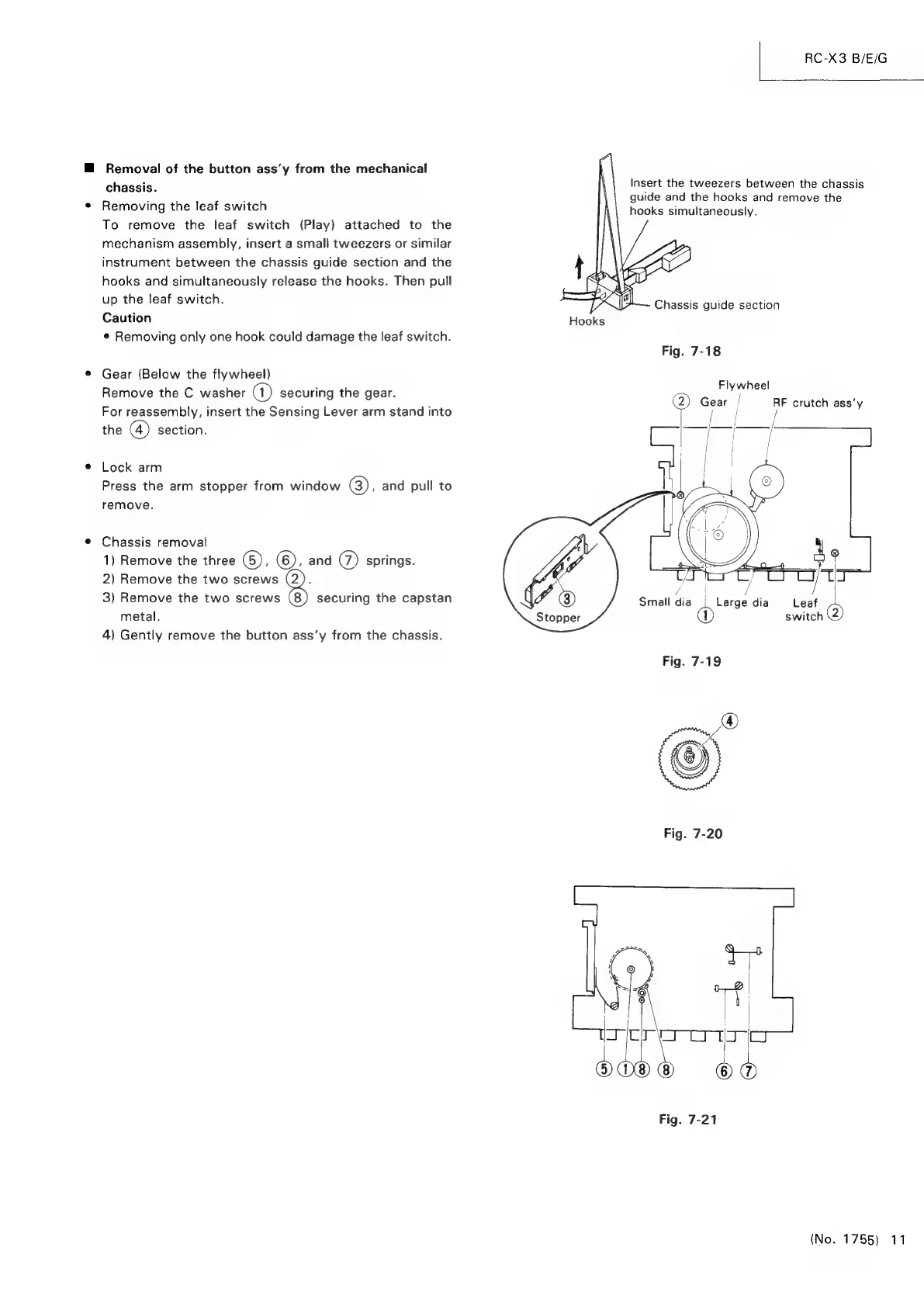
Removing
the
leaf
switch
To
remove
the
leaf
switch
(Play)
attached
to
the
mechanism
assembly,
insert
a
small
tweezers
or
similar
instrument
between
the
chassis
guide
section
and
the
hooks
and
simultaneously
release
the
hooks.
Then
pull
up
the
leaf
switch.
Caution
Hooks
¢
Removing
only
one
hook
could
damage
the
leaf
switch.
Insert
the
tweezers
between
the
chassis
guide
and
the
hooks
and
remove
the
hooks
simultaneously.
Fig.
7-18
©
Gear
(Below
the
flywheel)
ee
Remove
the
C
washer
a)
securing
the
gear.
pss
on
:
:
Gear
|
RF
crutch
ass’y
For
reassembly,
insert
the
Sensing
Lever
arm
stand
into
;
|
the
(4)
section.
—/—
:-—__}
*
Lock
arm
Press
the
arm
stopper
from
window
3),
and
pull
to
remove.
¢
Chassis
removal
1)
Remove
the
three
6), 6),
and
@
springs.
2)
Remove
the
two
screws
3)
Remove
the
two
screws
(8)
securing
the
capstan
metal.
4)
Gently
remove
the
button
ass’y
from
the
chassis.
/
i
/
Small
dia
wee
dia
Leaf
Stopper
switch
Fig.
7-19
®
Fig.
7-20
(No.
1755)
11