EasyManua.ls Logo

JVC TD-W717TN - System Integration and Dubbing; Compu Link Control System Functions; Dubbing Operations

JVC TD-W717TN
62 pages
Print Icon
To Next Page IconTo Next Page
To Previous Page IconTo Previous Page
Loading...
HH
DO
i
o
V
|
*
s
|
z
:
CO
^
J
o
COH
4
^
*
COMPU
LINK
CONTROL
SYSTEM
DUBBING
>
o
$
^
CO
CJ
1
CO
5
Notes
:
Synchronized
recording
or
DDRP
recording
stops
automati
-
cally
when
the
CD
player
stops
playing
.
Synchronized
recording
does
not
start
except
when
the
record
-
pause
mode
is
set
by
simultaneously
pressing
the
#
REC
/
REC
MUTE
and
ll
PAUSE
buttons
In
the
stop
mode
.
To
cancel
synchronized
recording
or
DDRP
recording
,
press
the
STOP
button
of
the
CD
player
or
cassette
deck
.
The
source
Is
locked
to
the
CD
position
during
synchronized
recording
or
DDRP
recording
to
avoid
accidental
stops
or
switch
-
over
to
another
component
.
To
switch
over
the
com
-
ponents
,
cancel
synchronized
recording
or
DDRP
recording
first
.
The
INPUT
LEVEL
control
does
not
function
during
DDRP
recording
.
2
COMPULINK
Synchro
dubbing
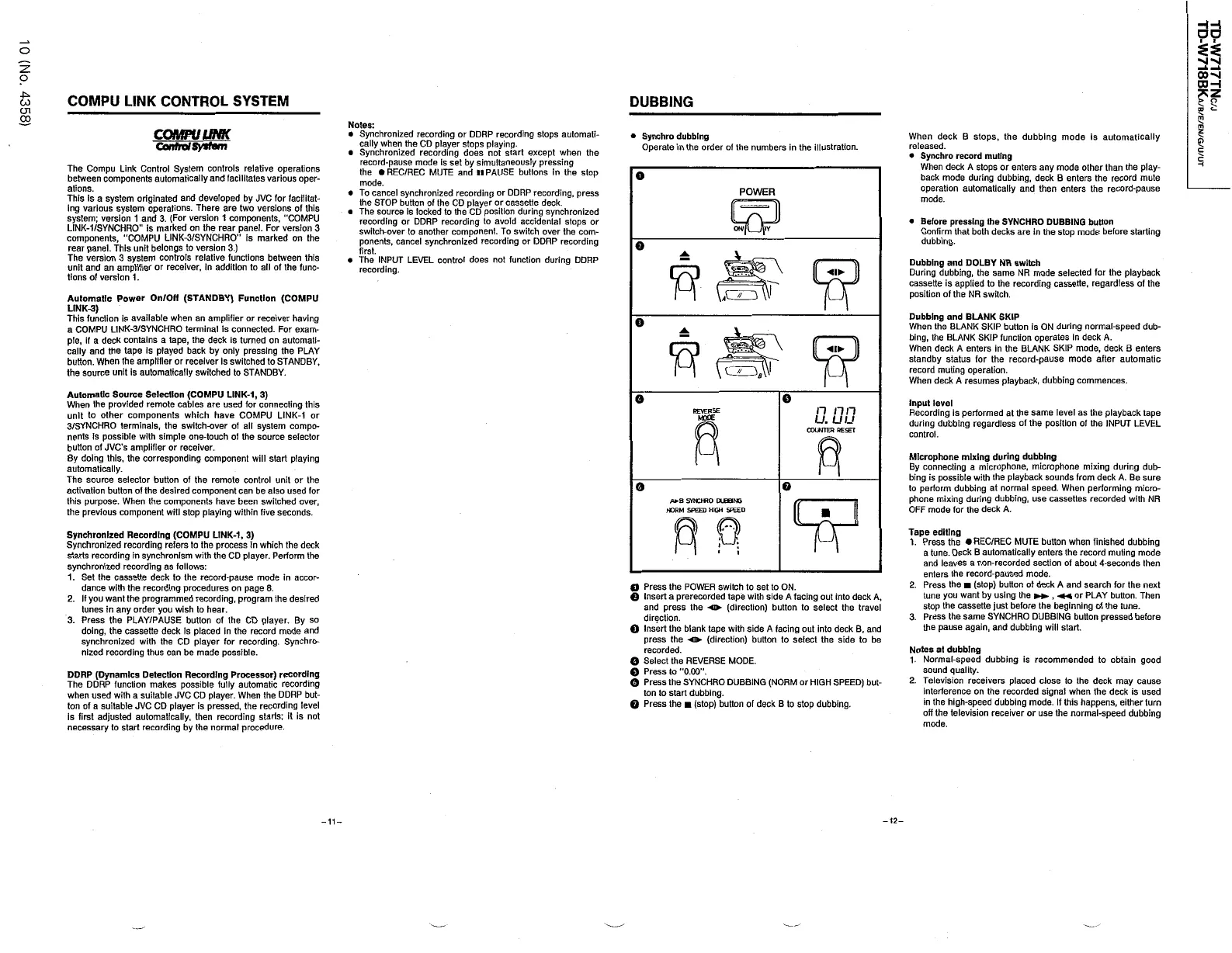
Operate
in
the
order
of
the
numbers
in
the
illustration
.
When
deck
B
stops
,
the
dubbing
mode
is
automatically
released
.
Synchro
record
muting
When
deck
A
stops
or
enters
any
mode
other
than
the
play
-
back
mode
during
dubbing
,
deck
B
enters
the
record
mute
operation
automatically
and
then
enters
the
record
-
pause
mode
.
D
ControlSysfm
H
The
Compu
Link
Control
System
controls
relative
operations
between
components
automatically
and
facilitates
various
oper
-
ations
.
This
is
a
system
originated
and
developed
by
JVC
for
facilitat
-
ing
various
system
operations
.
There
are
two
versions
of
this
system
;
version
1
and
3
.
(
For
version
1
components
,
COMPU
LINK
-
1
/
SYNCHRO
is
marked
on
the
rear
panel
.
For
version
3
components
,
COMPU
LINK
-
3
/
SYNCHRO
"
is
marked
on
the
rear
panel
.
This
unit
belongs
to
version
3
.
)
The
version
3
system
controls
relative
functions
between
this
unit
and
an
amplifier
or
receiver
,
in
addition
to
all
of
the
func
-
tions
of
version
1
.
o
POWER
Before
pressing
the
SYNCHRO
DUBBING
button
Confirm
that
both
decks
are
in
the
stop
mode
before
starting
dubbing
.
Dubbing
and
DOLBY
NR
switch
During
dubbing
,
the
same
NR
mode
selected
for
the
playback
cassette
is
applied
to
the
recording
cassette
,
regardless
of
the
position
of
the
NR
switch
.
Automatic
Power
On
/
OH
(
STANDBY
)
Function
(
COMPU
LINK
-
3
)
This
function
is
available
when
an
amplifier
or
receiver
having
a
COMPU
LINK
-
3
/
SYNCHRO
terminal
is
connected
-
For
exam
-
ple
,
if
a
deck
contains
a
tape
,
the
deck
is
turned
on
automati
-
cally
and
the
tape
Is
played
back
by
only
pressing
the
PLAY
button
.
When
the
amplifier
or
receiver
is
switched
to
STANDBY
,
the
source
unit
is
automatically
switched
to
STANDBY
.
Dubbing
and
BLANK
SKIP
When
the
BLANK
SKIP
button
is
ON
during
normal
-
speed
dub
-
bing
,
the
BLANK
SKIP
function
operates
in
deck
A
.
When
deck
A
enters
in
the
BLANK
SKIP
mode
,
deck
B
enters
standby
status
for
the
record
-
pause
mode
after
automatic
record
muting
operation
.
When
deck
A
resumes
playback
,
dubbing
commences
.
Automatic
Source
Selection
(
COMPU
LINK
-
1
,
3
)
When
the
provided
remote
cables
are
used
for
connecting
this
unit
to
other
components
which
have
COMPU
LINK
-
1
or
3
/
SYNCHRO
terminals
,
the
switch
-
over
of
all
system
compo
-
nents
is
possible
with
simple
one
-
touch
of
the
source
selector
button
of
JVC
s
amplifier
or
receiver
.
By
doing
this
,
the
corresponding
component
will
start
playing
automatically
.
The
source
selector
button
of
the
remote
control
unit
or
the
activation
button
of
the
desired
component
can
be
also
used
for
this
purpose
.
When
the
components
have
been
switched
over
,
the
previous
component
will
stop
playing
within
five
seconds
.
o
o
Input
level
Recording
is
performed
at
the
same
level
as
the
playback
tape
during
dubbing
regardless
of
the
position
of
the
INPUT
LEVEL
control
.
n
n
n
u
.
uu
COUNTER
RESET
REVERSE
Moce
Microphone
mixing
during
dubbing
By
connecting
a
microphone
,
microphone
mixing
during
dub
-
bing
is
possible
with
the
playback
sounds
from
deck
A
.
Be
sure
to
perform
dubbing
at
normal
speed
.
When
performing
micro
-
phone
mixing
during
dubbing
,
use
cassettes
recorded
with
NR
OFF
mode
for
the
deck
A
.
o
A
*
,
a
SYNCHRO
DUE
8
M
5
NORM
SPEED
HIGH
SPEED
Tape
editing
1
.
Press
the
REC
/
REC
MUTE
button
when
finished
dubbing
a
tune
.
Deck
B
automatically
enters
the
record
muting
mode
and
leaves
a
non
-
recorded
section
of
about
4
-
seconds
then
enters
the
record
-
paused
mode
.
2
.
Press
the
(
stop
)
button
of
deck
A
and
search
for
the
next
tune
you
want
by
using
the
,
«
or
PLAY
button
.
Then
stop
the
cassette
just
before
the
beginning
of
the
tune
.
3
.
Press
the
same
SYNCHRO
DUBBING
button
pressed
before
the
pause
again
,
and
dubbing
will
start
.
Synchronized
Recording
(
COMPU
LINK
-
1
,
3
)
Synchronized
recording
refers
to
the
process
In
which
the
deck
starts
recording
in
synchronism
with
the
CD
player
.
Perform
the
synchronized
recording
as
follows
:
1
.
Set
the
cassette
deck
to
the
record
-
pause
mode
in
accor
-
dance
with
the
recording
procedures
on
page
8
.
2
.
If
you
want
the
programmed
recording
,
program
the
desired
tunes
in
any
order
you
wish
to
hear
.
3
.
Press
the
PLAY
/
PAUSE
button
of
the
CD
player
.
By
so
doing
,
the
cassette
deck
is
placed
in
the
record
mode
and
synchronized
with
the
CD
player
for
recording
.
Synchro
-
nized
recording
thus
can
be
made
possible
.
O
Press
the
POWER
switch
to
set
to
ON
.
O
Insert
a
prerecorded
tape
with
side
A
facing
out
into
deck
A
,
and
press
the
-
o
(
direction
)
button
to
select
the
travel
direction
.
Q
Insert
the
blank
tape
with
side
A
facing
out
into
deck
B
,
and
press
the
-
«
(
direction
)
button
to
select
the
side
to
be
recorded
.
O
Select
the
REVERSE
MODE
.
Q
Press
to
"
0.00
.
O
Press
the
SYNCHRO
DUBBING
(
NORM
or
HIGH
SPEED
)
but
-
ton
to
start
dubbing
.
Q
Press
the
(
stop
)
button
of
deck
B
to
stop
dubbing
.
Notes
at
dubbing
1
.
Normal
-
speed
dubbing
is
recommended
to
obtain
good
sound
quality
.
2
.
Television
receivers
placed
close
to
the
deck
may
cause
interference
on
the
recorded
signal
when
the
deck
is
used
in
the
high
-
speed
dubbing
mode
.
If
this
happens
,
either
turn
off
the
television
receiver
or
use
the
normal
-
speed
dubbing
mode
.
DDRP
(
Dynamics
Detection
Recording
Processor
)
recording
The
DDRP
function
makes
possible
fully
automatic
recording
when
used
with
a
suitable
JVC
CD
player
.
When
the
DDRP
but
-
ton
of
a
suitable
JVC
CD
player
is
pressed
,
the
recording
level
is
first
adjusted
automatically
,
then
recording
starts
;
it
is
not
necessary
to
start
recording
by
the
normal
procedure
.
-
12
-
-
11
-

Table of Contents

Related product manuals