EasyManua.ls Logo

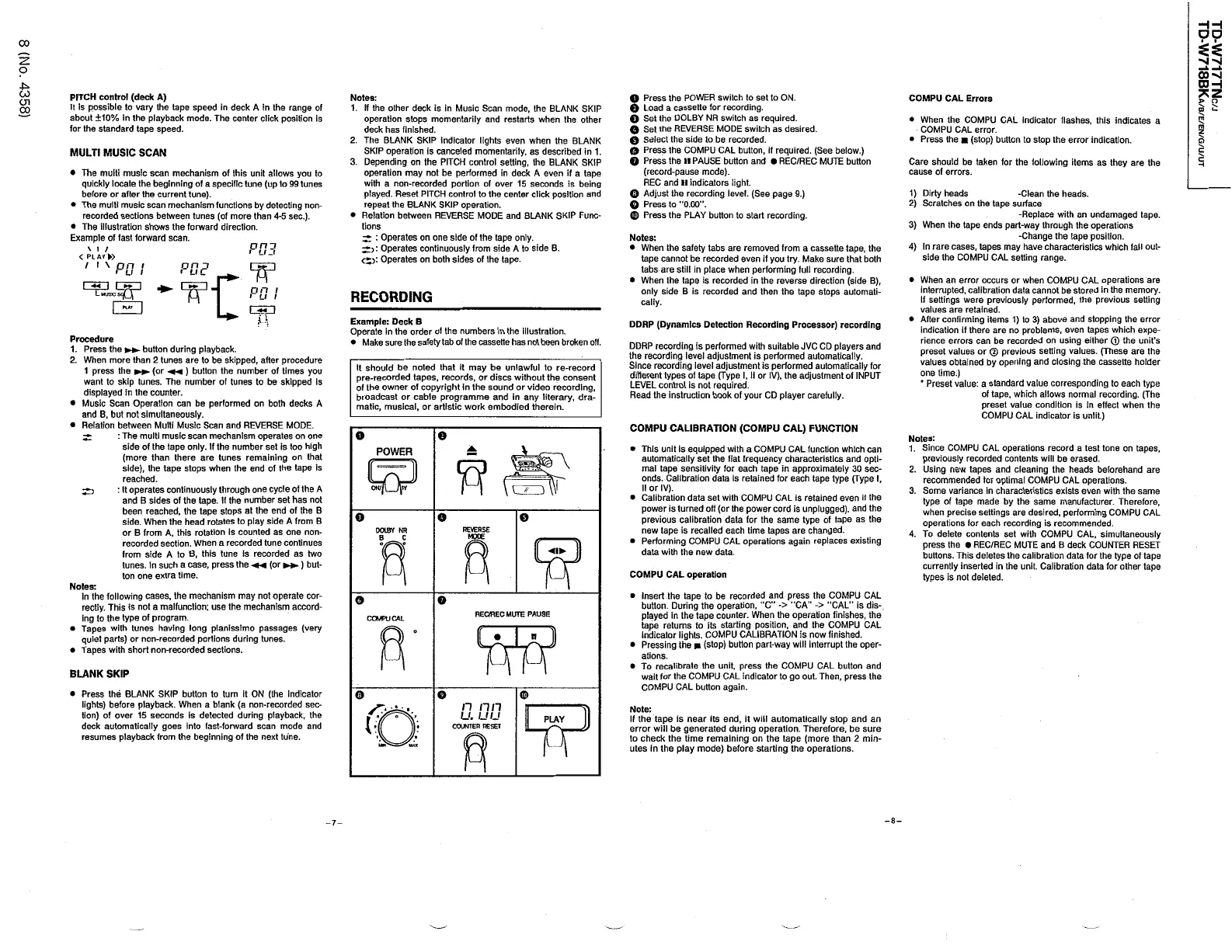
JVC TD-W717TN - Advanced Operations; Pitch Control and Tape Speed Adjustment; Music Scan and Blank Skip Functions; Recording Procedures

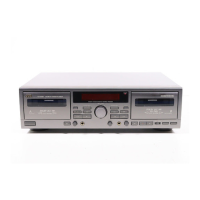
JVC TD-W717TN
62 pages
Print Icon
To Next Page IconTo Next Page
To Previous Page IconTo Previous Page
Loading...
HH
D O
CO
o
00
^
1
r a n
*
z
CO
PITCH
control
(
deck
A
)
It
is
possible
to
vary
the
tape
speed
in
deck
A
in
the
range
of
about
±
10
%
in
the
playback
mode
.
The
center
click
position
is
for
the
standard
tape
speed
.
Notes
:
1
.
If
the
other
deck
is
in
Music
Scan
mode
,
the
BLANK
SKIP
operation
stops
momentarily
and
restarts
when
the
other
deck
has
finished
.
2
.
The
BLANK
SKIP
indicator
lights
even
when
the
BLANK
SKIP
operation
is
canceled
momentarily
,
as
described
in
1
.
3
.
Depending
on
the
PITCH
control
setting
,
the
BLANK
SKIP
operation
may
not
be
performed
in
deck
A
even
if
a
tape
with
a
non
-
recorded
portion
of
over
15
seconds
is
being
played
.
Reset
PITCH
control
to
the
center
click
position
and
repeat
the
BLANK
SKIP
operation
.
Relation
between
REVERSE
MODE
and
BLANK
SKIP
Func
-
tions
^
:
Operates
on
one
side
of
the
tape
only
.
Operates
continuously
from
side
A
to
side
B
.
Operates
on
both
sides
of
the
tape
.
O
Press
the
POWER
switch
to
set
to
ON
.
0
Load
a
cassette
for
recording
.
O
Set
the
DOLBY
NR
switch
as
required
.
Q
Set
the
REVERSE
MODE
switch
as
desired
.
G
Select
the
side
to
be
recorded
.
0
Press
the
COMPU
CAL
button
,
if
required
.
(
See
below
.
)
Q
Press
the
ll
PAUSE
button
and
REC
/
REC
MUTE
button
(
record
-
pause
mode
)
.
REC
and
ll
indicators
light
.
0
Adjust
the
recording
level
.
(
See
page
9
.
)
O
Press
to
"
0.00
.
©
Press
the
PLAY
button
to
start
recording
.
COMPU
CAL
Errors
>
o
D
t
CJ
1
CO
When
the
COMPU
CAL
indicator
flashes
,
this
indicates
a
COMPU
CAL
error
.
Press
the
(
stop
)
button
to
stop
the
error
indication
.
m
z
D
MULTI
MUSIC
SCAN
Care
should
be
taken
for
the
following
items
as
they
are
the
cause
of
errors
.
H
The
multi
music
scan
mechanism
of
this
unit
allows
you
to
quickly
locate
the
beginning
of
a
specific
tune
(
up
to
99
tunes
before
or
after
the
current
tune
)
.
The
multi
music
scan
mechanism
functions
by
detecting
non
-
recorded
sections
between
tunes
(
of
more
than
4
-
5
sec
.
)
.
The
illustration
shows
the
forward
direction
.
Example
of
fast
forward
scan
.
\
i
/
<
PL
AY
>
/
i
\
on
i
u
i
1
)
Dirty
heads
2
)
Scratches
on
the
tape
surface
-
Clean
the
heads
.
-
Replace
with
an
undamaged
tape
.
3
)
When
the
tape
ends
part
-
way
through
the
operations
-
Change
the
tape
position
.
4
)
In
rare
cases
,
tapes
may
have
characteristics
which
fail
out
-
side
the
COMPU
CAL
setting
range
.
Notes
:
When
the
safety
tabs
are
removed
from
a
cassette
tape
,
the
tape
cannot
be
recorded
even
if
you
try
.
Make
sure
that
both
tabs
are
still
in
place
when
performing
full
recording
.
When
the
tape
is
recorded
in
the
reverse
direction
(
side
B
)
,
only
side
B
is
recorded
and
then
the
tape
stops
automati
-
cally
.
When
an
error
occurs
or
when
COMPU
CAL
operations
are
interrupted
,
calibration
data
cannot
be
stored
in
the
memory
.
If
settings
were
previously
performed
,
the
previous
setting
values
are
retained
.
After
confirming
items
1
)
to
3
)
above
and
stopping
the
error
indication
if
there
are
no
problems
,
even
tapes
which
expe
-
rience
errors
can
be
recorded
on
using
either
©
the
unit
'
s
preset
values
or
©
previous
setting
values
.
(
These
are
the
values
obtained
by
opening
and
closing
the
cassette
holder
one
time
.
)
*
Preset
value
:
a
standard
value
corresponding
to
each
type
of
tape
,
which
allows
normal
recording
.
(
The
preset
value
condition
is
in
effect
when
the
COMPU
CAL
indicator
is
unlit
.
)
*
<
I
I
I
nn
i
u
i
L
RECORDING
MUSIC
n
Example
:
Deck
B
Operate
in
the
order
of
the
numbers
in
the
illustration
.
Make
sure
the
safety
tab
of
the
cassette
has
not
been
broken
off
.
DDRP
(
Dynamics
Detection
Recording
Processor
)
recording
Procedure
1
.
Press
the
button
during
playback
.
2
.
When
more
than
2
tunes
are
to
be
skipped
,
after
procedure
1
press
the
(
or
MM
)
button
the
number
of
times
you
want
to
skip
tunes
.
The
number
of
tunes
to
be
skipped
is
displayed
in
the
counter
.
Music
Scan
Operation
can
be
performed
on
both
decks
A
and
B
,
but
not
simultaneously
.
Relation
between
Multi
Music
Scan
and
REVERSE
MODE
.
:
The
multi
music
scan
mechanism
operates
on
one
side
of
the
tape
only
.
If
the
number
set
is
too
high
(
more
than
there
are
tunes
remaining
on
that
side
)
,
the
tape
stops
when
the
end
of
the
tape
is
reached
.
:
It
operates
continuously
through
one
cycle
of
the
A
and
B
sides
of
the
tape
.
If
the
number
set
has
not
been
reached
,
the
tape
stops
at
the
end
of
the
B
side
.
When
the
head
rotates
to
play
side
A
from
B
or
B
from
A
,
this
rotation
Is
counted
as
one
non
-
recorded
section
.
When
a
recorded
tune
continues
from
side
A
to
B
,
this
tune
is
recorded
as
two
tunes
,
in
such
a
case
,
press
the
M
<
(
or
)
but
-
ton
one
extra
time
.
DDRP
recording
is
performed
with
suitable
JVC
CD
players
and
the
recording
level
adjustment
is
performed
automatically
.
Since
recording
level
adjustment
is
performed
automatically
for
different
types
of
tape
(
Type
I
,
II
or
IV
)
,
the
adjustment
of
INPUT
LEVEL
control
is
not
required
.
Read
the
instruction
book
of
your
CD
player
carefully
.
It
should
be
noted
that
it
may
be
unlawful
to
re
-
record
pre
-
recorded
tapes
,
records
,
or
discs
without
the
consent
of
the
owner
of
copyright
in
the
sound
or
video
recording
,
broadcast
or
cable
programme
and
in
any
literary
,
dra
-
matic
,
musical
,
or
artistic
work
embodied
therein
.
COMPU
CALIBRATION
(
COMPU
CAL
)
FUNCTION
O
o
Notes
:
1
.
Since
COMPU
CAL
operations
record
a
test
tone
on
tapes
,
previously
recorded
contents
will
be
erased
.
2
.
Using
new
tapes
and
cleaning
the
heads
beforehand
are
recommended
for
optimal
COMPU
CAL
operations
.
3
.
Some
variance
in
characteristics
exists
even
with
the
same
type
of
tape
made
by
the
same
manufacturer
.
Therefore
,
when
precise
settings
are
desired
,
performing
COMPU
CAL
operations
lor
each
recording
is
recommended
.
4
.
To
delete
contents
set
with
COMPU
CAL
,
simultaneously
press
the
REC
/
REC
MUTE
and
B
deck
COUNTER
RESET
buttons
.
This
deletes
the
calibration
data
lor
the
type
of
tape
currently
inserted
in
the
unit
.
Calibration
data
for
other
tape
types
is
not
deleted
.
This
unit
is
equipped
with
a
COMPU
CAL
function
which
can
automatically
set
the
flat
frequency
characteristics
and
opti
-
mal
tape
sensitivity
for
each
tape
in
approximately
30
sec
-
onds
.
Calibration
data
is
retained
for
each
tape
type
(
Type
I
,
II
or
IV
)
.
Calibration
data
set
with
COMPU
CAL
is
retained
even
if
the
power
is
turned
off
(
or
the
power
cord
is
unplugged
)
,
and
the
previous
calibration
data
for
the
same
type
of
tape
as
the
new
tape
is
recalled
each
time
tapes
are
changed
.
Performing
COMPU
CAL
operations
again
replaces
existing
data
with
the
new
data
.
V
POWER
o
o
e
DOLBY
NR
COMPU
CAL
operation
Notes
:
In
the
following
cases
,
the
mechanism
may
not
operate
cor
-
rectly
.
This
is
not
a
malfunction
;
use
the
mechanism
accord
-
ing
to
the
type
of
program
.
Tapes
with
tunes
having
long
pianissimo
passages
(
very
quiet
parts
)
or
non
-
recorded
portions
during
tunes
.
Tapes
with
short
non
-
recorded
sections
.
Insert
the
tape
to
be
recorded
and
press
the
COMPU
CAL
button
.
During
the
operation
,
"
C
-
>
"
CA
"
-
>
"
CAL
"
is
dis
-
.
played
in
the
tape
counter
.
When
the
operation
finishes
,
the
tape
returns
to
its
starting
position
,
and
the
COMPU
CAL
indicator
lights
.
COMPU
CALIBRATION
is
now
finished
.
Pressing
the
(
stop
)
button
part
-
way
will
interrupt
the
oper
-
ations
.
To
recalibrate
the
unit
,
press
the
COMPU
CAL
button
and
wait
for
the
COMPU
CAL
indicator
to
go
out
.
Then
,
press
the
COMPU
CAL
button
again
.
o
o
REC
/
REC
MUTE
PAUSE
COMPU
CAL
BLANK
SKIP
Press
the
BLANK
SKIP
button
to
turn
it
ON
(
the
indicator
lights
)
before
playback
.
When
a
blank
(
a
non
-
recorded
sec
-
tion
)
of
over
15
seconds
is
detected
during
playback
,
the
deck
automatically
goes
into
fast
-
forward
scan
mode
and
resumes
playback
from
the
beginning
of
the
next
tune
.
O
©
o
n
IIII
u
.
UU
COUNTER
RESET
Note
:
If
the
tape
is
near
its
end
,
it
will
automatically
stop
and
an
error
will
be
generated
during
operation
.
Therefore
,
be
sure
to
check
the
time
remaining
on
the
tape
(
more
than
2
min
-
utes
in
the
play
mode
)
before
starting
the
operations
.
PLAY
-
8
-
-
7
-

Table of Contents

Related product manuals