EasyManua.ls Logo

JVC TD-W717TN - Part Removal Steps; Eject Arm and Mechanism Holder Removal; Board Assembly Removal

JVC TD-W717TN
62 pages
Print Icon
To Next Page IconTo Next Page
To Previous Page IconTo Previous Page
Loading...
TD
-
W
717
TNC
/
J
TD
-
W
718
BKA
/
B
/
E
/
EN
/
G
/
U
/
UT
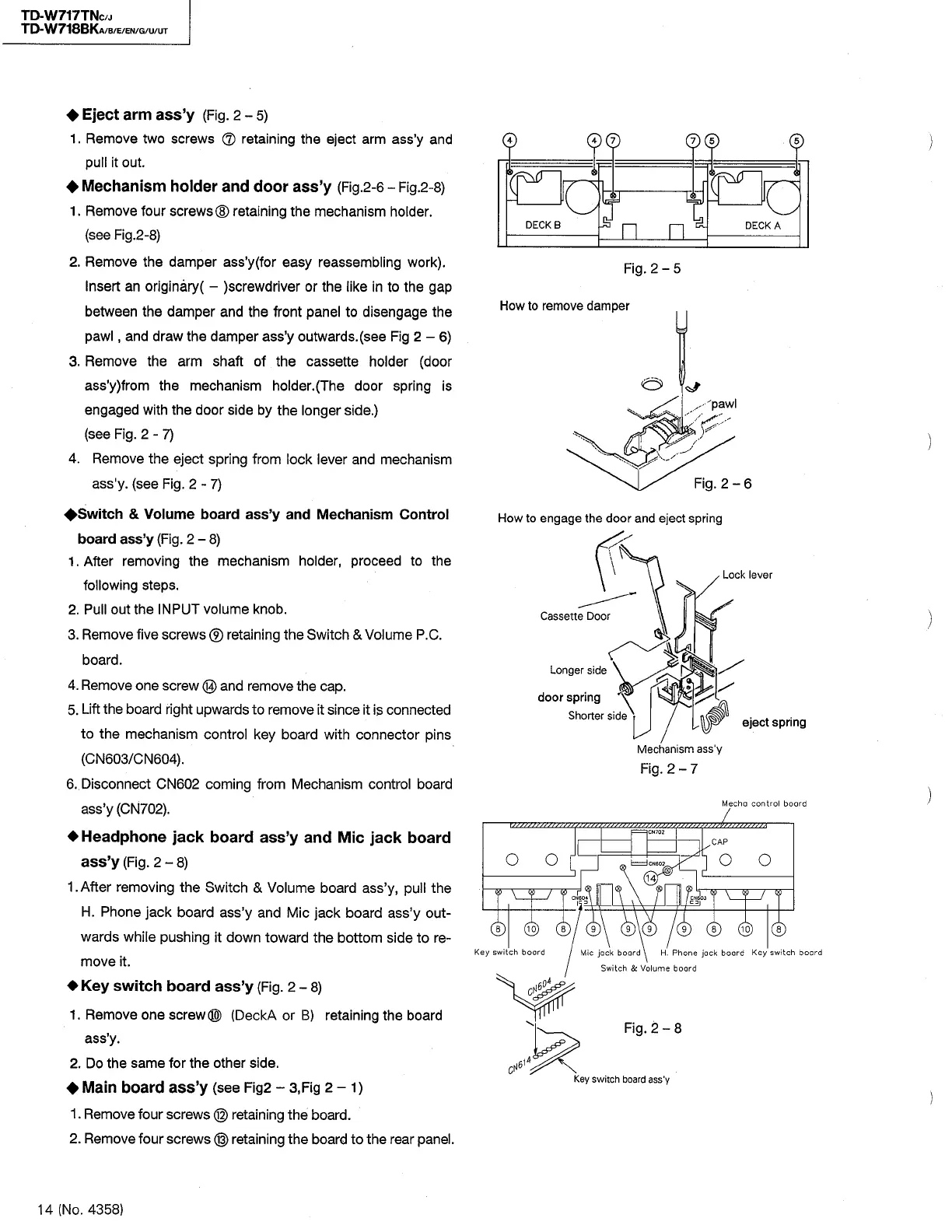
Eject
arm
ass
y
(
Fig
.
2
-
5
)
1
.
Remove
two
screws
®
retaining
the
eject
arm
ass
y
and
pull
it
out
.
Mechanism
holder
and
door
ass
y
(
Fig
.
2
-
6
-
Fig
.
2
-
8
)
1
.
Remove
four
screws
®
retaining
the
mechanism
holder
,
(
see
Fig
.
2
-
8
)
2
.
Remove
the
damper
ass
y
(
for
easy
reassembling
work
)
.
Insert
an
originary
(
-
)
screwdriver
or
the
like
in
to
the
gap
between
the
damper
and
the
front
panel
to
disengage
the
pawl
,
and
draw
the
damper
ass
y
outwards
.
(
see
Fig
2
-
6
)
3
.
Remove
the
arm
shaft
of
the
cassette
holder
(
door
ass
y
)
from
the
mechanism
holder
.
(
The
door
spring
is
engaged
with
the
door
side
by
the
longer
side
.
)
(
see
Fig
.
2
-
7
)
4
.
Remove
the
eject
spring
from
lock
lever
and
mechanism
ass
'
y
.
(
see
Fig
.
2
-
7
)
^
Switch
&
Volume
board
ass
y
and
Mechanism
Control
board
ass
y
(
Fig
.
2
-
8
)
1
.
After
removing
the
mechanism
holder
,
proceed
to
the
following
steps
,
2
.
Pull
out
the
INPUT
volume
knob
.
3
.
Remove
five
screws
®
retaining
the
Switch
&
Volume
P
.
C
.
board
.
4
.
Remove
one
screw
©
and
remove
the
cap
.
5
.
Lift
the
board
right
upwards
to
remove
it
since
it
is
connected
to
the
mechanism
control
key
board
with
connector
pins
(
CN
603
/
CN
604
)
.
6
.
Disconnect
CN
602
coming
from
Mechanism
control
board
ass
y
(
CN
702
)
.
4
Headphone
jack
board
ass
y
and
Mic
jack
board
ass
y
(
Fig
.
2
-
8
)
1
.
After
removing
the
Switch
&
Volume
board
ass
y
,
pull
the
H
.
Phone
jack
board
ass
y
and
Mic
jack
board
ass
y
out
-
wards
while
pushing
it
down
toward
the
bottom
side
to
re
-
move
it
.
Key
switch
board
ass
y
(
Fig
.
2
-
8
)
1
.
Remove
one
screw
®
(
DeckA
or
B
)
retaining
the
board
ass
y
.
2
.
Do
the
same
for
the
other
side
.
4
Main
board
ass
y
(
see
Fig
2
-
3
,
Fig
2
-
1
)
1
.
Remove
four
screws
®
retaining
the
board
.
2
.
Remove
four
screws
®
retaining
the
board
to
the
rear
panel
.
0
®
©
0
©
DECKS
DECKA
Fig
.
2
-
5
How
to
remove
damper
u
Fig
.
2
-
6
How
to
engage
the
door
and
eject
spring
Lock
lever
Cassette
Door
Longer
side
door
spring
Shorter
side
\
eject
spring
Mechanism
ass
'
y
Fig
.
2
-
7
Mecha
control
boord
l
CN
702
CAP
O
O
o
o
I
rd
CN
602
.
14
)
L
&
T
T
w
V
3
7
T
CN
60
*
©
®
®
a
©
©
9
)
\
(
9
9
8
Key
switch
board
Mic
jack
board
\
H
.
Phone
jack
board
Key
switch
board
Switch
&
Volume
board
Fig
.
2
-
8
Key
switch
board
ass
'
y
14
(
No
.
4358
)

Table of Contents

Related product manuals