EasyManua.ls Logo

JVC TD-W717TN - Component Identification; Front Panel Controls and Indicators; Playback Operations; Playback Features

JVC TD-W717TN
62 pages
Print Icon
To Next Page IconTo Next Page
To Previous Page IconTo Previous Page
Loading...
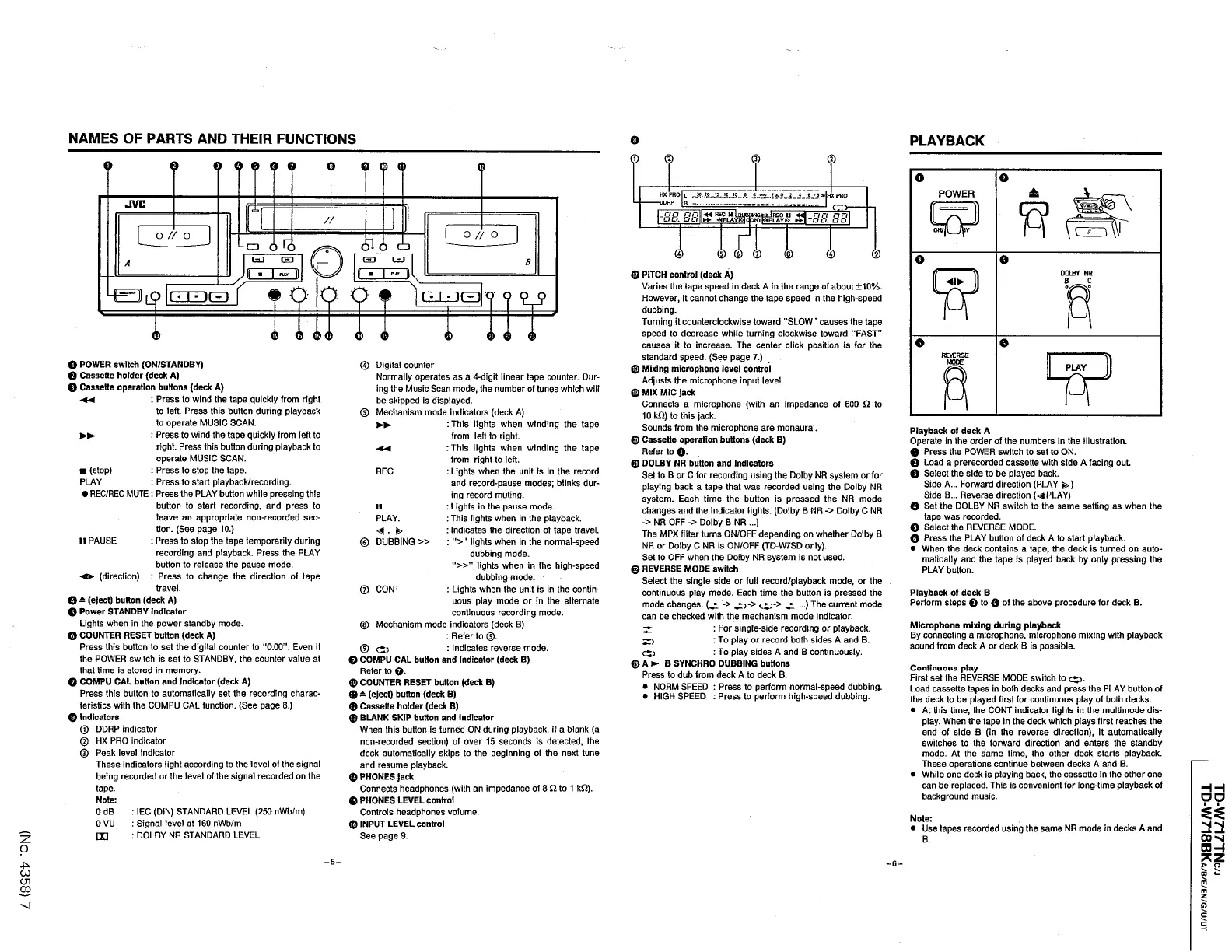
NAMES
OF
PARTS
AND
THEIR
FUNCTIONS
PLAYBACK
Q
©
©
o
©
0
0
6
0
0
0
O
©
0
HXPRO
L
ODHP
H
JVC
cr
>
Eife
?
&
-
88
88
-
88
88
+
4
REG
uLm
»
«
PLAY
»
>
/
/
c
D
o
/
/
o
o
/
/
o
61
o
cb
o
R
)
©
©
©
©
©
©
CH
3
B
A
0
PITCH
control
(
deck
A
)
Varies
the
tape
speed
in
deck
A
in
the
range
of
about
±
10
%
.
However
,
it
cannot
change
the
tape
speed
in
the
high
-
speed
dubbing
.
Turning
it
counterclockwise
toward
"
SLOW
causes
the
tape
speed
to
decrease
while
turning
clockwise
toward
"
FAST
causes
it
to
increase
.
The
center
click
position
is
for
the
standard
speed
.
(
See
page
7
.
)
©
Mixing
microphone
level
control
Adjusts
the
microphone
input
level
.
©
MIX
MIC
jack
Connects
a
microphone
(
with
an
impedance
of
600
£
2
to
10
kO
)
to
this
jack
.
Sounds
from
the
microphone
are
monaural
.
©
Cassette
operation
buttons
(
deck
B
)
Refer
to
©
.
©
DOLBY
NR
button
and
indicators
Set
to
B
or
C
for
recording
using
the
Dolby
NR
system
or
for
playing
back
a
tape
that
was
recorded
using
the
Dolby
NR
system
.
Each
time
the
button
is
pressed
the
NR
mode
changes
and
the
indicator
lights
.
(
Dolby
B
NR
-
>
Dolby
C
NR
-
>
NR
OFF
-
>
Dolby
B
NR
...
)
The
MPX
filter
turns
ON
/
OFF
depending
on
whether
Dolby
B
NR
or
Dolby
C
NR
is
ON
/
OFF
(
TD
-
W
7
SD
only
)
.
Set
to
OFF
when
the
Dolby
NR
system
Is
not
used
.
©
REVERSE
MODE
switch
Select
the
single
side
or
full
record
/
playback
mode
,
or
the
continuous
play
mode
.
Each
time
the
button
is
pressed
the
mode
changes
.
(
^
-
>
<
*
p
-
>
^
...
)
The
current
mode
can
be
checked
with
the
mechanism
mode
indicator
.
:
For
single
-
side
recording
or
playback
.
:
To
play
or
record
both
sides
A
and
B
.
:
To
play
sides
A
and
B
continuously
.
©
A
B
SYNCHRO
DUBBING
buttons
Press
to
dub
from
deck
A
to
deck
B
.
NORM
SPEED
:
Press
to
perform
normal
-
speed
dubbing
.
HIGH
SPEED
:
Press
to
perform
high
-
speed
dubbing
.
PUY
PUT
O
o
o
|
Q
|
[
«
i
-
i m
.
o
9 9
0
©
©
d
)
© ©
©
©
©
O
POWER
switch
(
ON
/
STANDBY
)
©
Cassette
holder
(
deck
A
)
©
Cassette
operation
buttons
(
deck
A
)
©
Digital
counter
Normally
operates
as
a
4
-
digit
linear
tape
counter
.
Dur
-
ing
the
Music
Scan
mode
,
the
number
of
tunes
which
will
be
skipped
is
displayed
.
Mechanism
mode
indicators
(
deck
A
)
:
This
lights
when
winding
the
tape
from
left
to
right
.
:
This
lights
when
winding
the
tape
from
right
to
left
.
:
Lights
when
the
unit
is
in
the
record
and
record
-
pause
modes
;
blinks
dur
-
ing
record
muting
.
:
Lights
in
the
pause
mode
.
:
This
lights
when
in
the
playback
.
:
Indicates
the
direction
of
tape
travel
.
:
"
>
"
lights
when
In
the
normal
-
speed
dubbing
mode
.
"
»
"
lights
when
in
the
high
-
speed
dubbing
mode
.
:
Lights
when
the
unit
is
in
the
contin
-
uous
play
mode
or
in
the
alternate
continuous
recording
mode
.
Mechanism
mode
indicators
(
deck
B
)
:
Refer
to
®
.
:
Indicates
reverse
mode
.
©
COMPU
CAL
button
and
indicator
(
deck
B
)
Refer
to
Q
.
©
COUNTER
RESET
button
(
deck
B
)
©
(
eject
)
button
(
deck
B
)
0
Cassette
holder
(
deck
B
)
©
BLANK
SKIP
button
and
indicator
When
this
button
is
turne
'
d
ON
during
playback
,
if
a
blank
(
a
non
-
recorded
section
)
of
over
15
seconds
is
detected
,
the
deck
automatically
skips
to
the
beginning
of
the
next
tune
and
resume
playback
.
©
PHONES
jack
Connects
headphones
(
with
an
impedance
of
8
fi
to
1
kfi
)
.
©
PHONES
LEVEL
control
Controls
headphones
volume
.
©
INPUT
LEVEL
control
See
page
9
.
:
Press
to
wind
the
tape
quickly
from
right
to
left
.
Press
this
button
during
playback
to
operate
MUSIC
SCAN
.
:
Press
to
wind
the
tape
quickly
from
left
to
right
.
Press
this
button
during
playback
to
operate
MUSIC
SCAN
.
:
Press
to
stop
the
tape
.
:
Press
to
start
playback
/
recording
.
REC
/
REC
MUTE
:
Press
the
PLAY
button
while
pressing
this
button
to
start
recording
,
and
press
to
leave
an
appropriate
non
-
recorded
sec
-
tion
.
(
See
page
10
.
)
:
Press
to
stop
the
tape
temporarily
during
recording
and
playback
.
Press
the
PLAY
button
to
release
the
pause
mode
.
-
o
*
(
direction
)
:
Press
to
change
the
direction
of
tape
travel
.
©
Playback
of
deck
A
Operate
in
the
order
of
the
numbers
in
the
illustration
.
©
Press
the
POWER
switch
to
set
to
ON
.
Q
Load
a
prerecorded
cassette
with
side
A
facing
out
.
©
Select
the
side
to
be
played
back
.
Side
A
...
Forward
direction
(
PLAY
£
>
)
Side
B
.
.
.
Reverse
direction
(
<
^
PLAY
)
O
Set
the
DOLBY
NR
switch
to
the
same
setting
as
when
the
tape
was
recorded
.
Q
Select
the
REVERSE
MODE
.
G
Press
the
PLAY
button
of
deck
A
to
start
playback
.
When
the
deck
contains
a
tape
,
the
deck
is
turned
on
auto
-
matically
and
the
tape
is
played
back
by
only
pressing
the
PLAY
button
.
(
stop
)
PLAY
REC
II
PLAY
.
<
4
,
S
>
II
PAUSE
©
DUBBING
»
®
CONT
Playback
of
deck
B
Perform
steps
©
to
0
of
the
above
procedure
for
deck
B
.
0
-
(
eject
)
button
(
deck
A
)
0
Power
STANDBY
Indicator
Lights
when
in
the
power
standby
mode
.
0
COUNTER
RESET
button
(
deck
A
)
Press
this
button
to
set
the
digital
counter
to
"
0.00
"
.
Even
if
the
POWER
switch
is
set
to
STANDBY
,
the
counter
value
at
that
time
is
stored
in
memory
.
©
COMPU
CAL
button
and
indicator
(
deck
A
)
Press
this
button
to
automatically
set
the
recording
charac
-
teristics
with
the
COMPU
CAL
function
.
(
See
page
8
.
)
0
Indicators
©
DDRP
indicator
©
HX
PRO
indicator
©
Peak
level
indicator
These
indicators
light
according
to
the
level
of
the
signal
being
recorded
or
the
level
of
the
signal
recorded
on
the
tape
.
Note
:
0
dB
:
I
EC
(
DIN
)
STANDARD
LEVEL
(
250
nWb
/
m
)
0
VU
:
Signal
level
at
160
nWb
/
m
CXJ
:
DOLBY
NR
STANDARD
LEVEL
©
Microphone
mixing
during
playback
By
connecting
a
microphone
,
microphone
mixing
with
playback
sound
from
deck
A
or
deck
B
is
possible
.
©
<
£
>
C
£
3
Continuous
play
First
set
the
REVERSE
MODE
switch
to
o
.
Load
cassette
tapes
in
both
decks
and
press
the
PLAY
button
of
the
deck
to
be
played
first
for
continuous
play
of
both
decks
.
At
this
time
,
the
CONT
indicator
lights
in
the
multimode
dis
-
play
.
When
the
tape
in
the
deck
which
plays
first
reaches
the
end
of
side
B
(
in
the
reverse
direction
)
,
it
automatically
switches
to
the
forward
direction
and
enters
the
standby
mode
.
At
the
same
time
,
the
other
deck
starts
playback
.
These
operations
continue
between
decks
A
and
B
.
While
one
deck
is
playing
back
,
the
cassette
in
the
other
one
can
be
replaced
.
This
is
convenient
for
long
-
time
playback
of
background
music
.
HH
DO
Note
:
Use
tapes
recorded
using
the
same
NR
mode
in
decks
A
and
Nl
-
sJ
00
*
4
B
.
OH
o
-
5
-
-
6
-
>
o
CD
<
-
CJ
CJ
1
m
CO
m
z
o

Table of Contents

Related product manuals