EasyManua.ls Logo

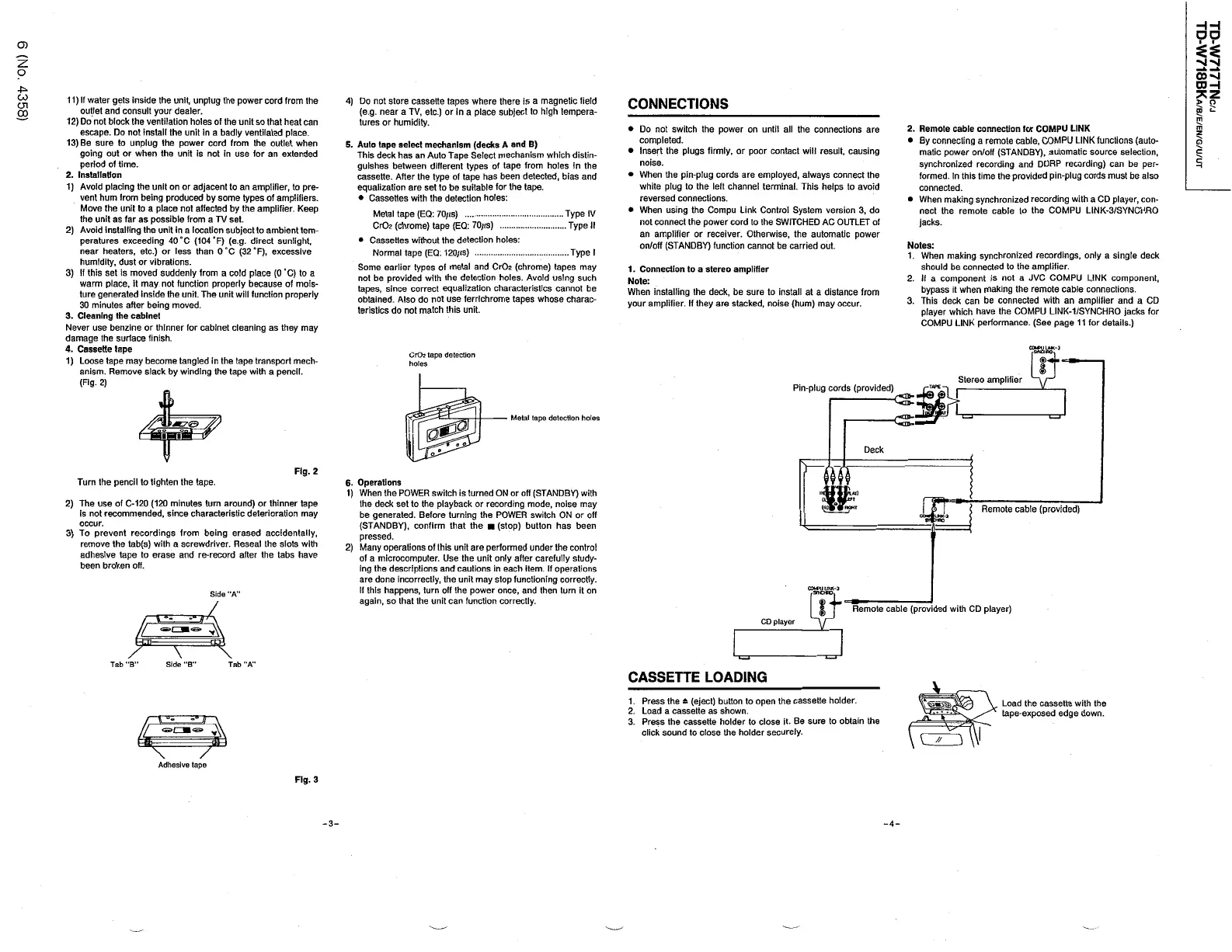
JVC TD-W717TN - Connections and Operations; Connecting to Audio Systems; Cassette Loading Procedure; General Operations Guide

JVC TD-W717TN
62 pages
Print Icon
To Next Page IconTo Next Page
To Previous Page IconTo Previous Page
Loading...
HH
DO
O
)
z
:
o
00
-
si
CDH
4
^
CO
11
)
If
water
gets
Inside
the
unit
,
unplug
the
power
cord
from
the
outlet
and
consult
your
dealer
.
12
)
Do
not
block
the
ventilation
holes
of
the
unit
so
that
heat
can
escape
.
Do
not
install
the
unit
in
a
badly
ventilated
place
.
13
)
Be
sure
to
unplug
the
power
cord
from
the
outlet
when
going
out
or
when
the
unit
is
not
in
use
for
an
extended
period
of
time
.
2
.
Installation
1
)
Avoid
placing
the
unit
on
or
adjacent
to
an
amplifier
,
to
pre
-
vent
hum
from
being
produced
by
some
types
of
amplifiers
.
Move
the
unit
to
a
place
not
affected
by
the
amplifier
.
Keep
the
unit
as
far
as
possible
from
a
TV
set
.
2
)
Avoid
installing
the
unit
in
a
location
subject
to
ambient
tem
-
peratures
exceeding
40
°
C
(
1040
F
) (
e
.
g
.
direct
sunlight
,
near
heaters
,
etc
.
)
or
less
than
0
°
C
(
32
°
F
)
,
excessive
humidity
,
dust
or
vibrations
.
3
)
If
this
set
Is
moved
suddenly
from
a
cold
place
(
0
°
C
)
to
a
warm
place
,
it
may
not
function
properly
because
of
mois
-
ture
generated
inside
the
unit
.
The
unitwill
function
properly
30
minutes
after
being
moved
.
3
.
Cleaning
the
cabinet
Never
use
benzine
or
thinner
for
cabinet
cleaning
as
they
may
damage
the
surface
finish
.
4
.
Cassette
tape
1
)
Loose
tape
may
become
tangled
in
the
tape
transport
mech
-
anism
.
Remove
slack
by
winding
the
tape
with
a
pencil
.
(
Fig
-
2
)
4
)
Do
not
store
cassette
tapes
where
there
is
a
magnetic
field
(
e
.
g
.
near
a
TV
,
etc
.
)
or
in
a
place
subject
to
high
tempera
-
tures
or
humidity
.
CONNECTIONS
>
o
5
?
^
CJl
CO
m
2
.
Remote
cable
connection
for
COMPU
LINK
By
connecting
a
remote
cable
,
COMPU
LINK
functions
(
auto
-
matic
power
on
/
off
(
STANDBY
)
,
automatic
source
selection
,
synchronized
recording
and
DDRP
recording
)
can
be
per
-
formed
.
In
this
time
the
provided
pin
-
plug
cords
must
be
also
connected
.
When
making
synchronized
recording
with
a
CD
player
,
con
-
nect
the
remote
cable
to
the
COMPU
LINK
-
3
/
SYNCHRO
jacks
.
Do
not
switch
the
power
on
until
all
the
connections
are
completed
.
Insert
the
plugs
firmly
,
or
poor
contact
will
result
,
causing
noise
.
When
the
pin
-
plug
cords
are
employed
,
always
connect
the
white
plug
to
the
left
channel
terminal
.
This
helps
to
avoid
reversed
connections
.
When
using
the
Compu
Link
Control
System
version
3
,
do
not
connect
the
power
cord
to
the
SWITCHED
AC
OUTLET
of
an
amplifier
or
receiver
.
Otherwise
,
the
automatic
power
on
/
off
(
STANDBY
)
function
cannot
be
carried
out
.
m
z
o
5
.
Auto
tape
select
mechanism
(
decks
A
and
B
)
This
deck
has
an
Auto
Tape
Select
mechanism
which
distin
-
guishes
between
different
types
of
tape
from
holes
in
the
cassette
.
After
the
type
of
tape
has
been
detected
,
bias
and
equalization
are
set
to
be
suitable
for
the
tape
.
Cassettes
with
the
detection
holes
:
Metal
tape
(
EQ
:
70
/
«
s
)
Cr
02
(
chrome
)
tape
(
EQ
:
70
/
<
s
)
Cassettes
without
the
detection
holes
:
Normal
tape
(
EQ
:
120
/
ts
)
Some
earlier
types
of
metal
and
Cr
02
(
chrome
)
tapes
may
not
be
provided
with
the
detection
holes
.
Avoid
using
such
tapes
,
since
correct
equalization
characteristics
cannot
be
obtained
.
Also
do
not
use
ferrlchrome
tapes
whose
charac
-
teristics
do
not
match
this
unit
.
c
5
Type
IV
.
Type
II
Notes
:
1
.
When
making
synchronized
recordings
,
only
a
single
deck
should
be
connected
to
the
amplifier
.
2
.
If
a
component
is
not
a
JVC
COMPU
LINK
component
,
bypass
it
when
making
the
remote
cable
connections
.
3
.
This
deck
can
be
connected
with
an
amplifier
and
a
CD
player
which
have
the
COMPU
LINK
-
1
/
SYNCHRO
jacks
for
COMPU
LINK
performance
.
(
See
page
11
for
details
.
)
Type
I
1
.
Connection
to
a
stereo
amplifier
Note
:
When
installing
the
deck
,
be
sure
to
install
at
a
distance
from
your
amplifier
.
If
they
are
stacked
,
noise
(
hum
)
may
occur
.
CrO
?
tape
detection
holes
Stereo
amplifier
Pin
-
plug
cords
(
provided
)
TAPS
.
I
CX
A
i
<
s
;
:
Metal
tape
detection
holes
If
Deck
?
Fig
.
2
Turn
the
pencil
to
tighten
the
tape
.
6
.
Operations
1
)
When
the
POWER
switch
is
turned
ON
or
off
(
STANDBY
)
with
the
deck
set
to
the
playback
or
recording
mode
,
noise
may
be
generated
.
Before
turning
the
POWER
switch
ON
or
off
(
STANDBY
)
,
confirm
that
the
(
stop
)
button
has
been
pressed
.
2
)
Many
operations
of
this
unit
are
performed
under
the
control
of
a
microcomputer
.
Use
the
unit
only
after
carefully
study
-
ing
the
descriptions
and
cautions
in
each
item
.
If
operations
are
done
incorrectly
,
the
unit
may
stop
functioning
correctly
.
If
this
happens
,
turn
off
the
power
once
,
and
then
turn
it
on
again
,
so
that
the
unit
can
function
correctly
.
2
)
The
use
of
C
-
120
(
120
minutes
turn
around
)
or
thinner
tape
Is
not
recommended
,
since
characteristic
deterioration
may
occur
.
3
)
To
prevent
recordings
from
being
erased
accidentally
,
remove
the
tab
(
s
)
with
a
screwdriver
.
Reseal
the
slots
with
adhesive
tape
to
erase
and
re
-
record
after
the
tabs
have
been
broken
off
.
Remote
cable
(
provided
)
Side
"
A
/
Remote
cable
(
provided
with
CD
player
)
CD
player
V
7
\
\
Tab
"
A
"
Tab
"
B
"
Side
"
B
"
CASSETTE
LOADING
1
.
Press
the
&
(
eject
)
button
to
open
the
cassette
holder
.
2
.
Load
a
cassette
as
shown
.
3
.
Press
the
cassette
holder
to
close
it
.
Be
sure
to
obtain
the
click
sound
to
close
the
holder
securely
.
Load
the
cassette
with
the
tape
-
exposed
edge
down
.
XXL
llj
3
$
7
\
Adhesive
tape
Fig
.
3
-
3
-
-
4
-

Table of Contents

Related product manuals