E-19
VIDEO
DC
IRIS
VIDEO
DC
IRIS
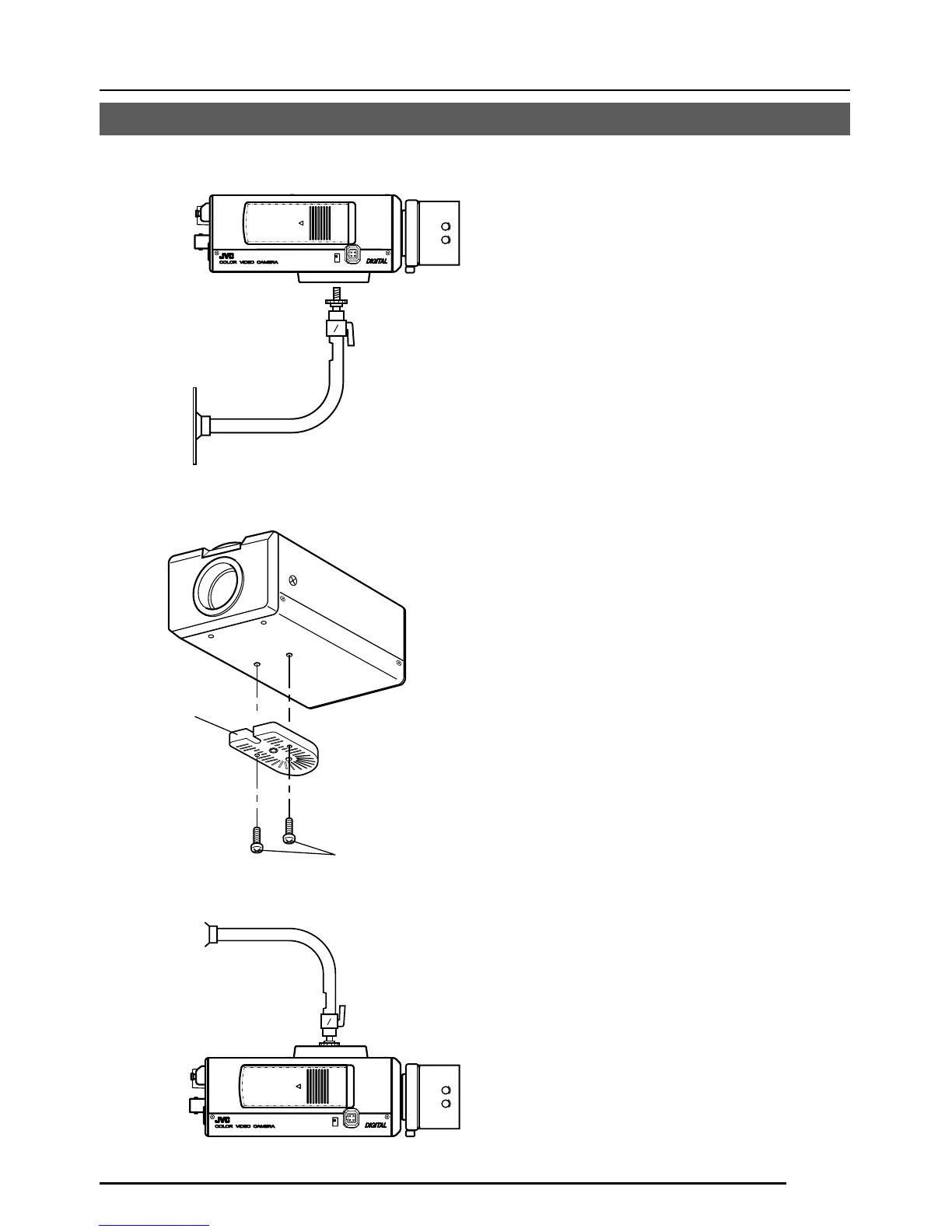
Camera-
mounting bracket
Fixing screws
Installation of camera
• Mounting from the bottom
This camera is originally designed to be
mounted from the bottom, as shown q.
The hole is standard photographic pan-
head screw size (1/4-20 UNC). Example
the Fixing unit or Pan/Tilt unit.
• Mounting from the top
Remove the CAMERA MOUNTING
BRACKET from the bottom of the camera
by removing two fixing screws as shown
w. Attach the CAMERA MOUNTING
BRACKET to the top, then mount the
camera on the Fixing Unit as shown e.
Make sure that two original screws are
used when mounting the CAMERA
MOUNTING BRACKET. Be sure to use a
6 mm long locking screw for the camera-
mounting bracket.
(This camera is used indoor and under
similar conditions.)
q
w
e



 To Next Page