The K-RAIN KRX6 is a 6-zone indoor Wi-Fi irrigation controller designed for residential use, offering advanced control and scheduling options for your watering system. It integrates seamlessly with the Holman Home app, available on both iOS and Android devices, providing convenient management from your smartphone.
Function Description:
The KRX6 controller manages up to six independent watering zones, allowing for customized irrigation schedules. It supports various scheduling options, including 7-day, interval days, odd days (including/excluding 31st), and even days, with an additional misting function. The device features Wi-Fi connectivity for remote control via the Holman Home app, enabling users to start, stop, and adjust watering schedules from anywhere. It also includes on-board manual controls for direct operation. A key feature is its ability to integrate with Holman Home automations, allowing for more sophisticated watering routines. The controller is designed for indoor use and includes a memory backup power system, requiring a separately sold 9V battery. It also offers a 15-day rain delay function to conserve water during wet periods.
Important Technical Specifications:
- Zones: 6 zones
- Power Supply: 1A 24VAC plug pack supply. Input: 24V AC 50Hz. Output: Max 1 amp.
- Station Output: 24V AC 50/60Hz, 0.5 amp max.
- Master/Pump Output: 24V AC 0.25 amp max.
- Overload Protection: Standard 20mm, 1 amp fuse.
- Memory Backup: Requires a 9V battery (sold separately).
- Fuse: M-205 fuse rated at 1A for power spike protection.
- Maximum Run Time per Zone: 11:59 hours.
- Wi-Fi: 2.4GHz Wi-Fi network (not 5GHz).
- Connectivity: Wi-Fi control with Holman Home via iOS® or Android®. Bluetooth for initial setup (EZ Mode).
- Installation: Indoor model, must not be exposed to rain or water ingress, or direct sunlight. Install near a 240V AC outlet.
- Wiring: Disconnect all 240VAC power before wiring. Strip approx. 6mm of insulation. Connect one cable from terminals to each solenoid valve. Complete the circuit by looping a common cable to all valves and connecting to the COMMON (C) terminal.
Usage Features:
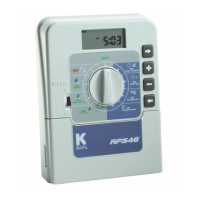
- Main Dial: The central control for OFF, RUN, and zone selection (1-6).
- AP Indicator: Lights up to indicate AP mode during Wi-Fi setup.
- START Button: Initiates watering schedules.
- STOP Button: Halts current watering.
- Holman Home App Integration:
- Download: Available on App Store and Google Play.
- Account Registration: Requires an email address.
- Device Pairing: Can be added to Holman Home via "Discovering Devices" (if Bluetooth is active), EZ Mode (Bluetooth connection), or AP Mode (direct Wi-Fi connection).
- Location Access: Holman Home will ask to access location data for weather information.
- Watering Status: Displays current watering zone, time remaining, and next watering schedule.
- Starts Status: Shows enabled/disabled starts and allows enabling/disabling "Allow Enabled Starts to Water."
- Watering Delay: Configurable delay (e.g., 1 day).
- Zone Settings: Customize zone names, watering mode (Normal or Misting), on time, delay time, and run times for each start (A, B, C).
- Manual Watering: Allows for immediate watering of selected zones for a specified duration. Users can select individual zones or multiple zones to water sequentially starting at Zone 1.
- Offline Device Notification: The app displays a warning message if the KRX6 is not connected to the internet.
- Time Zones: The app highlights which time zone the KRX6 is currently set to.
- Holman Home Automations: Starts run as part of Holman Home automation. Watering delays only affect scheduled starts from the KRX6 interface; starts running from Holman Home automations will ignore watering delays. Zones can be excluded using the watering delay function.
Maintenance Features:
- 9V Battery Replacement: The 9V battery for memory backup is located under the terminal cover. To replace, remove the cover, feed the battery snap cable through the slit, and then replace the terminal cover.
- Fuse Replacement: The controller uses a 5mm x 20mm 1amp glass fuse. If the fuse blows, check wiring on each station and reconnect.
- Troubleshooting:
- KRX6 cannot connect to Holman Home:
- Confirm KRX6 is powered ON.
- Confirm KRX6 and smartphone are within Wi-Fi range.
- Ensure Bluetooth is turned on and permissions are approved for Holman Home.
- Check Wi-Fi router network functions (unblocked, firewalls).
- Confirm Wi-Fi network name (SSID) and password are correct.
- Confirm KRX6 is connected to a 2.4GHz Wi-Fi network (not 5GHz), ensure broadcast is enabled, and the network is not hidden.
- Confirm Wi-Fi router encryption method is WPA2-PSK and authentication type is AES, or both.
- Check the number of connected devices to the Wi-Fi (usually 16 or 50 devices limit).
- If Wi-Fi router enables MAC address filter, remove the device from the MAC filter list and make sure the Wi-Fi router is allowing KRX6 to be connected.
- Ensure Wi-Fi router has DHCP service enabled.
- If Wi-Fi router is not compatible, replace it.
- KRX6 was connected but is now not connecting after mounting: Indicates a lack of Wi-Fi signal. Move the KRX6 and Wi-Fi router closer.
- No LED lights on: No power to the unit. Check the power point or plug transformer pack. Check the fuse (1amp 240 to 24V AC/AC transformer).
- Single zone not working: Faulty solenoid coil or break in field wire. Check solenoid coil (a good solenoid coil should read around 33Ω on a multi meter). Test field cable for continuity. Test common cable for continuity.
- No automatic start: Setup error, MAIN DIAL is in OFF position, or blown transformer. If unit works manually, check setup or MAIN DIAL position. If not, check fuse (next to terminal block). If fuse doesn't need replacing, check wiring and transformer (should be supplying 24V AC).
- Buttons not responding: Contact Customer Service.
- Multiple zones watering at once: Solenoids may be dirty. Check for faulty driver triac, incorrect field wiring, or broken/lost common wire. If outputs are still locked on, contact Customer Service.
- KRX6 is not connecting in AP MODE: Ensure mobile data is switched off.
- Fuse keeps blowing: 1amp glass fuse is installed to protect the board from damage. If fuse blows, check wiring on each station. If fuse is continuously blowing, remove all wires from stations. Reconnect each station one at a time to determine which station is causing the fault.
Warranty:
Holman Industries offers a 3-year replacement guarantee for products with manufacturing defects. The warranty excludes liability for consequential loss or damage, and damage caused by improper use, installation, or unauthorized repairs. For warranty claims, contact Holman Industries at 1300 716 188 or support@holmanindustries.com.au. Proof of purchase is required.

 Need help?
 General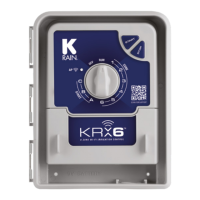

 To Next Page