WWW.KAARTA.COM 106
Caution: Do not change any of the other port information! The
TCP/IP ports have been configured for the integrated Trimble PPK
and should not be adjusted (see Figure 77).
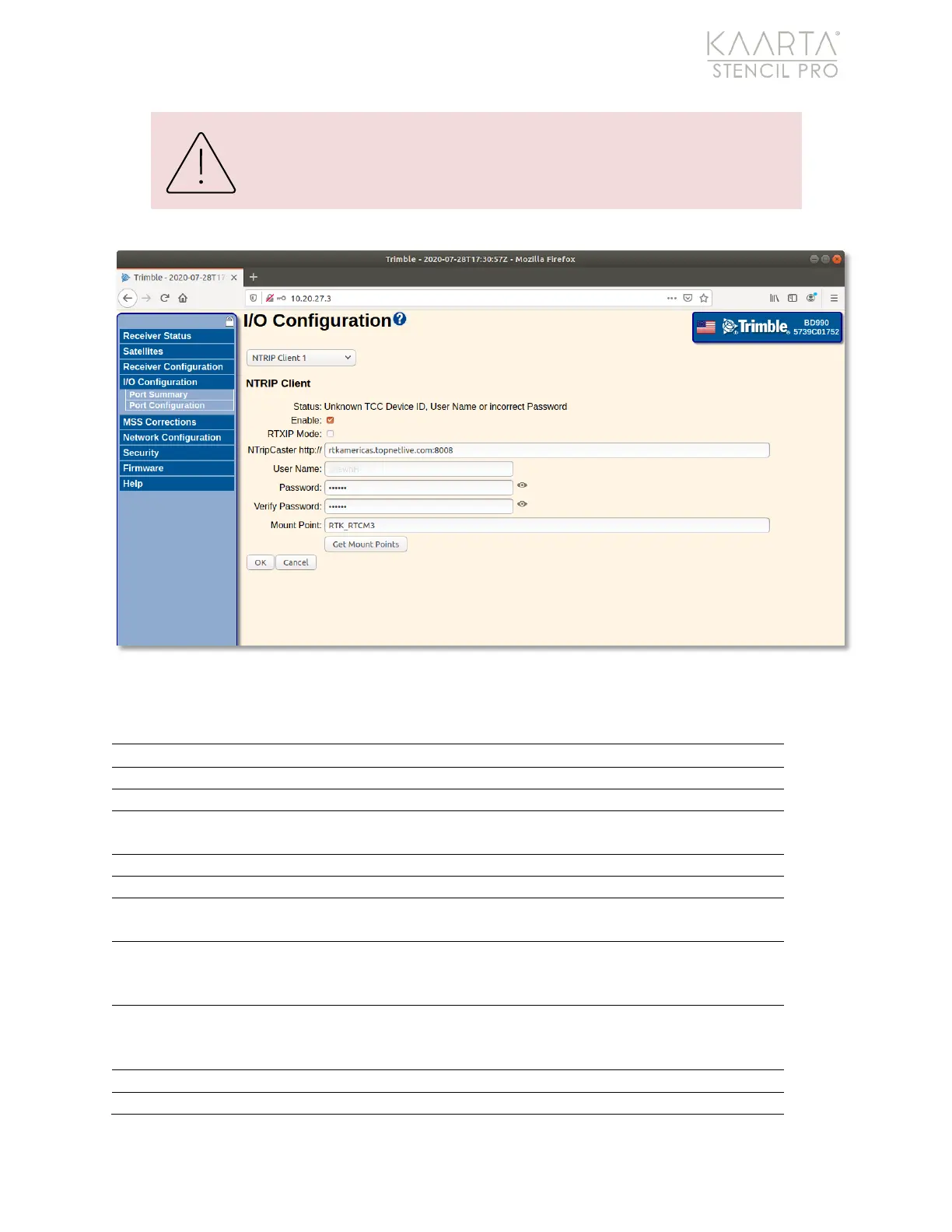
Figure 78: NTRIP Client settings.
NTRIP CLIENT SETTINGS
Indicates the current status of the NTRIP connection.
Select to enable the NTRIP Client.
Select to connect to the Trimble CenterPoint RTX service, if applicable.
The address and port of the NTRIP Caster that the receiver will connect
to receive correction data.
Enter the username required to log on to the server.
Enter the password required to log on to the server.
Enter name of the correction stream to which you are connecting on
the NTRIP Caster if known or select from the list using the Get Mount
Points
Use this button to obtain a list of available IBSS base stations for
selection. The list is ordered with the closest at the top of the list and
includes the distance from your current location in km.
Click OK to accept any NTRIP client settings changes.
Click Cancel to cancel any settings changes.



 To Next Page