36 English
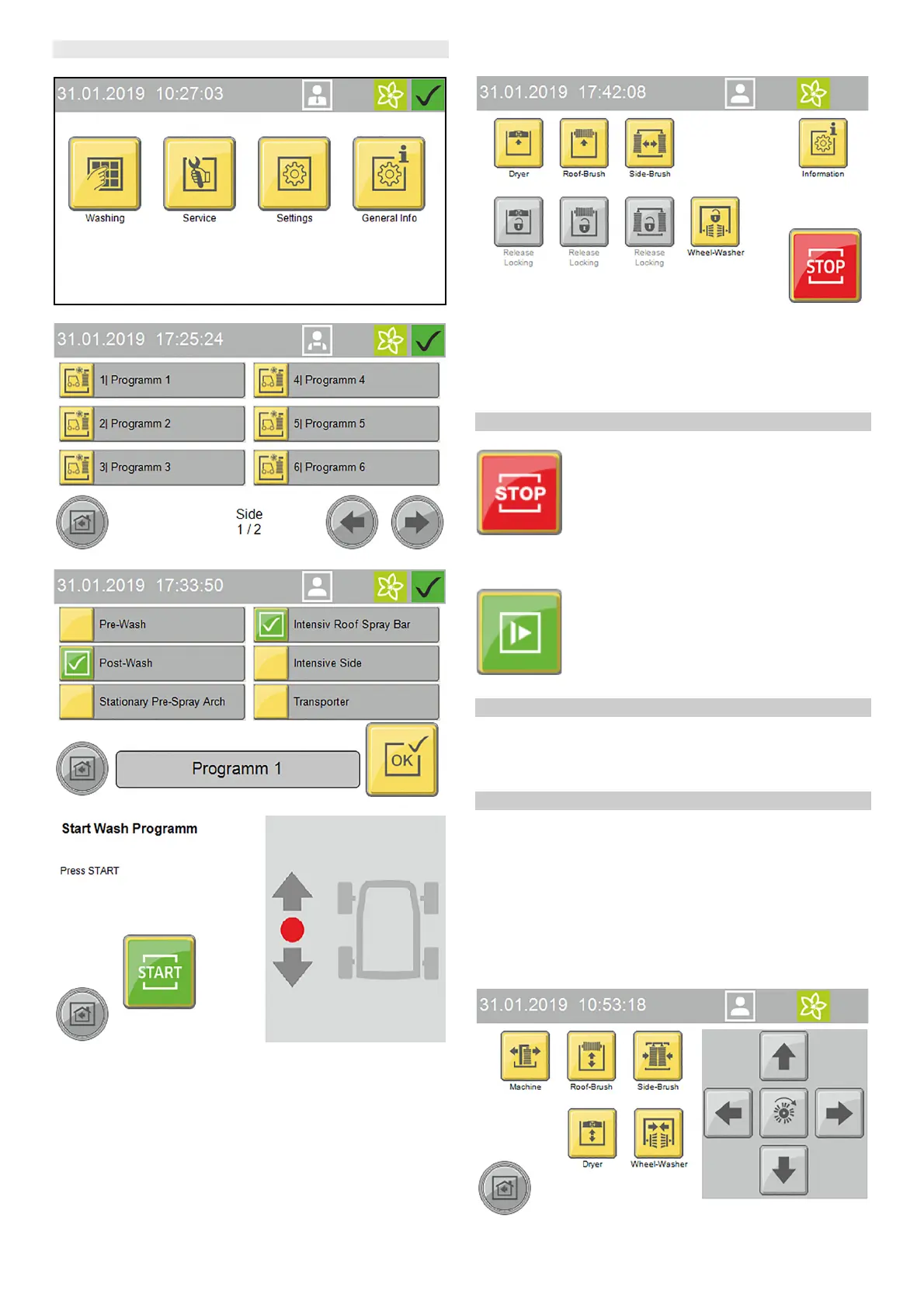
Start the program on the display
1. Press the "Wash" button.
2. Select the desired washing program.
3. Select the desired options and confirm with "OK".
4. Start the washing program.
5. The following manual functions can be executed via the dis-
play while a washing program is running:
a Lock/raise dryer
b Lock/raise roof brush
c Lock/outwards movement of the side brushes
d Stop the wheel brushes
Press the "Information" button to show the program progress
display.
Interrupting the currently running program
1. Press the "Stop" button.
The program is interrupted.
2. Press the "Start" button to resume the program.
Programme end
After the programme has finished, the positioning light indicates
whether the vehicle should be driven forwards or backwards out
of the system.
1. Drive the vehicle out of the system.
Manual mode
Manual functions can be performed with the following assem-
blies:
● Portal - move
● Roof brush - raise and lower, switch on and off
● Side brushes - move in and out, switch on and off
● Dryer - raise and lower, switch on and off
● Wheel brushes - move in and out, switch on and off
1. Select Service / Manual mode / Manual portal in the main
menu.
The menu with executable manual functions opens.





 To Next Page