English – 27
Maintenance and Care
If the bristles are worn out, you must replace the brush.
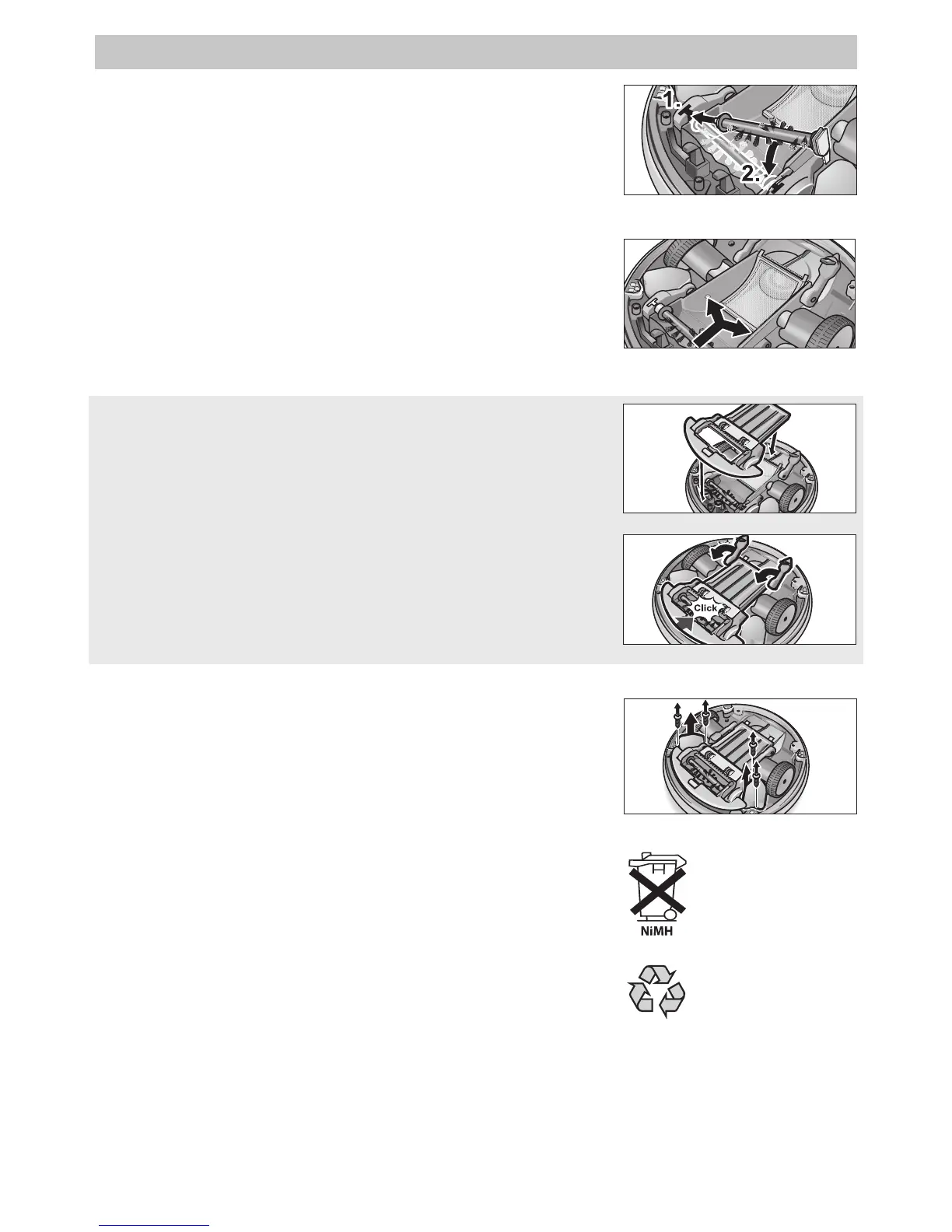
Inserting the brush
• Insert the brush into the support on the left side (1).
• Press the brush into the right-hand guide with the hook
pointing downward until it locks into place (2).
Cleaning the dust sensors
• Clean the dust sensors using a soft cloth or a paintbrush.
Finish all maintenance works of the robot with the following
steps:
Installing the dirt receptacle cover
• Put the cover onto the dirt receptacle.
• Close both locking levers.
• In addition, press on the front side of the cover to ensure the
dirt receptacle is closed safely.
Exchanging the batteries
Use only original Kärcher batteries.
• Release the two screws on the two batteries, and remove the
old batteries.
• Insert the new batteries, and fasten them with the screws.
Please arrange for the proper disposal of the batteries.
Batteries contain substances that must not enter the environ-
ment. Please dispose your batteries using appropriate collection
systems.
Please arrange for the proper disposal of the old appliance
Before that, first remove the two in-built batteries.
Old appliances contain valuable materials that can be recycled.
Please dispose your old appliances using appropriate collection
systems.
Figure 22: Inserting the brush
Figure 23: Cleaning the dust sensors
Figure 24: Installing the dirt receptacle cover
Figure 25: Closing the locking lever
Figure 26: Exchanging the batteries


 To Next Page
 Loading...