a message “Please enter your password” will be displayed when the message
listen key is pressed. After entering the password the voice messages can be
listened.
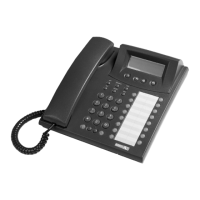
· Page Key: When this “Page” key is pressed, the first functions of the all-
programmable speed dial keys become the second functions for the same keys. In
that case two different function statuses of each key are displayed through the
LEDs. In normal operation, the LED lights in red for the first page functions and
lights in green for the second page functions. When the green LEDs are ON, it
means the second functions of the keys are active. Moreover, when the green LED
lights, the character “^” will be seen in the date/time line of the 4 line display and it
shows that the second functions of the programmable keys are active. If there is a
key as a “page” key and another key is desired to program as page key, the first
and the second functions of the old page key is directly erased. At the first
initiation of the phone, the LED of page key (if exists) will light in red.
· Call Collect Key: When the user is busy or in a conversation, the incoming
internal or external call can be answered by pressing this key and at that time the
first call is dropped.
Code Programming
By “Feature Code” Menu:
The entire functions supported by the exchange can be programmed for ST26
telephone set through the Feature code menu. Any eight-digit code can be assigned to
the programmable keys. That code could be one that is related to user, such as Follow
Me (85), one that is related to the operator, such as Wake Up Service (8389) or one
that is related to the system supervisor, such as entry to the exchange programming
(877777). If the entered code is none of them, then it is taken as an extension number
and this extension number is called directly when this key is used. After accessing the
Key Settings > Feature code submenu, if one of the programmable keys is selected,
one of the corresponding codes is entered for the “no=” option and then if it is
confirmed through the “Accept” key, then the program will have been assigned to the
selected key. (Please refer to the DS Series User’s Guide for information related to the
functions supported by the exchange and the codes to program them.)
By “Auto Setting” Menu:
In ST26 telephone sets, possibility of assigning different functions to the entire keys
simultaneously is provided via the Auto Setting option under the Key Settings menu.
This feature will be explained in detail later in the section “Auto Settings”. Via the
automatic programming, about 20 functions can be programmed at the same time.
These functions can be changed later one by one, as already explained in the sections
above, or they can be cleared through the “Clear All?” option in the same menu.



 To Next Page