Operating Instructions | KBL Tower space 2000
24
CHANGE SETTINGS
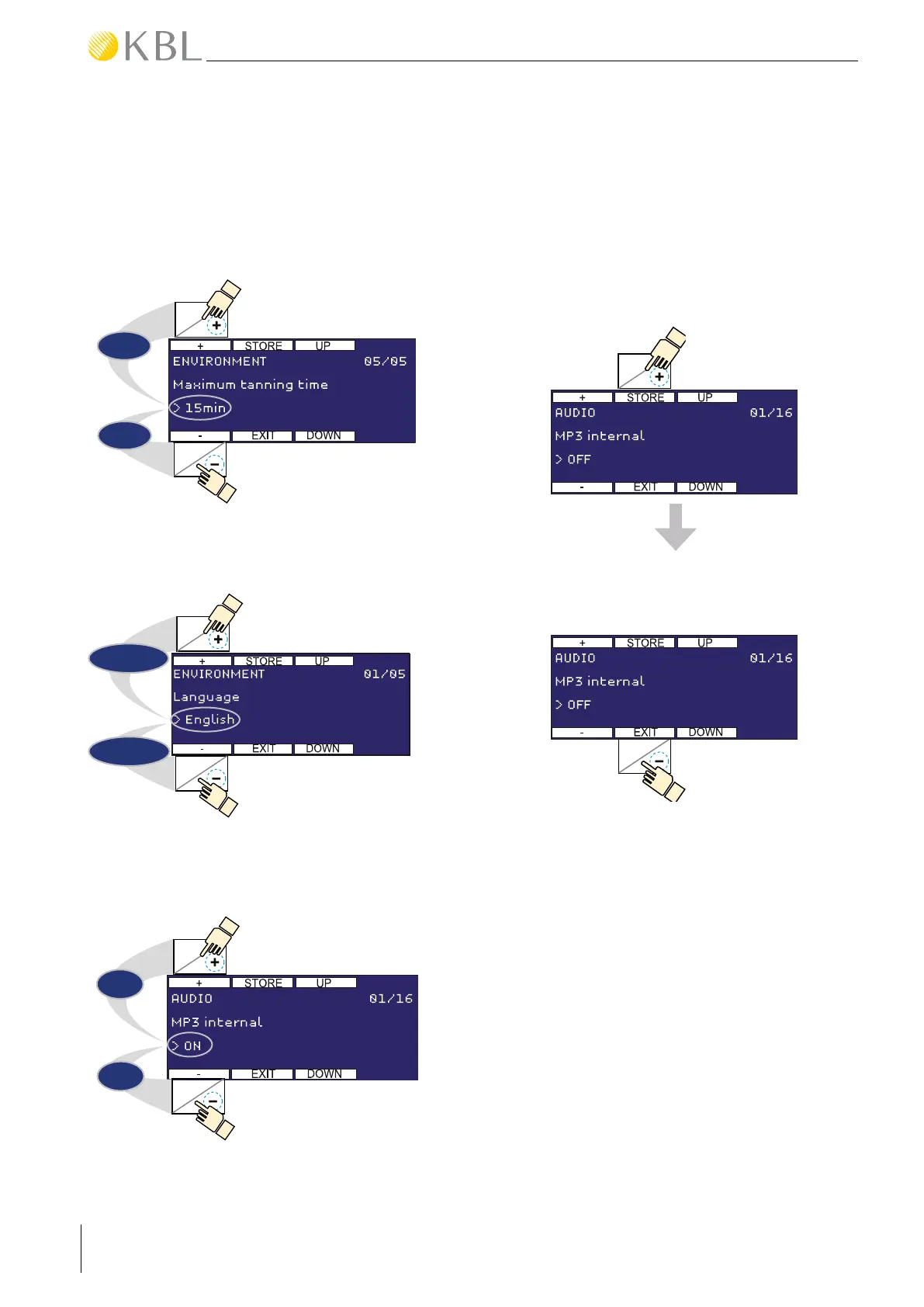
• Depending on the respective function, you can
change values, select options and switch
functions on or off. To do so, use the buttons 2
(+) and 7 (-).
7
2
Example:
Changing a value
-1min
+1min
7
2
Example:
Selecting an option
> English
> German
7
2
Example:
Switching a function on/off
> ON
> OFF
STORE & EXIT
• Save your settings by pressing the button 3
(STORE). If you fail to do so, the system will not
take over the changes you made. -> See also
chapter “Service Menu - Timeout”.
• By pressing the STORE button, you save all
changes you have made in all menu items.
3
• By pressing 8 (EXIT), you go back to the previous
menu level, or you exit the service menu.
8
SERVICE MENU - TIMEOUT
After performing your last operating action, you have
2 minutes left to save the changes you have made.
Then, a prompt appears and all changes are auto-
matically discarded after an additional 20 seconds.
SERVICE MENU - AUDIBLE SIGNALS
For user convenience, operation and storage
processes are acoustically acknowledged in different
ways:
Operation process -> short sound
Storage process -> long sound



 To Next Page