18 19
ENEN
KBSOUND
®
STARKBSOUND
®
STAR User ManualUser Manual
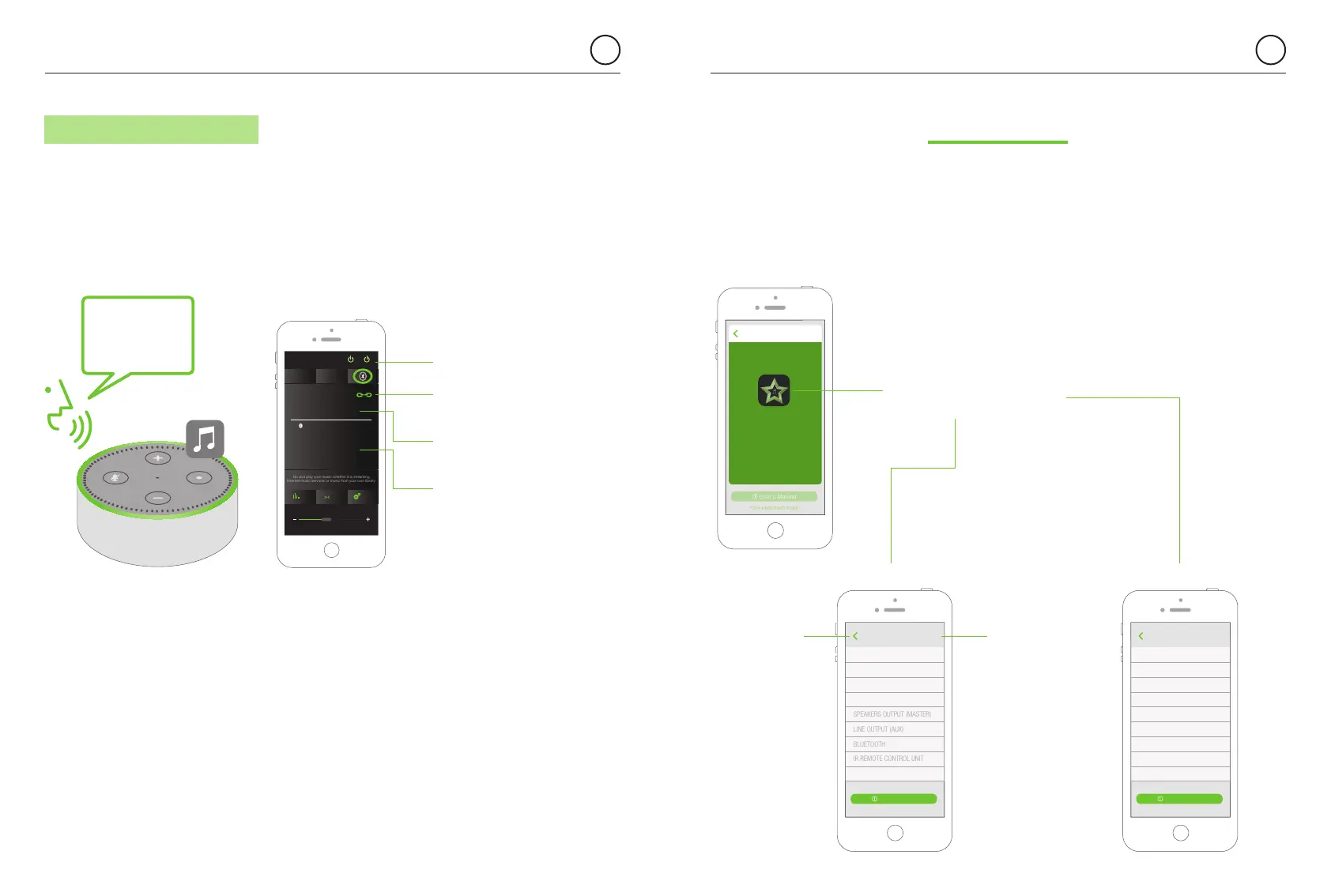
If you wish to stream music from any Amazon Alexa device setup
the Bluetooth connection with the KBSOUND STAR and say “Alexa,
connect with the speaker”.
To change the source of the Bluetooth streaming at any time, disconnect
the Bluetooth device (A2DP) pressing the disconnect icon in the App screen,
and connect a new one following the same process.
Note: To connect the Amazon Alexa device with the MASTER
by Bluetooth, the password of the MASTER must be set to 0000
KBSOUND
DAB
Echo Dot
MasterAux
ON / OFF
SettingsBass
FM
1234 KBSOUND STAR
Ideal
Go and play your music whether it is streaming
Internet music services or music from your own library
Bluetooth Audio Streaming
disconnect BT
Audio device
(A2DP)
Alexa,
connect with
the speaker
name of the
device which
is connected
information
about the current
streaming
Hope of deliverance
Paul McCartney
The very best
6.3.2 AMAZON ALEXA DEVICES
AUTO POWER - ON
1234 KBSOUND STAR
About
IDEAL MODE
DAB
AUDIO CHANNELS
LANGUAGE English >
Back
User’s Manual
jump to the
ABOUT SCREEN
jump to
the previous
SCREEN
(Android = Also
the standard
back button)
Certain features of the Settings screen such as: Speaker output (master), Line output
(Aux), Bluetooth and Remote Control Accessory can be blocked using the “About”
screen. This block will avoid undesired changes in the settings.
Go to the “About” screen and tap on the STAR App logo five times to switch
between the block and unblocked menus.
block menu unblocked menu
7. Settings
AUTO POWER - ON
1234 KBSOUND STAR
About
IDEAL MODE
DAB
AUDIO CHANNELS
SPEAKERS OUTPUT (MASTER)
LINE OUTPUT (AUX)
BLUETOOTH
IR REMOTE CONTROL UNIT
LANGUAGE English >
Back
User’s Manual
1234 KBSOUND STAR
User’s Manual
Back
Copyright (C) 2018 EISSOUND
All rights reserved
Model 52792
Version 2.0.1.20170124
Firmware 01.02.00
KBSOUND STAR
tap on the STAR App logo
ve times to switch between
the block and unblocked menus.


 To Next Page