26 27
ENEN
KBSOUND
®
STARKBSOUND
®
STAR User ManualUser Manual
8. Multiroom: Bluetooth ID
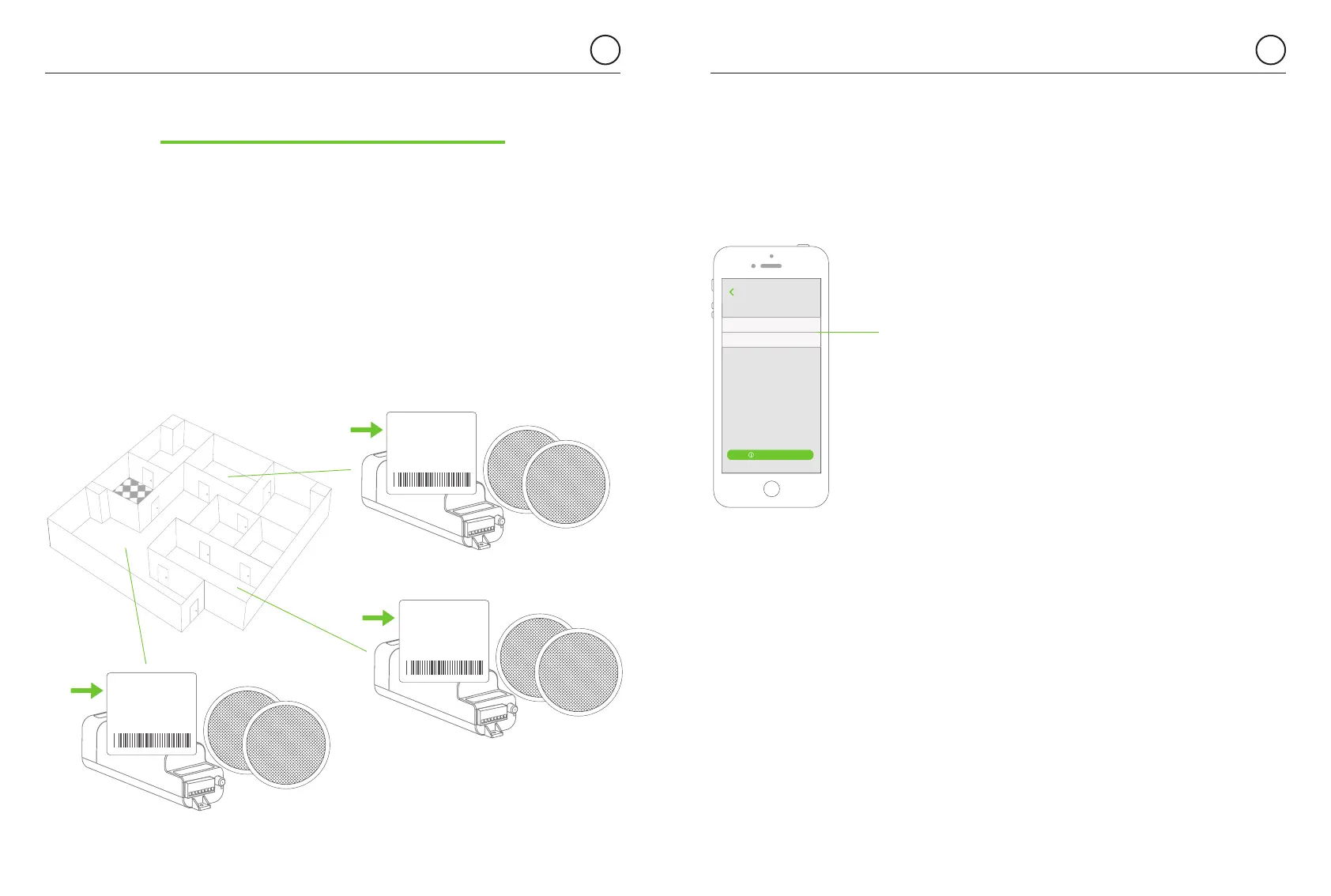
Many MASTERS can be installed in the same home/building. Each one will have
a unique KBSOUND STAR Bluetooth ID and password.
The default factory Bluetooth ID for each MASTER is XXXX KBSOUND STAR
where XXXX is a number between 0000 and 9999. The default password for
each MASTER is a 4-digit number between 0000 and 9999 (different from the
KBSOUND STAR Bluetooth ID). This data can be found on the label
of the MASTER and the label provided with the “Quick reference guide”.
When more than one MASTER is installed in the same home/building,
it is convenient to rename the KBSOUND STAR Bluetooth ID making daily
operation more friendly.
The ID must be a name containing only letters and numbers.
Other symbols are not allowed. It is important to use a name which
has a meaning in order to facilitate the identification of each MASTER.
(advice: use names like KITCHEN, LIVING ROOM, BEDROOM, etc.)
Warning: if the Bluetooth ID and/or password have been forgotten,
reset to factory default (see chapter 10.3).
BLUETOOTH ID:
5091 KBSOUND STAR
PASSWORD:
MAC address:
00 : 00 : 00 : 00 : 00 : 00
****
BLUETOOTH ID:
2819 KBSOUND STAR
PASSWORD:
MAC address:
00 : 00 : 00 : 00 : 00 : 00
****
BLUETOOTH ID:
0105 KBSOUND STAR
PASSWORD:
MAC address:
00 : 00 : 00 : 00 : 00 : 00
****
To personalize the KBSOUND STAR Bluetooth ID and password open
the Settings and go to the Bluetooth ID screen and edit the ID and/or the password.
Living room
BLUETOOTH ID
1234 KBSOUND STAR
About
PASSWORD 1234
Changing the Bluetooth identifier may require
that you “forget the device” and “pair” again from
the Bluetooth Settings Menu with the new name.
Please, take note of the password before pressing
“continue” as you will need to pair again.
Back
User’s Manual
MASTER ID
and password
for the Bluetooth
connection


 To Next Page