22 23
ENEN
KBSOUND
®
STARKBSOUND
®
STAR User ManualUser Manual
7.3 DAB
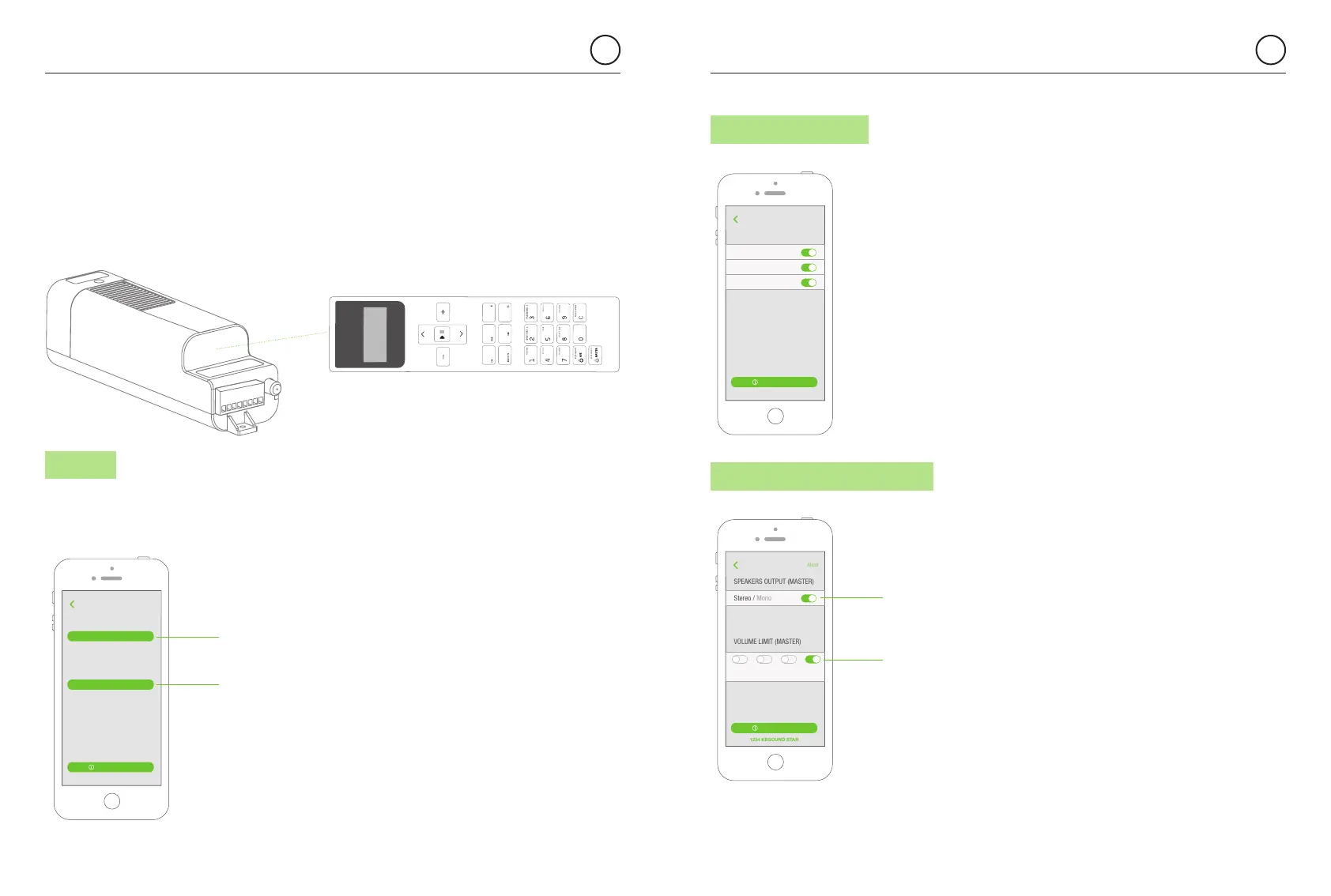
7.4 AUDIO CHANNELS
When any of the audio channels are not
in use they can be disabled and the button
will not appear in the audio screen.
Take note that this selection overrides
all audio channels available in other
KBSOUND STAR units managed
by other device.
FM
AUDIO CHANNELS
1234 KBSOUND STAR
About
DAB
Bluetooth
When disabled, buttons will not be shown
in the audio screens.
Back
User’s Manual
2. Using the Remote Control Accessory to save the Ideal Mode in the MASTER,
if purchased separately.
The Ideal Mode for Audio channel (FM,DAB, Buetooth), volume and equalization can be stored
in the MASTER with the Remote Control Accessory.
Only the Remote Control can be use to store this information in the MASTER never the App.
Selecting the DAB settings button you will be able
to update and reset the DAB services.
Master
7.5 SPEAKER OUTPUT (MASTER)
Stereo / Mono
SPEAKERS OUTPUT (MASTER)
VOLUME LIMIT (MASTER)
1234 KBSOUND STAR
About
Select the speakers output (Master) between
STEREO or MONO.
Select the maximum volume of the speakers
output (Master)
Back
User’s Manual
Min Medium
Low
Medium
High
Max
select the MASTER speaker output to MONO or STEREO
limit the maximum volume for the speaker output
IR
EQ
DAB
1234 KBSOUND STAR
About
Update DAB services. Adds new services found
Back
User’s Manual
Update DAB
Re-scan the DAB services available. It replaces
all the DAB services by the new ones. It also deletes
all the DAB favourites
Reset DAB
update DAB in the MASTER unit
reset DAB in the MASTER unit


 To Next Page