14 15
ENEN
KBSOUND
®
STARKBSOUND
®
STAR User ManualUser Manual
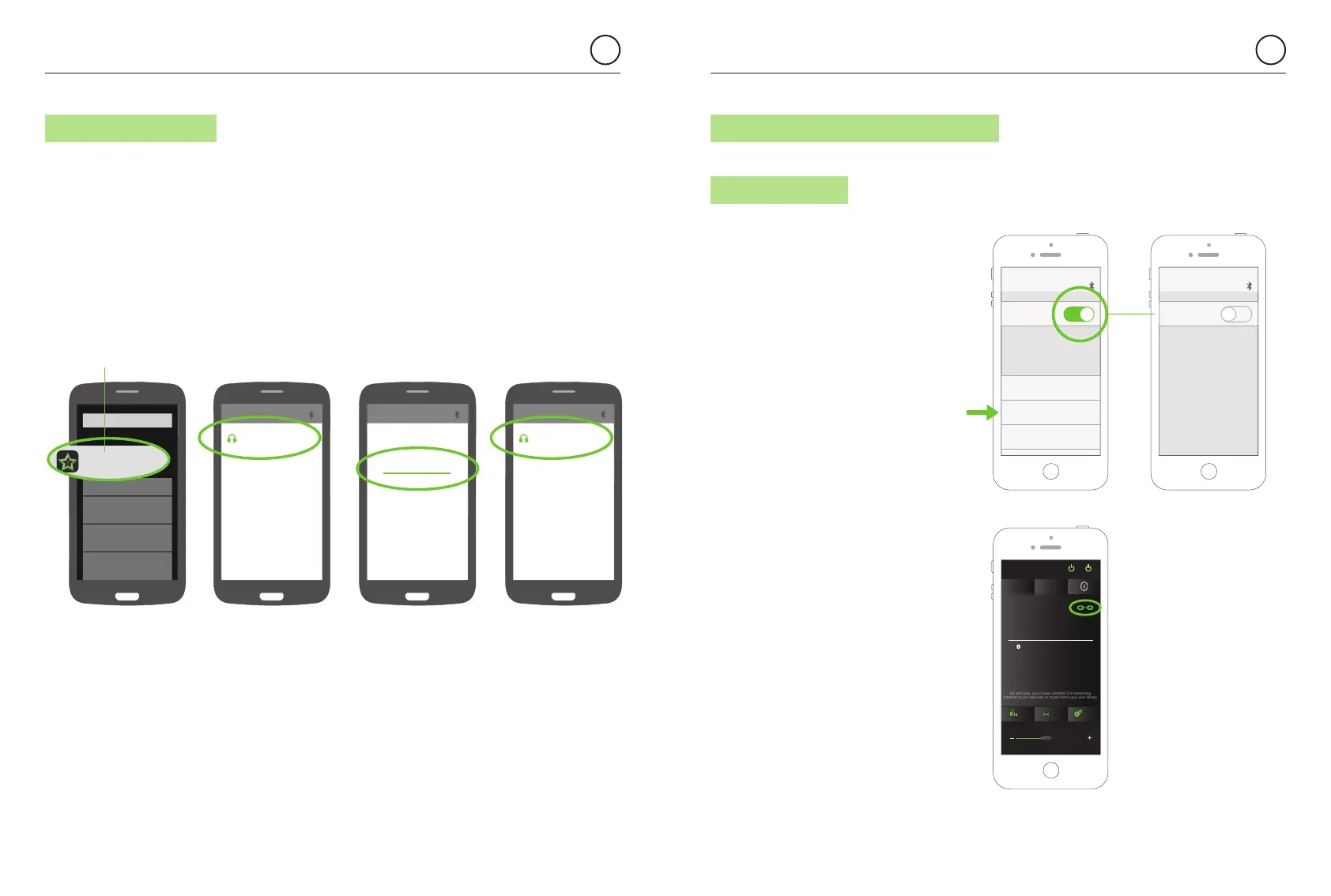
6.2.1. iOS DEVICES
There are two options:
1. Open the iOS Bluetooth settings
Menu and disconnect Bluetooth.
(Total Bluetooth disconnection
is advisable, although some iOS
models/versions permit individual
disconnections).
2. In the App, tap the ”disconnect icon”
in the “Bluetooth Audio Streaming”
screen.
Bluetooth
0105 KBSOUND STAR Connected
MY DEVICES
JF14 FREEDOM Not Connected
BT 140401 Not Connected
Bluetooth
6.1.2 ANDROID DEVICES 6.2 BLUETOOTH AUDIO DISCONNECTION
1. Be sure that the KBSOUND STAR App is closed, not running in the background
(see chapter 14.15 FAQ’s).
2. Open ANDROID Bluetooth Settings Menu.
3. Select the KBSOUND STAR Bluetooth ID (e.g. 0001 KBSOUND STAR).
4. Introduce the password (e.g. 4582). Needed only when pairing, not in future connections.
5. Check that the MASTER (e.g. 0001 KBSOUND STAR) is correctly connected.
Note: the above process is just an example
(GOOGLE NEXUS 5 / ANDROID 5.0.1) since
different devices have different configurations
for different brands, models and versions.
KBSOUND STAR
if KBSOUND STAR App is running
in background, close it.
0001 KBSOUND STAR
0001 KBSOUND STAR
Connected
Bluetooth pairing request
0001 KBSOUND STAR
4582
KBSOUND
DAB
Bluetooth
MasterAux
SettingsBass
FM
1234 KBSOUND STAR
Ideal
Bluetooth Audio Streaming
Go and play your music whether it is streaming
Internet music services or music from your own library


 To Next Page