10 11
English
English
Recommendation
For optimal sound output, it is recommended that you set the X300A Wireless system gain level to its
minimum (See P.11 – System gain control), and the master volume of your computer to its maximum.
Increase the system gain slowly to a level comfortable for your listening.
Options for volume control during playback:
1. Use the system gain as the main volume control
I. Use this option for playback without losing bit-depth.
II. Set the volume on media player to its maximum when using this option.
2. Use the volume control on media player
I. Use this option for convenience in volume adjustment via your computer’s interface.
For better music enjoyment while multi-tasking on your computer, it is recommended that the system
sound be disabled to prevent any interruption to music listening.
For Windows:
1. Choose “Control Panel” from the Start menu.
2. Click “Sound”.
3. Click the “Sounds” tab.
4. Select “No Sounds” under “Sound Scheme” and click “Ok”.
For Mac OS:
1. Choose “System Preferences” from the Apple menu.
2. Click “Sound”.
3. Click the “Sound Effects” tab.
4. Uncheck “Play user interface sound effects”.
Play
* It is recommended that the X300A Wireless be used with Windows 7 and Mac OS 10.6 & above operating
systems.
2a. For Windows
I. Play and enjoy your music.
2b. For Mac OS
I. Choose “System Preferences” from the Apple
menu.
II. Click “Sound”.
III. Click the “Output” tab.
IV. Select “KEF X300A Wireless” from the device list.
V. Play and enjoy your music.
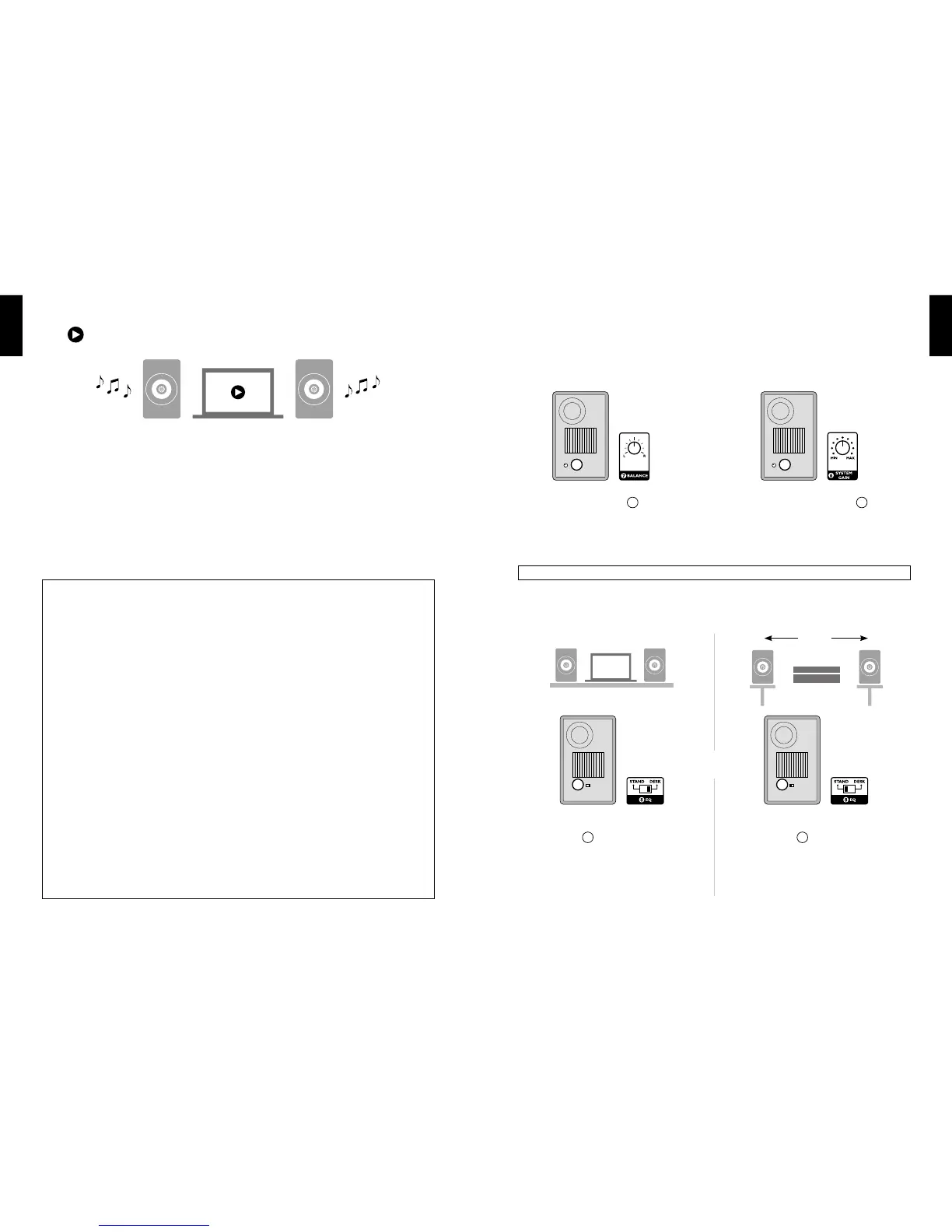
Sound Optimisation - EQ setting
Desktop
Switch to “DESK”
8
for desktop / near eld
listening.
Stand
Switch to “STAND”
8
for open space listening. For
optimal performance, the use of good quality speaker
stands with the X300A Wireless is recommended. A
5M USB cable is also recommended for open space
conguration so that the speakers could be placed
between 2M to 3M apart for optimum stereo effect.
L
8
L
8
2-3 M
Or
* Not available in Wireless streaming mode.
Controls and Settings
Balance control System gain control
Adjust the “BALANCE” knob
7
until you hear the
most balanced sound from Left and Right speakers.
The default setting is at the 12 o’clock position for
equal balance between the speakers.
Adjust the “SYSTEM GAIN” knob
6
to control
music volume. The default setting is at the 12 o’clock
position.
Caution! Continuous listening to music at high volume may cause hearing damage.
R
7
L
6



 To Next Page