12 13
English
English
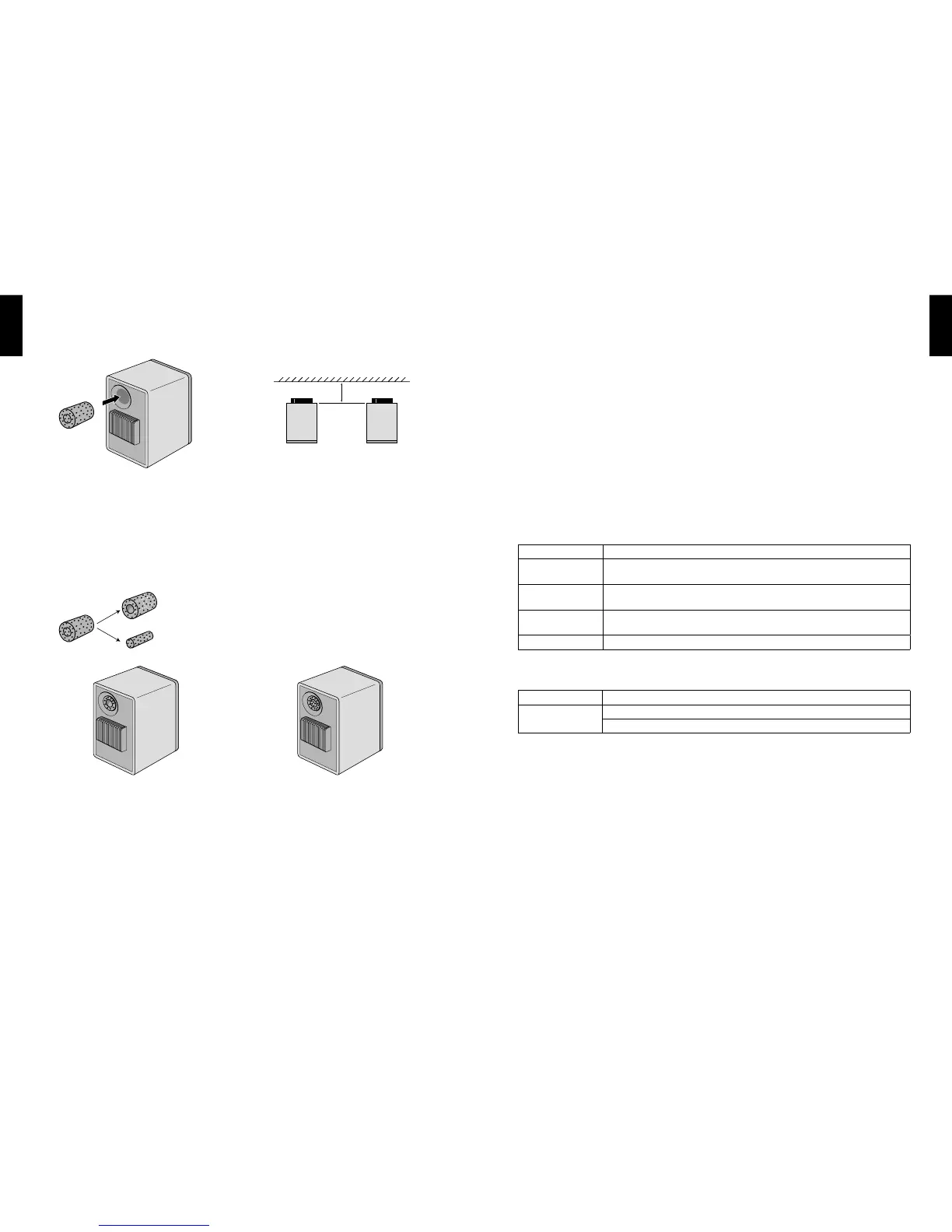
Sound Optimisation - Use of bungs
A pair of bungs is supplied with the X300A Wireless system for you to ne-tune the bass output. When the
speakers are positioned close to the wall, it is recommended that the bungs be placed into the rear port if
you nd the bass output to be overwhelming or boomy.
2. Full bung
For more bass reduction, you may put the full bung
into port.
It is recommended that you try the different bung
configuration to achieve the most optimal sound
output for your environment.
1. Outer bung only
The bung can be separated into outer and inner
bungs. The use of the outer bung only will give less
bass reduction.
Outer bung
Inner bung
Top View
Wall
<18"
Status Indication
Problem Action
Fast blue light
blinking
Make sure that the Left and Right speakers are properly connected through the
USB cable.
Amber light on
Check if your home Wi-Fi network is working properly. If problem persists, try to
re-setup the wireless connection.
Fast amber light
blinking
Try to upgrade your rmware again. If problem persists, please contact your local
dealer or service helpdesk.
Red light blinking Switch off the X300A Wireless and switch on again after 15 minutes.
Troubleshooting
Power
Problem Action
X300A Wireless
does not turn on
Connect power cords between speakers and the mains socket respectively.
Make sure that your main power supply has been turned on.
1. Enter the KEF Wireless Easy Setup Wizard and select your language of choice.
2. Select “Upgrade rmware” and follow the on-screen instructions.
3. Power off and on the X300A Wireless after Firmware Upgrade is completed.
* No playback is allowed during Firmware Upgrade.
Firmware Upgrade
Stay tuned to rmware upgrade announcements on KEF website (www.kef.com). Always upgrade to the latest
rmware to ensure you can enjoy the best of X300A Wireless.



 To Next Page