EasyManua.ls Logo

Kenmore 1350 - Page 29

Kenmore 1350
48 pages
Print Icon
To Next Page IconTo Next Page
To Previous Page IconTo Previous Page
Loading...
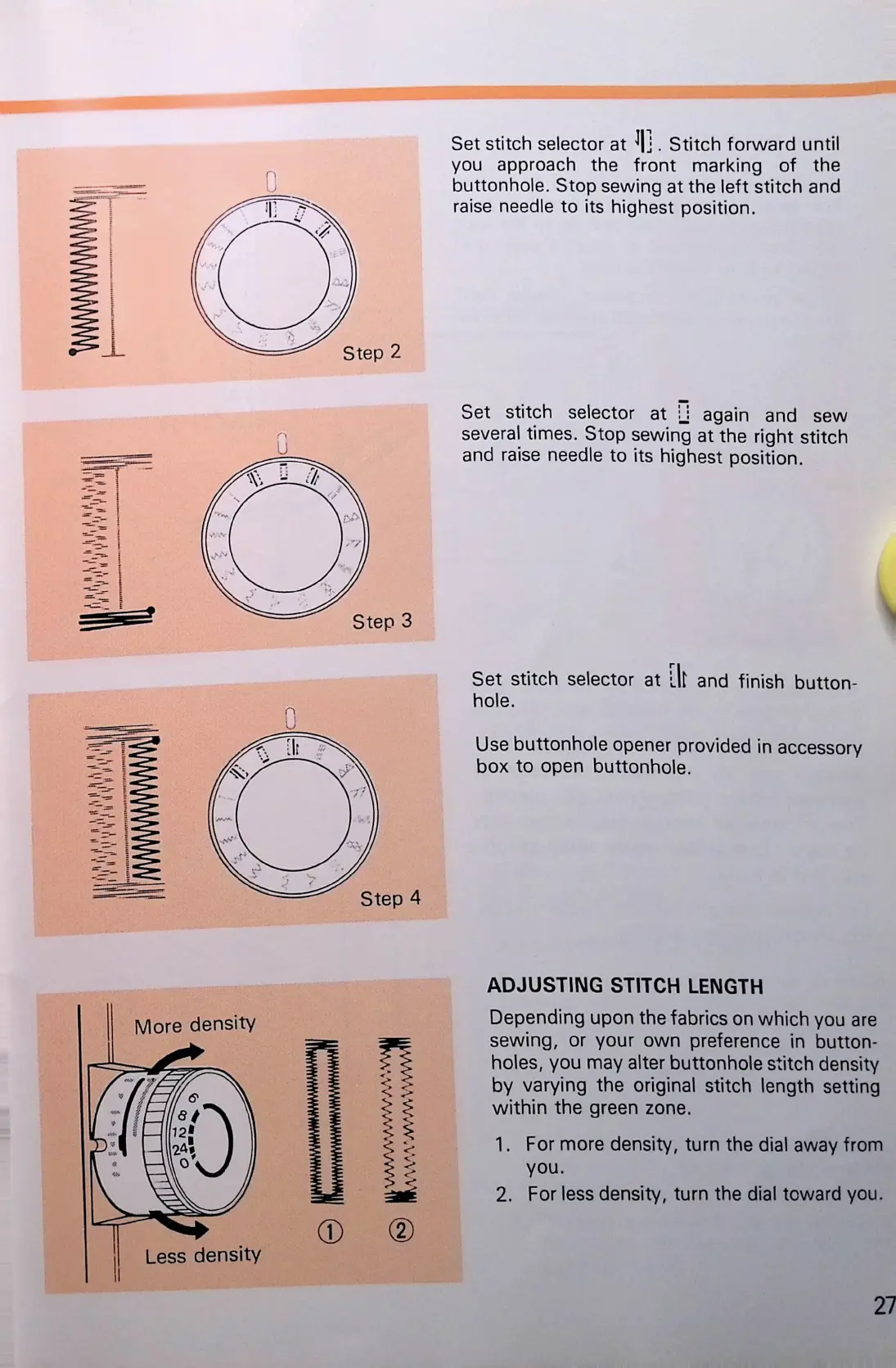
Set
stitch
selector
at
^|j
.
Stitch
forward
until
you
approach
the
front
marking
of
the
buttonhole.
Stop
sewing
at
the
left
stitch
and
raise
needle
to
its
highest
position.
Set
stitch
selector
at
H
again
and
sew
several
times.
Stop
sewing
at
the
right
stitch
and
raise
needle
to
its
highest
position.
Set
stitch
selector
at
lit
and
finish
button
hole.
Use
buttonhole
opener
provided
in
accessory
box
to
open
buttonhole.
ADJUSTING
STITCH
LENGTH
Depending
upon
the
fabrics
on
which
you
are
sewing,
or
your
own
preference
in
button
holes,
you
may
alter
buttonhole
stitch
density
by
varying
the
original
stitch
length
setting
within
the
green
zone.
1.
For
more
density,
turn
the
dial
away
from
you.
2.
For
less
density,
turn
the
dial
toward
you.
27

Related product manuals