16
Manual Recording
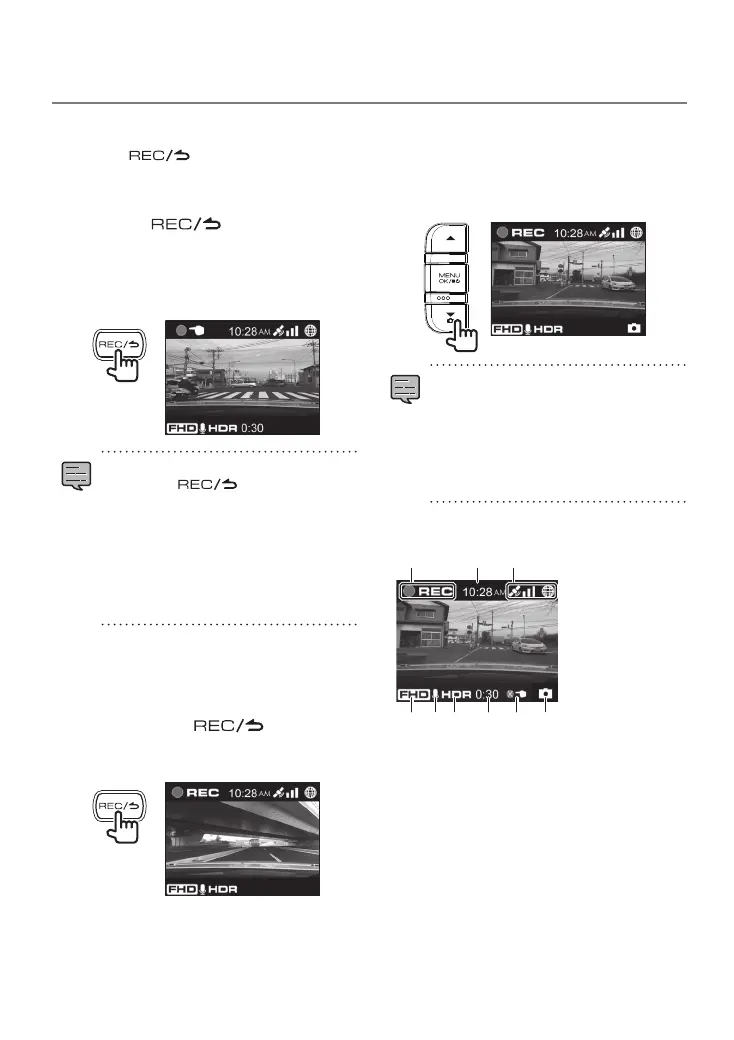
Pressing the
[
]
button on the device
during continuous recording allows you to
record manually whenever you wish.
1.
Press the [ ] button.
Manual recording starts and then the mode
returns to continuous recording after the time
set for the recording time of manual recording
elapses.
•
If you wish to extend the recording time,
press the [
] button again.
•
The recording time of manual recording
is the 10 seconds before manual
recording plus the time set in "Manual
recording time." (
Á
P.20)
•
Recording cannot be performed during
folder or file selection, playback, deletion,
and setting.
Recording
Taking a Photo
Pressing the [K] button on the device during continuous
recording allows you to take a photo whenever you wish.
1.
Press the [K] button.
•
The recording data is saved to the still
image recordings folder.
•
If you wish to take another photo, press
the [K] button again.
•
A photo cannot be taken when the device
is not recording such as during playback
or when configuring menu settings.
Recording screen indicators
1
4 5 6 7 9
2 3
8
1
Recording mode
2
Time
3
GPS reception state
4
Resolution (3M: 2304x1296, FHD:
1920x1080, or HD: 1280x720)
5
Audio recording
6
HDR recording
7
Remaining manual recording or event
recording time
8
Number of files exceeded (manual recording,
event recording, parking recording, or photos)
9
Photo taking
Continuous Recording
Forcibly start recording even during playback or
menu display.
1.
Hold down the [ ] button.
Playback or menu display stops and continuous
recording resumes.
DRV-430_B5A-0959-01_EU_EN.indd 16 2017/12/21 12:13


 To Next Page