19
Various Settings
Operation with MENU
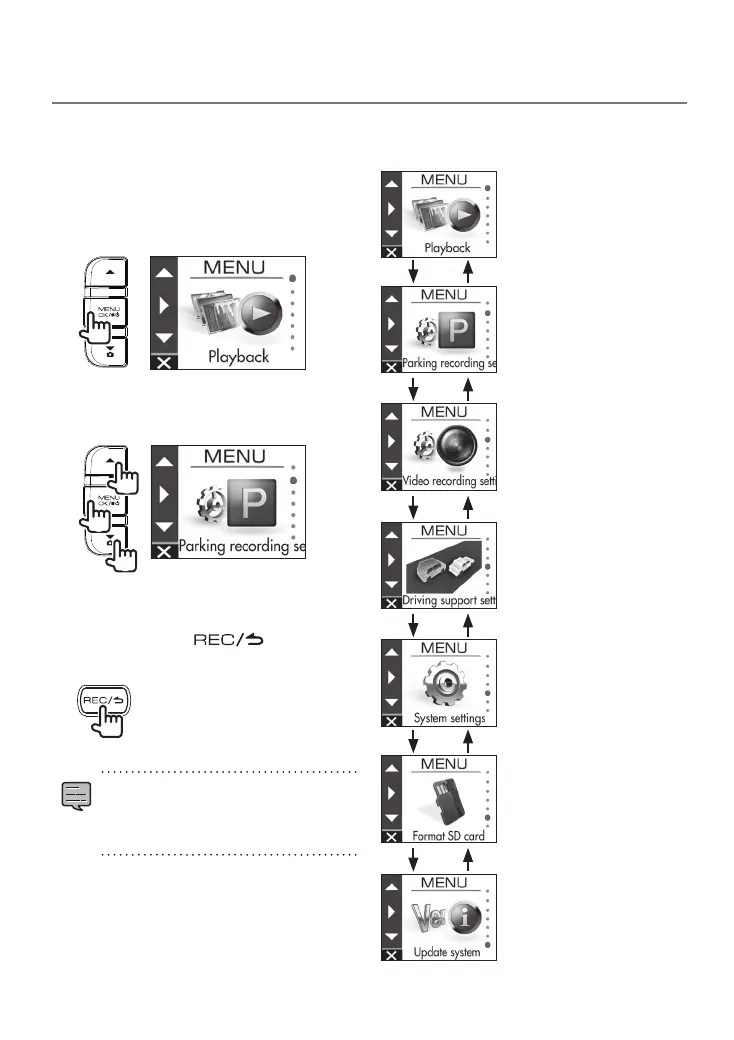
Perform operations such as playback and
configuring video recording settings on the
MENU screen.
1.
Press the [MENU/OK] button.
MENU appears.
2.
Use the [
J
]/[K] buttons to select an
item and then press the [MENU/OK]
button.
2
1
1
Repeat the same operation according to the
selected item.
3.
Hold down the [ ] button to
end the procedure.
•
Except for the recording described in
"Recording at Any Location (Forcibly
Recording)," recording is not possible
while the menu is displayed. (
Á
P.16)
The MENU screen of step 2 changes in the
following order.
Playback
Parking recording settings
Video recording settings
Driving support settings
System settings
Format SD card
Update system
DRV-430_B5A-0959-01_EU_EN.indd 19 2017/12/21 12:13



 To Next Page