18
Operation with the Playback
Menu
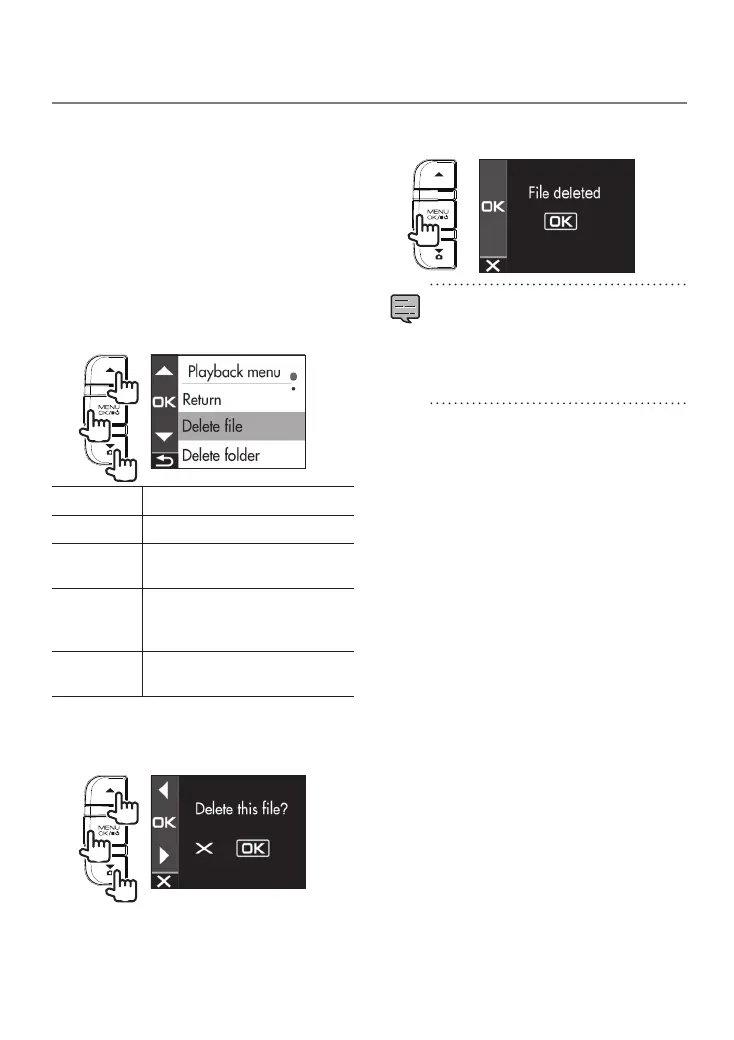
Protect or delete files such as event recording
files or photos. You can also delete all of the files
in a folder.
1.
Select a le or photo to play.
2.
Press twice the [MENU/OK] button,
use the [
J
]/[K] buttons to select
an item, and press the [MENU/OK]
button.
2
1
1
Return Returns to folder selection.
Delete file Deletes a file that is not protected.
Delete folder
Deletes all files in the folder that are
not protected.
Protect file
Protects the file so that it will remain
even if an attempt to overwrite or
delete it is made.
Remove file
protection
Removes file protection.
3.
Use the [
J
]/[K] buttons to select
<OK> and then press the [MENU/OK]
button.
2
1
1
4.
Press the [MENU/OK] button to end
the procedure.
•
Continuous recording files cannot be
protected.
•
To delete a protected file, remove file
protection.
•
When an SD card is formatted, all files
including protected files are deleted.
Protecting or Deleting Files
DRV-430_B5A-0959-01_EU_EN.indd 18 2017/12/21 12:13


 To Next Page