10
Data Size: B6L (182 mm x 128 mm)
Book Size: B6L (182 mm x 128 mm)
CD/USB/iPod/ANDROID
Direct Music Search
(using the remote control)
1 Press DIRECT.
2 Press the number buttons to enter a track/file number.
3 Press to search for music.
• To cancel, press or DIRECT.
• Not available if Random Play is selected.
• Not applicable for iPodUSB and ANDROID source.
Settings to use KENWOOD Remote application
KENWOOD Remote application is designed to control the KENWOOD car
receiver’s operations from the iPhone/iPod (via USB input terminal).
Preparation:
Install the latest version of KENWOOD Remote application on your device
before connecting.
You can make the settings in the same way as connection via Bluetooth.
( 21)
Other settings
1
Press the volume knob to enter
[FUNCTION]
.
2 Turn the volume knob to select an item (see the following table),
then press the knob.
3 Repeat step 2 until the desired item is selected or activated.
4 Press and hold to exit.
To return to the previous setting item, press .
Default:
XX
USB
MUSIC DRIVE DRIVE CHANGE
:The next drive (
[DRIVE 1]
to
[DRIVE 4]
) is selected
automatically and playback starts.
Repeat steps
1
to
3
to select the following drives.
SKIP SEARCH 0.5%
/
1%
/
5%
/
10%
: While listening to iPodUSB or ANDROID source, selects
the skip search ratio over the total files.
Pandora®
(for / / )
Preparation:
Install the latest version of the Pandora application on your device
(iPhone/iPod touch), then create an account and log in to Pandora.
• Select
[ON]
for
[PANDORA SRC]
in
[SOURCE SELECT]
.
( 5)
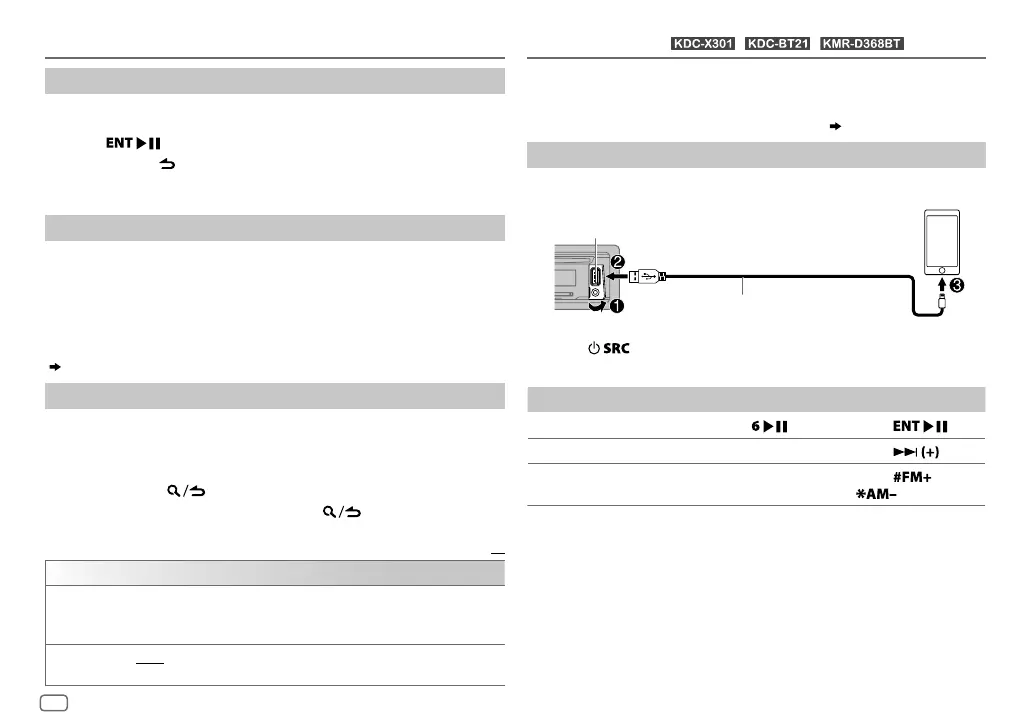
Start listening
1
Open the Pandora application on your device.
2 Connect your device to the USB input terminal.
3 Press repeatedly to select PANDORA.
Broadcast starts automatically.
To On the faceplate On the remote control
Playback/pause
Press
. Press
.
Skip a track
Press T.
Press
.
Thumbs up or thumbs
down
*
3
Press J/K.
Press
/
.
*
1
KCA-iP102 : 30-pin type, KCA-iP103 : Lightning type
*
2
Do not leave the cable inside the car when not using.
*
3
If thumbs down is selected, the current track is skipped.
USB input terminal
KCA-iP102/KCA-iP103 (optional accessory)
*
1
or accessory of the iPod/iPhone
*
2
ENGLISH
JS_KWD_KDC_X301_KN_EN_6.indd 10JS_KWD_KDC_X301_KN_EN_6.indd 10 23/8/2016 11:18:13 AM23/8/2016 11:18:13 AM






 To Next Page