ENGLISH
5
Data Size: B6L (182 mm x 128 mm)
Book Size: B6L (182 mm x 128 mm)
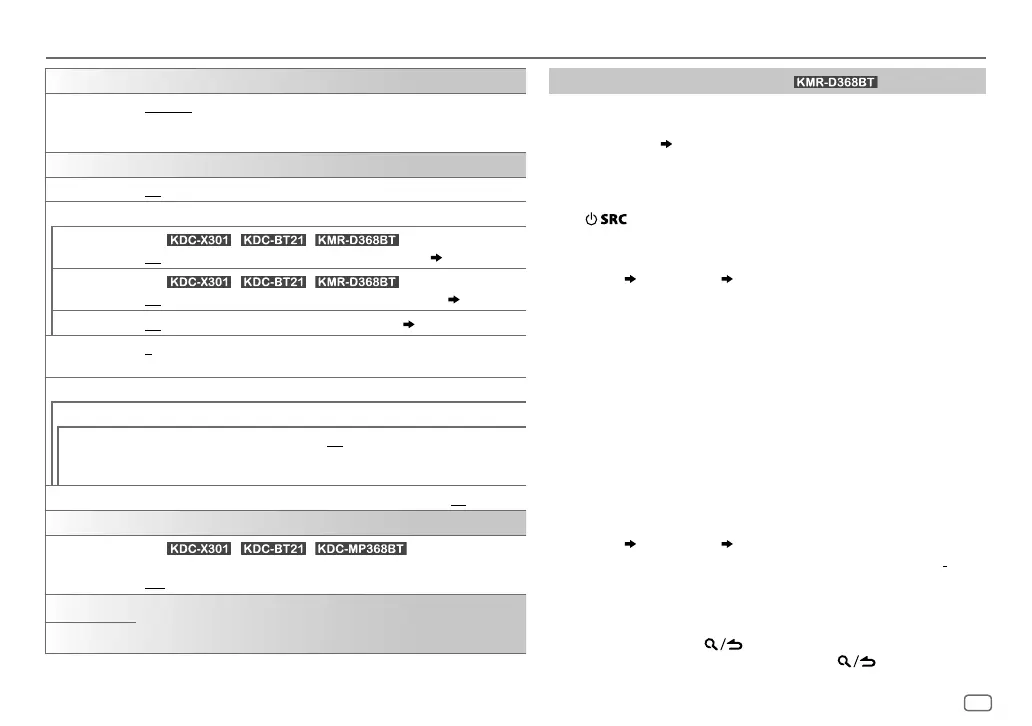
TUNER SETTING
PRESET TYPE
NORMAL
:Memorizes one station for each preset button in each band (FM1/
FM2/FM3/AM).;
MIX
:Memorizes one station or SiriusXM channel for each
preset button, regardless of the selected band or SiriusXM channel.
SYSTEM
KEY BEEP
ON
:Activates the keypress tone.;
OFF
:Deactivates.
SOURCE SELECT
PANDORA SRC
(For / / )
ON
:Enables PANDORA in source selection.;
OFF
:Disables.
( 10)
IHEART SRC
(For / / )
ON
:Enables IHEARTRADIO in source selection.;
OFF
:Disables.
( 11)
BUILT-IN AUX
ON
:Enables AUX in source selection.;
OFF
:Disables.
( 7)
CD READ
1
:Automatically distinguishes between audio file disc and music CD.;
2
:Forces
to play as a music CD. No sound can be heard if an audio file disc is played.
F/W UPDATE
UPDATE SYSTEM
F/W UP xxxx
YES
:Starts upgrading the firmware.;
NO
:Cancels (upgrading is not activated).
FACTORY RESET YES
:Resets the settings to default (except the stored station).;
NO
:Cancels.
CLOCK
CLOCK DISPLAY
(For / / )
ON
:The clock time is shown on the display even when the unit is turned off.;
OFF
:Cancels.
ENGLISH
Select the display language for
[FUNCTION]
menu and music information if
applicable.
By default,
[ENGLISH]
is selected.
ESPANOL
Register the marine remote ID
(for )
Applicable only when you connect Kenwood Marine Remote Control
unit (KCA-RC55MR, optional accessory) to this unit.
• For connection,
33, Wiring connection
.
• Refer also to the supplied instruction manual of the Kenwood
Marine Remote Control unit for more information.
Preparation:
Press
repeatedly to enter STANDBY, then press the volume
knob to enter
[FUNCTION].
1 Turn the volume knob to select an item, then press the knob.
[SYSTEM]
[REM SETTING]
[REMOTE ID SET]
Remote control ID list is displayed.
•
[YES]
indicates that this ID is already registered.
•
[NO]
indicates that this ID is available.
2 Turn the volume knob to select an available ID
[REM ID1]
/
[REM ID2]
/
[REM ID3]
, then press the knob
.
“REGISTERING” appears on the display window.
To register, on the Kenwood Marine Remote Control unit:
• Press ENTER to register as
[REM ID1]
.
• Press SRC to register as
[REM ID2]
.
• Press DISP to register as
[REM ID3]
.
Once the ID is registered, “COMPLETED” appears.
To delete the registered ID
1
Turn the volume knob to select an item, then press the knob.
[SYSTEM]
[REM SETTING]
[REMOTE ID DEL]
2 Turn the volume knob to select the ID to delete [
ID1 DELETE]
/
[
ID2 DELETE]
/[
ID3 DELETE]
, then press the knob.
3 Turn the volume knob to select
[YES]
to delete the selected ID,
and select
[NO]
to cancel.
• To exit, press and hold .
• To return to the previous setting item, press
.
GETTING STARTED
JS_KWD_KDC_X301_KN_EN_6.indd 5JS_KWD_KDC_X301_KN_EN_6.indd 5 23/8/2016 11:17:48 AM23/8/2016 11:17:48 AM






 To Next Page