8
Data Size: B6L (182 mm x 128 mm)
Book Size: B6L (182 mm x 128 mm)
CD/USB/iPod/ANDROID
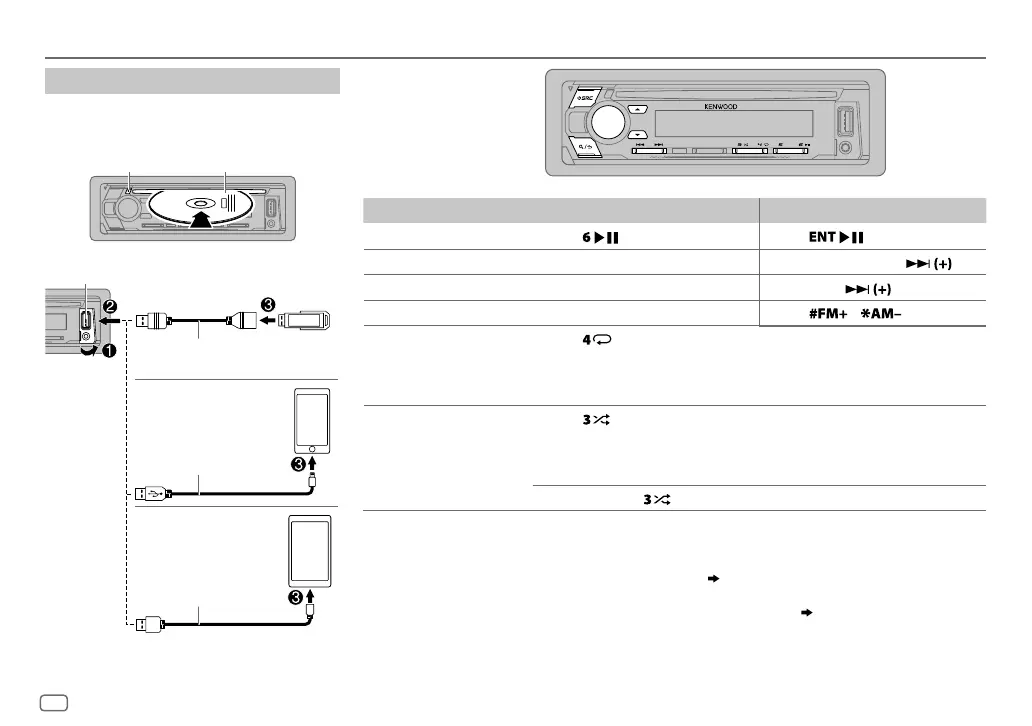
Start playback
The source changes automatically and
playback starts.
CD
*
1
KCA-iP102 : 30-pin type, KCA-iP103 : Lightning type
*
2
Do not leave the cable inside the car when not using.
To On the faceplate On the remote control
Playback/pause Press .
Press
.
Reverse/Fast-forward
*
4
Press and hold S/T. Press and hold S/ .
Select a track/file
Press S/T. Press S/
.
Select a folder
*
5
Press J/K.
Press
/ .
Repeat play
*
6
Press repeatedly.
TRACK REPEAT
/
ALL REPEAT
: Audio CD
FILE REPEAT
/
FOLDER REPEAT
/
ALL REPEAT
: MP3/WMA/AAC/WAV/FLAC file
FILE REPEAT
/
FOLDER REPEAT
/
REPEAT OFF
: iPod or ANDROID
Random play
*
6
Press repeatedly.
DISC RANDOM
/
RANDOM OFF
: Audio CD
FOLDER RANDOM
/
RANDOM OFF
: MP3/WMA/AAC/WAV/FLAC file, iPod or
ANDROID
Press and hold
to select
ALL RANDOM
.
*
7
*
3
When connecting an Android device, “Press [VIEW] to install KENWOOD MUSIC PLAY APP” is shown. Follow the instructions
to install the application. You can also install the latest version of KENWOOD MUSIC PLAY application on your Android device
before connecting.
*
4
For ANDROID: Applicable only when
[BROWSE MODE]
is selected.
( 9)
*
5
For CD: Only for MP3/WMA/AAC files. This does not work for iPod/ANDROID.
*
6
For iPod/ANDROID: Applicable only when
[MODE OFF]
/
[BROWSE MODE]
is selected.
( 9)
*
7
For CD: Only for MP3/WMA/AAC files.
ENGLISH
Label side
M
Eject disc
USB input terminal
CA-U1EX (max.: 500mA)
(optional accessory)
Micro USB 2.0 cable
*
2
(commercially available)
KCA-iP102/KCA-iP103 (optional
accessory)
*
1
or accessory of the
iPod/iPhone
*
2
USB
iPod/iPhone
ANDROID
*
3
JS_KWD_KDC_X301_KN_EN_4.indd 8JS_KWD_KDC_X301_KN_EN_4.indd 8 21/7/2016 11:40:38 AM21/7/2016 11:40:38 AM






 To Next Page