ENGLISH
15
Data Size: B6L (182 mm x 128 mm)
Book Size: B6L (182 mm x 128 mm)
TUNE START
*
2
ON
:All qualified music channels in the
SmartFavorite will start playback from the
beginning of the song.;
OFF
:Cancels.
SIGNAL LEVEL
Shows the strength (
NO SIGNAL
/
WEAK
/
GOOD
/
STRONG)
of the current received signal.
BUFFER USAGE
Shows the memory usage (
0%
to
100%
) for
Replay buffer.
SXM RESET YES
:Resets stored channel and lock setting to
default.;
NO
:Cancels.
*
1
Displayed only when
[USER DEFINED]
is selected.
*
2
Available only if the connected SiriusXM Vehicle Tuner is SXV200 or later
that supports SmartFavorites.
SiriusXM® Radio
(for / )
BLUETOOTH®
BLUETOOTH — Connection
Supported Bluetooth profiles
– Hands-Free Profile (HFP)
– Advanced Audio Distribution Profile (A2DP)
– Audio/Video Remote Control Profile (AVRCP)
– Serial Port Profile (SPP)
– Phonebook Access Profile (PBAP)
Supported Bluetooth codecs
– Sub Band Codec (SBC)
– Advanced Audio Coding (AAC)
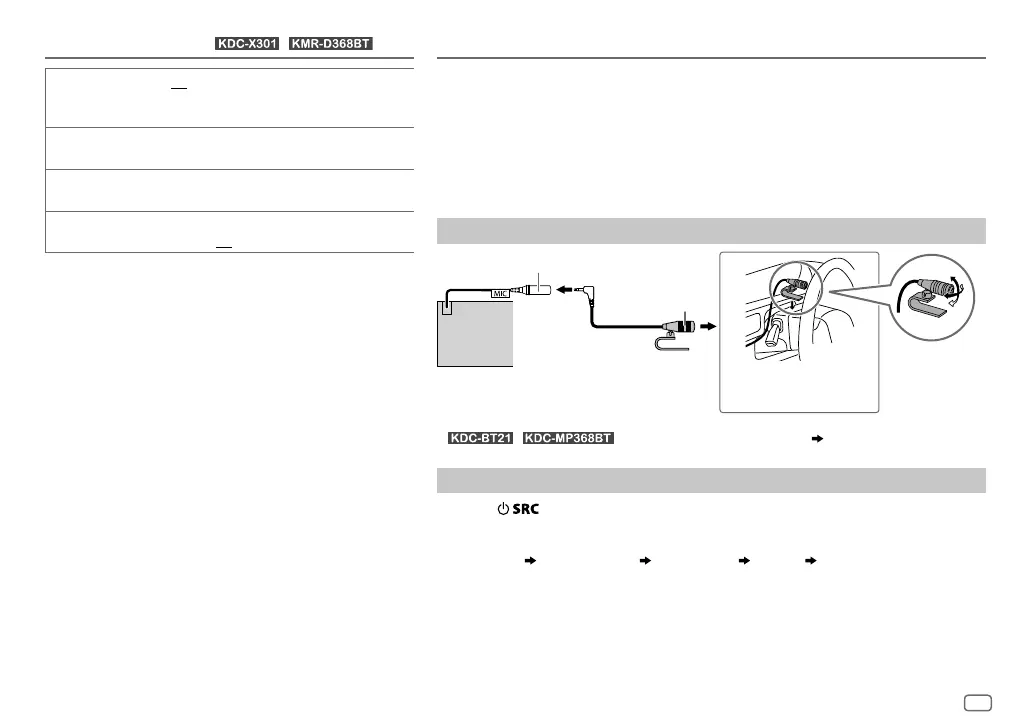
Connect the microphone
*
/ : Connect to the microphone input jack. (
34
)
Pair and connect a Bluetooth device for the first time
1
Press to turn on the unit.
2 Search and select this unit model name (KDC-X3**/KDC-BT2*/KDC-MP3**BT/
KMR-D3**BT) on the Bluetooth device.
“PAIRING”
“PASS XXXXXX” Device name “PRESS” “VOLUME KNOB” appears
on the display.
• For some Bluetooth devices, you may need to enter the Personal Identification
Number (PIN) code immediately after searching.
3 Press the volume knob to start pairing.
“PAIRING OK” appears when pairing is completed.
Adjust the
microphone angle
Secure using cord clamps
(not supplied) if necessary.
MIC (microphone input terminal)*
Microphone
(supplied)
Rear panel
JS_KWD_KDC_X301_KN_EN_4.indd 15JS_KWD_KDC_X301_KN_EN_4.indd 15 21/7/2016 11:40:41 AM21/7/2016 11:40:41 AM






 To Next Page