24
Data Size: B6L (182 mm x 128 mm)
Book Size: B6L (182 mm x 128 mm)
AUDIO SETTINGS
Digital Time Alignment settings
Digital Time Alignment sets the delay time of the speaker output to
create a more suitable environment for your vehicle.
• For more information,
Determining the value for [DISTANCE] and [GAIN] of
[DTA SETTINGS]
.
DTA SETTINGS
POSITION
Selects your listening position (reference point).
ALL
:Not compensating;
FRONT RIGHT:
Front right seat;
FRONT LEFT
:Front left seat;
FRONT ALL
:Front seat
DISTANCE 0FT
to
20.01FT
:Fine adjust the distance to compensate. (Before
making an adjustment, select the speaker you want to adjust.)
GAIN –8DB
to
0DB
:Fine adjust the output volume of the selected speaker.
(Before making an adjustment, select the speaker you want to adjust.)
DTA RESET YES
:Resets the settings (
[DISTANCE]
and
[GAIN]
) of the selected
[POSITION]
to default.;
NO
:Cancels.
CAR SETTINGS
Identify your car type and rear speaker location in order to make the
adjustment for
[DTA SETTINGS]
.
CAR TYPE COMPACT
/
FULL SIZE CAR
/
WAGON
/
MINIVAN
/
SUV
/
MINIVAN(LONG)
:Selects the type of vehicle.;
OFF:
Not
compensating.
R-SP LOCATION
Selects the location of the rear speakers in your vehicle to calculate the
furthest distance from the listening position selected (reference point).
•
DOOR
/
REAR DECK
:Selectable only when
[CAR TYPE]
is selected as
[OFF]
,
[COMPACT]
,
[FULL SIZE CAR]
,
[WAGON]
or
[SUV]
.
•
2ND ROW
/
3RD ROW
:Selectable only when
[CAR TYPE]
is selected
as
[MINIVAN]
or
[MINIVAN(LONG)]
.
•
Before making an adjustment for
[DISTANCE]
and
[GAIN]
of
[DTA SETTINGS]
, select the
speaker you want to adjust:
FRONT LEFT
/
FRONT RIGHT
/
REAR LEFT
/
REAR RIGHT
/
SUBWOOFER:
You can only select
[REAR LEFT], [REAR RIGHT]
and
[SUBWOOFER]
if a setting other than
[NONE]
is selected for
[REAR]
and
[SUBWOOFER]
of
[SPEAKER SIZE]
.
•
[R-SP LOCATION]
of
[CAR SETTING]
is selectable only if a setting other than
[NONE]
is
selected for
[REAR]
of
[SPEAKER SIZE]
.
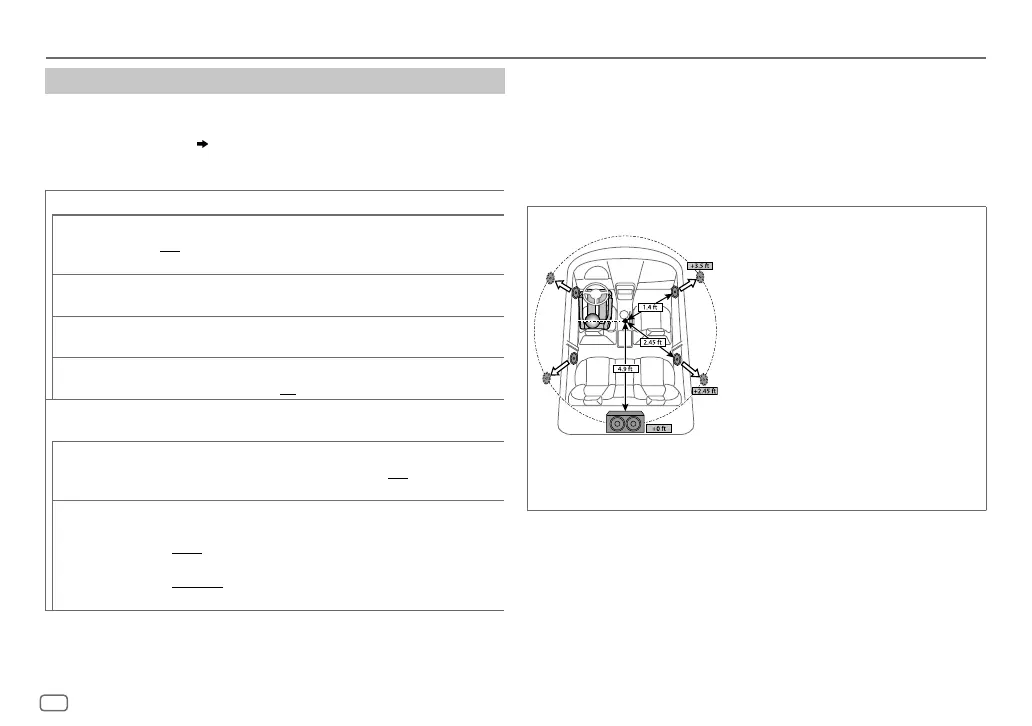
Determining the value for [DISTANCE] and [GAIN] of [DTA SETTINGS]
If you specify the distance from the center of the
currently set listening position to every speaker,
the delay time will be automatically computed
and set.
1
Determine the center of the currently set
listening position as the reference point.
2
Measure the distances from the reference
point to the speakers.
3
Calculate the differences between the
distance of the furthest speaker (rear
speaker) and other speakers.
4
Set the
[DISTANCE]
calculated in step
3
for
individual speakers.
5
Adjust
[GAIN]
for individual speakers.
Example: When
[FRONT ALL]
is selected as the
listening position
ENGLISH
JS_KWD_KDC_X301_KN_EN_4.indd 24JS_KWD_KDC_X301_KN_EN_4.indd 24 21/7/2016 11:40:43 AM21/7/2016 11:40:43 AM






 To Next Page