10
BLUETOOTH®
Alphabet Search
You can search through the contacts quickly according to the first
letter (A to Z), number (0 to 9), or symbol.
• The second alphabet of the contact will be searched if the first
alphabet does not exist.
1 Press to enter Bluetooth mode.
2 Turn the volume knob to select
[PHONE BOOK]
, then press the
knob.
3 Press to enter alphabet search mode.
The first menu (ABCDEFGHIJK) appears. To go to the other
menu (LMNOPQRSTUV or WXYZ1 ), press 4
/
¢.
4 Turn the volume knob to select the desired first letter, then
press the knob.
• To search with numbers, select “1”.
• To search with symbols, select “ ”.
5 Turn the volume knob to select a name, then press the knob.
6 Turn the volume knob to select a phone number, then press
the knob to call.
• To return to the previous hierarchy, press .
• Contacts are categorized as: GE (general), HM (home), OF (office),
MO (mobile), OT (others).
• This unit can display only non-accent letters. (Accent letters such
as “Ú” is shown as “U”.)
Use Voice Recognition
1 Press and hold .
2 Speak the name of the contact you want to call or the voice
command to control the phone functions.
• Supported Voice Recognition features vary for each phone. Refer
to the instruction manual of the connected phone for details.
• This unit also supports the intelligent personal assistant function
of iPhone.
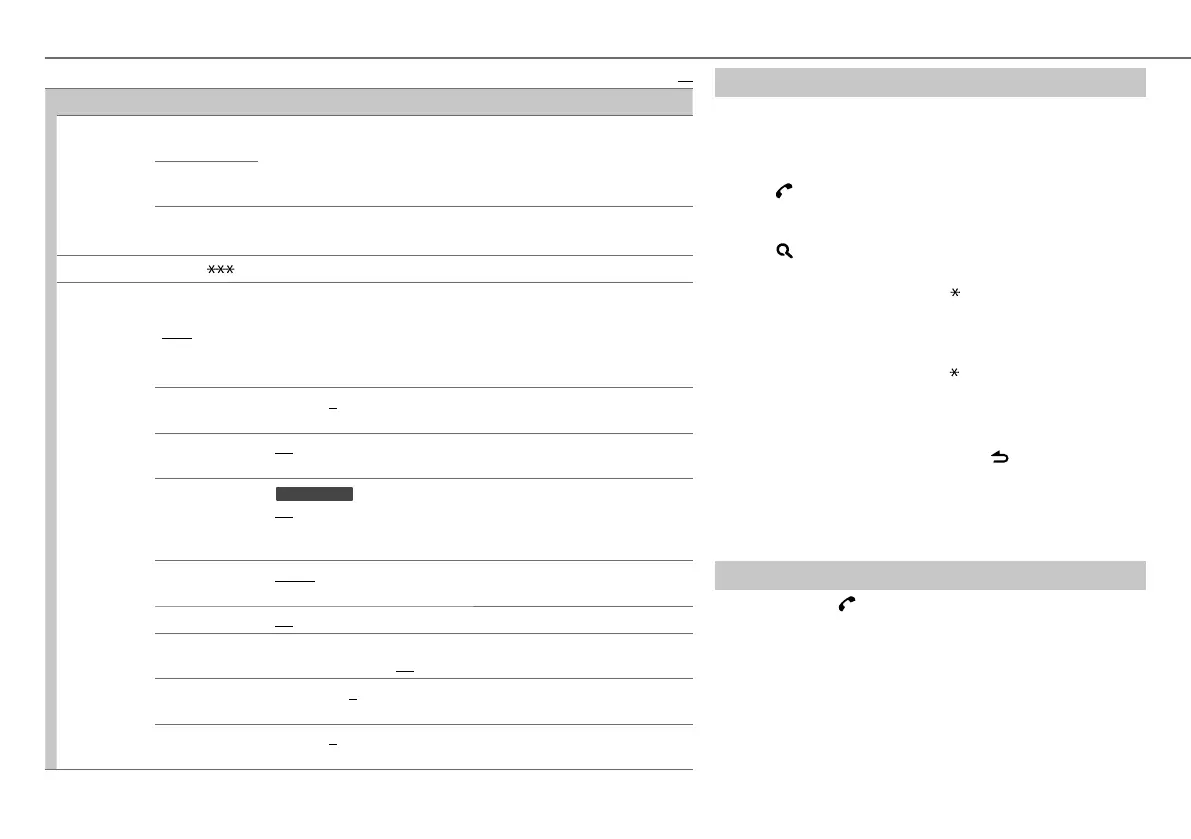
Default:
XX
SETTINGS
PAIRING PHONE SELECT/
PHONE SEL
: Select the phone or audio device to connect or disconnect.
AUDIO SELECT/
AUDIO SEL
DEVICE DELETE/
DVC DELETE
1
Turn the volume knob to select a device to delete, then press the knob.
2
Turn the volume knob to select [YES] or [NO], then press the knob.
TRANSFER PB
*
: “DL PB ” appears and transfer the phonebook of the connected phone to this unit manually.
DETAILED SET/
DETAIL SET
PIN CODE EDIT/
PIN EDIT
(0000)
Changes the PIN code (up to 8 digits).
1
Turn the volume knob to select a number.
2
Press
4 / ¢
to move the entry position.
Repeat steps
1
and
2
until you finish entering the PIN code.
3
Press the volume knob to confirm.
AUTO ANSWER
1 — 99 (8): The unit answers incoming calls automatically in the selected
time. ; OFF: Cancels.
RECONNECT
ON: The unit automatically reconnect when the Bluetooth device is within
range. ; OFF: Cancels.
AUTO PAIRING/
AUTO PAIR
KDC
-
BT43U
:
ON: The unit automatically pair supported Bluetooth device (iPhone/iPod touch)
when it is connected through USB input terminal. Depending on the iOS version
of the connected iPhone/iPod touch, this function may not work. ; OFF: Cancels.
BT HF/AUDIO
FRONT: Ouputs audio from the front left and right speakers. ; ALL: Outputs
audio from all the speakers.
CALL BEEP
ON: The unit beeps when there is an incoming call. ; OFF: Cancels.
BT F/W UPDATE/
BT UPDATE
BT F/W XX.XX
: YES:
Updates all the Bluetooth settings (including stored pairing,
phonebook, and etc.). ;
NO:
Cancels
.
MIC GAIN
–20 — +8 (0): The sensitivity of the microphone increases as the number
increased.
ECHO LEVEL
1 — 10 (4): Adjust the echo cancellation delay time until the least echo is
being heard during a phone conversation.
* Selectable only when the connected phone supports OPP.
EN_KDC-BT43U_001A_4.indd 10EN_KDC-BT43U_001A_4.indd 10 10/19/12 5:31:37 PM10/19/12 5:31:37 PM






 To Next Page