12
AUDIO SETTINGS
While listening to any source...
1 Press the volume knob to enter
[FUNCTION]
.
2 Turn the volume knob to select
[AUDIO CONTROL]
/
[AUDIO CTRL]
, then press the
knob.
3 Turn the volume knob to make a selection (see the following table), then
press the knob.
Repeat step 3 until the desired item is selected or activated.
4 Press and hold to exit.
(or using RC-406)
1 Press AUD to enter
[AUDIO CONTROL]
.
2 Press 5/∞ to make a selection, then press ENT 38.
• To return to the previous hierarchy, press .
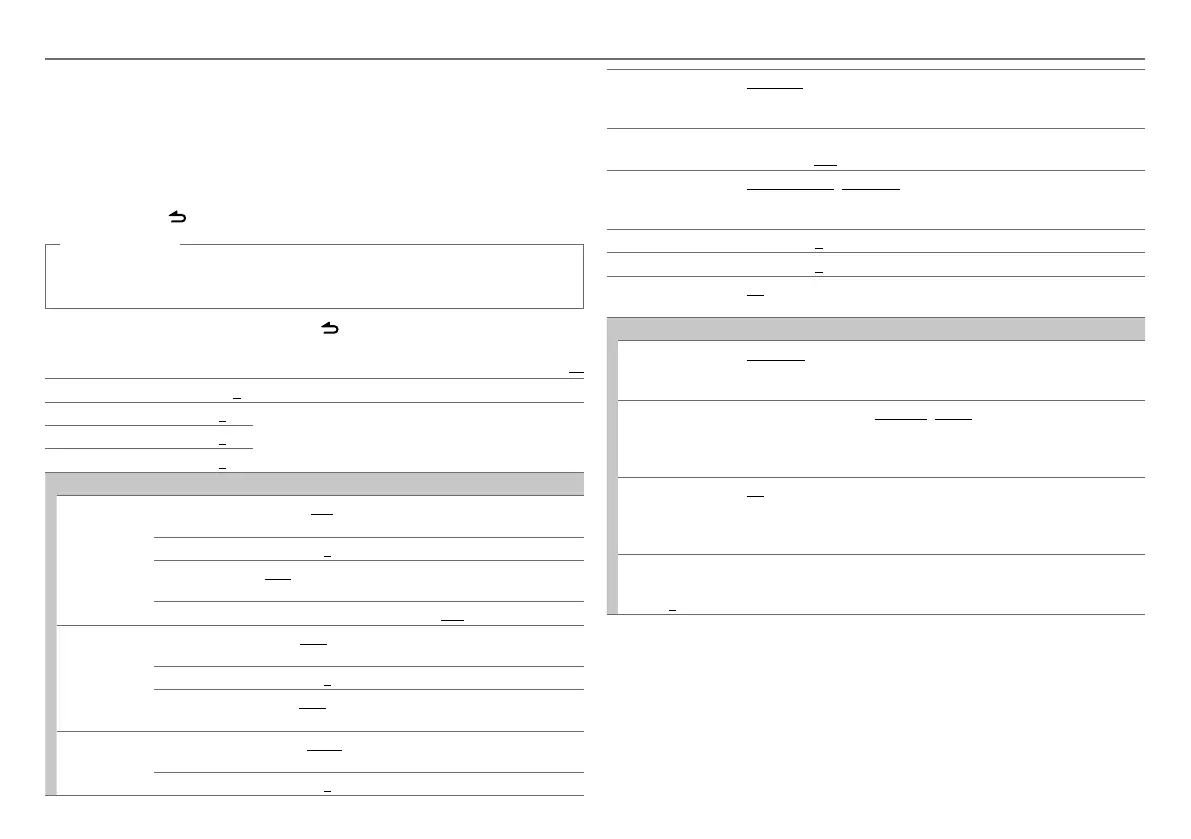
Default:
XX
SUB-W LEVEL –15 to +15 (0): Adjusts the subwoofer output level.
BASS LEVEL
–8 to +8 (0):
Adjusts the level to memorize for each source. (Before making
an adjustment, select the source you want to adjust.)
MID LEVEL
–8 to +8 (0):
TRE LEVEL
–8 to +8 (0):
EQ PRO
BASS ADJUST BASS CTR FRQ/
BASS C FRQ
60/ 80/ 100/ 200: Selects the center frequency.
BASS LEVEL
–8 to +8 (0): Adjusts the level.
BASS Q FACTOR/
BASS Q FCTR
1.00/ 1.25/ 1.50/ 2.00: Adjusts the quality factor.
BASS EXTEND
ON: Turns on the extended bass. ; OFF: Cancels.
MID ADJUST MID CTR FRQ/
MID C FRQ
0.5K/ 1.0K/ 1.5K/ 2.5K: Selects the center frequency.
MID LEVEL
–8 to +8 (0): Adjusts the level.
MID Q FACTOR/
MID Q FCTR
0.75/ 1.00/ 1.25: Adjusts the quality factor.
TRE ADJUST TRE CTR FRQ/
TRE C FRQ
10.0K/ 12.5K/ 15.0K/ 17.5K: Selects the center frequency.
TRE LEVEL
–8 to +8 (0): Adjusts the level.
PRESET EQ NATURAL/ USER/ ROCK/ POPS/ EASY/ TOP40/ JAZZ/
POWERFUL: Selects a preset equalizer suitable to the music genre. (Select
[USER] to use the customized bass, middle, and treble settings.)
BASS BOOST
B.BOOST LV1/ B.BOOST LV2/ B.BOOST LV3: Selects your preferred bass
boost level. ; OFF: Cancels.
LOUDNESS
LOUDNESS LV1/ LOUD LV1/ LOUDNESS LV2/ LOUD LV2: Selects your
preferred low and high frequencies boost to produce a well-balanced sound
at a low volume level. ; LOUDNESS OFF/ LOUD OFF: Cancels.
BALANCE
L15 to R15 (0): Adjusts the left and right speaker output balance.
FADER
R15 to F15 (0): Adjusts the rear and front speaker output balance.
SUBWOOFER SET/
SUB-W SET
ON: Turns on the subwoofer output. ; OFF: Cancels.
DETAILED SET/ DETAIL SET
LPF SUBWOOFER/
LPF SUB-W
THROUGH: All signals are sent to the subwoofer. ; 85HZ/ 120HZ/
160HZ: Audio signals with frequencies lower than 85 Hz/ 120 Hz/ 160 Hz
are sent to the subwoofer.
SUB-W PHASE
REVERSE/ REV (180°)/ NORMAL/ NORM (0°): Selects the phase of
the subwoofer output to be in line with the speaker output for optimum
performance. (Selectable only if a setting other than [THROUGH] is selected
for [LPF SUBWOOFER]/ [LPF SUB-W].)
SUPREME SET
ON: Creates realistic sound by interpolating the high-frequency components
that are lost in AAC/MP3/WMA audio compression. ; OFF: Cancels.
(Selectable only when playing back an AAC/MP3/WMA disc or a USB
device, except iPhone/iPod.)
VOLUME OFFSET/
VOL OFFSET
(Default: 0)
–8 to +8 (for AUX) ; –8 to 0 (for other sources): Presets the volume
adjustment level of each source. (Before adjustment, select the source you
want to adjust.)
•
[SUB-W LEVEL]
/
[SUBWOOFER SET]/ [SUB-W SET]
/
[LPF SUBWOOFER]/ [LPF SUB-W]
/
[SUB-W PHASE]
is selectable only if
[SWITCH PREOUT]/ [SWITCH PRE]
is set to
[SUB-W]
.
(➜
4
)
•
[SUB-W LEVEL]
/
[LPF SUBWOOFER]/ [LPF SUB-W]
/
[SUB-W PHASE]
is selectable only if
[SUBWOOFER SET]/ [SUB-W SET]
is set to
[ON]
.
EN_KDC-BT43U_001A_4.indd 12EN_KDC-BT43U_001A_4.indd 12 10/19/12 9:06:00 AM10/19/12 9:06:00 AM






 To Next Page