TK-3170
15
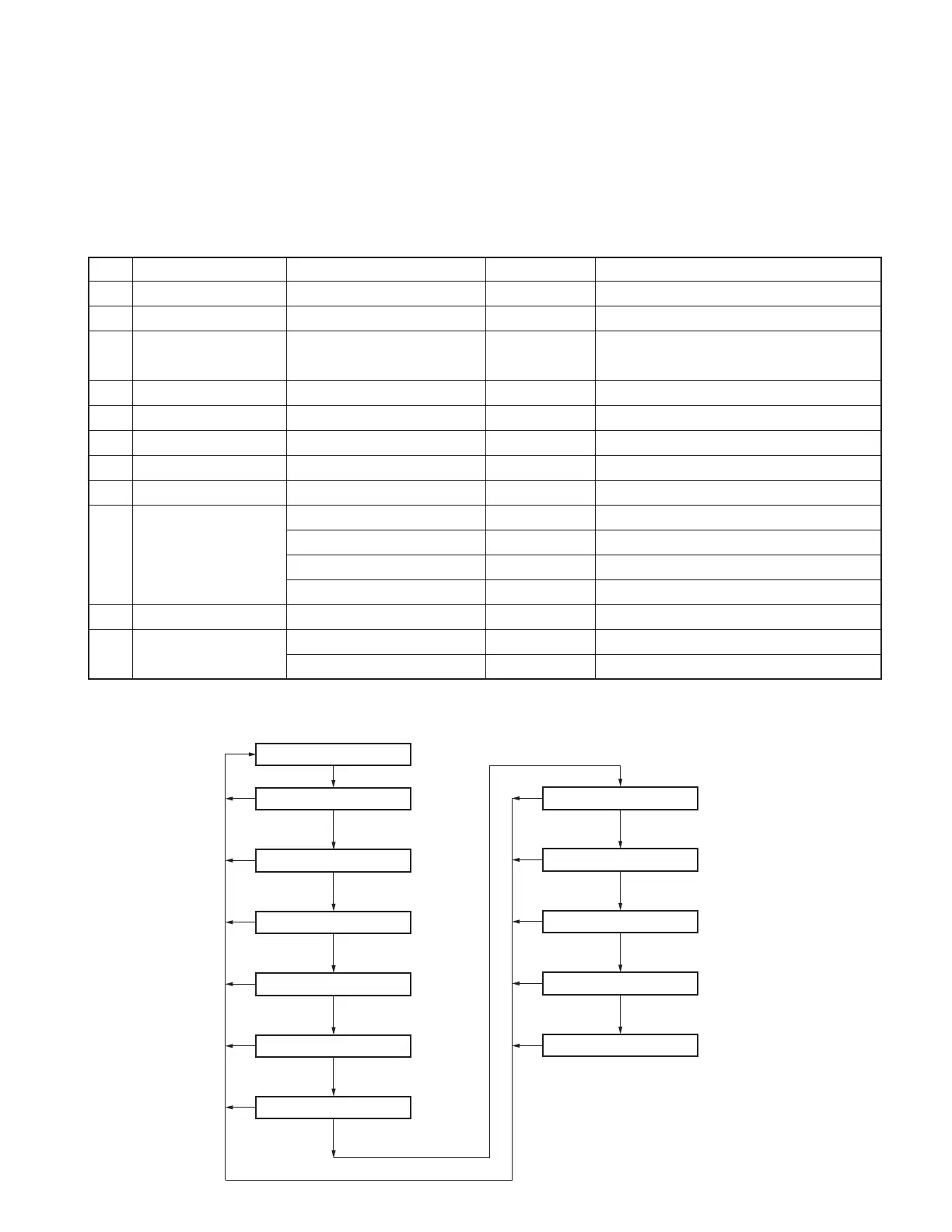
8-4. Function Setting Mode
5-tone and FleetSync/DTMF common item.
1. Press the [Side1] key when “SELF” is displayed. The
transceiver enters Function Setting Mode.
2. Press the [C] key to select the setting you wish to modify.
3. Rotate the selector to select the desired value.
4. Press the [B] key to store the value in memory and ad-
vance to the next setting.
5. Press the [C] key to skip any settings you do not wish to
modify.
6. Press the [S] key to exit. “SELF” appears on the display.
No. Function Choices Display Remarks
1Auto Backlight YES/NO Default=No
2 Power-on Tone Current/Off, 1~31 Default=Current
3 Control Tone Current/Off, 1~31 During Self-Programming, it is constant
Default=Current
4 Warning Tone Current/Off, 1~31 Default=Current
5Alert Tone Current/Off, 1~31 Default=Current
6Side Tone Current/Off, 1~31 Default=Current
7 Minimum Volume 0~31 Default=0
8 Battery Saver ON/OFF Default=ON
9 Battery Warning Off
While Transmitting ←Default
Always
Always with Beep
10 Squelch Level 0~9/1STEP Default=5
11 Panel Test/ Enable
Panel Tuning Mode Disable ←Default
REALIGNMENT
PTM_ENA_
PTM_D I S_
ATLT_NO_
PONT _ CUR
CNT T _ CUR
WA R T _ C U R
ALTT_CUR
SIDT_CUR
MIN I _ __ 0
BTW_ALWY
BTW_ALWB
SQL _ _ _ 5 _
BAT T _ _ON
BTW_OFF_
BTW_WTX_
Self programming mode
[Side1]
Auto backlight
Power-on tone
Control tone
Warning tone
Alert tone
Side tone
[B] (Write data)
[C] (Don’t write data)
[B] (Write data)
[C] (Don’t write data)
[B] (Write data)
[C] (Don’t write data)
[B] (Write data)
[C] (Don’t write data)
[B] (Write data)
[C] (Don’t write data)
Minimum volume
Battery saver
[B] (Write data)
[C] (Don’t write data)
Battery warning
[B] (Write data)
[C] (Don’t write data)
Squelch level
[B] (Write data)
[C] (Don’t write data)
[B] (Write data)
[C] (Don’t write data)
[B] (Write data)
[C] (Don’t write data)
[S]
[S]
[S]
[S]
[S]
[S]
[S]
[S]
[S]
[S]
[S]
Panel test/Panel tuning mode
■ Function setting mode flow chart






 To Next Page