TK-3170
18
DISASSEMBLY FOR REPAIR
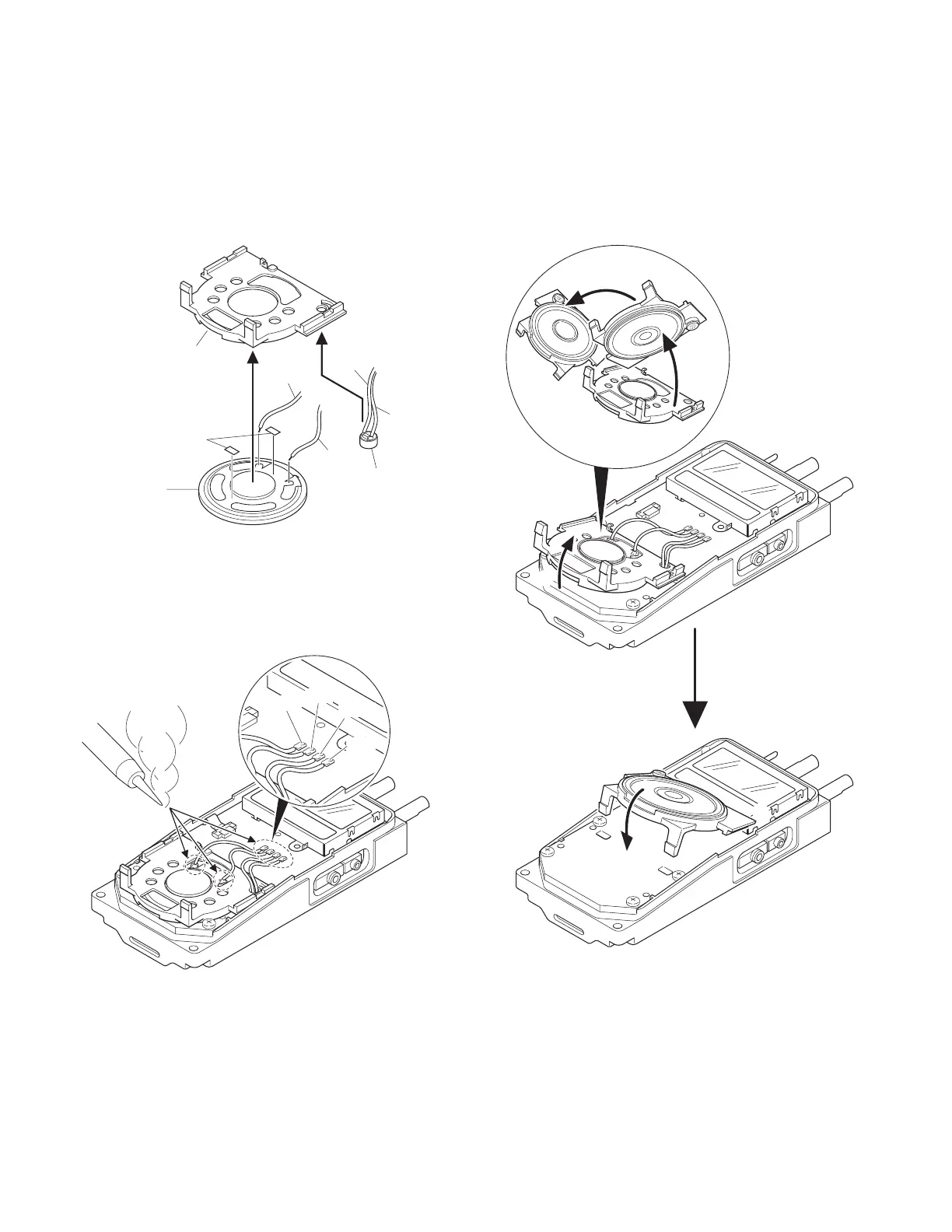
7. Replacing the Speaker and Microphone
1) After affixing the double-sided tape (5.4 x 2.7 mm) to the
speaker, attach the speaker to the speaker holder ( q ).
2) Insert the microphone into the hold of the holder, as
shown by the diagram ( w ).
3) Match the speaker and microphone lead wires with the
color-code of silkscreen of the printed circuit board ( e ),
then solder them in place.
4) Lift the speaker holder ( r ), then flip it over to the left
( t ).
5) Insert the tabs of the speaker holder into the slots of the
transceiver.
First insert the bottom tabs into the control unit ( y ), then
insert the top tabs into the LCD cover ( u ).
Red
White
Blue
Black
Speaker holder
Microphone
Speaker
Double-sided tape
w
q
Black
Red
White
Blue
e
t
y
r
u







 To Next Page