TK-3170
39
Panel Tuning Mode
■ Preparations for tuning the transceiver
Before attempting to tune the transceiver, connect the
unit to a suitable power supply.
Whenever the transmitter is turned, the unit must be con-
nected to a suitable dummy load (i.e. power meter).
The speaker output connector must be terminated with a
8Ω dummy load and connected to an AC voltmeter and an
audio distortion meter or a SINAD measurement meter at all
times during tuning.
■ Transceiver tuning
(To place transceiver in tuning mode)
Press [S] key, now in tuning mode. Use [B] key to write
tuning data through tuning modes, and [Selector] to adjust
tuning requirements (1 to 256 appeares on LCD).
Use [C] key to select the adjustment item through tuning
modes. Use [A] key to adjust 3 or 5 reference level adjust-
ments, and use [Side2] key to switch between Wide/Narrow.
Channel appears on LCD. Set channel according to tuning
requirements.
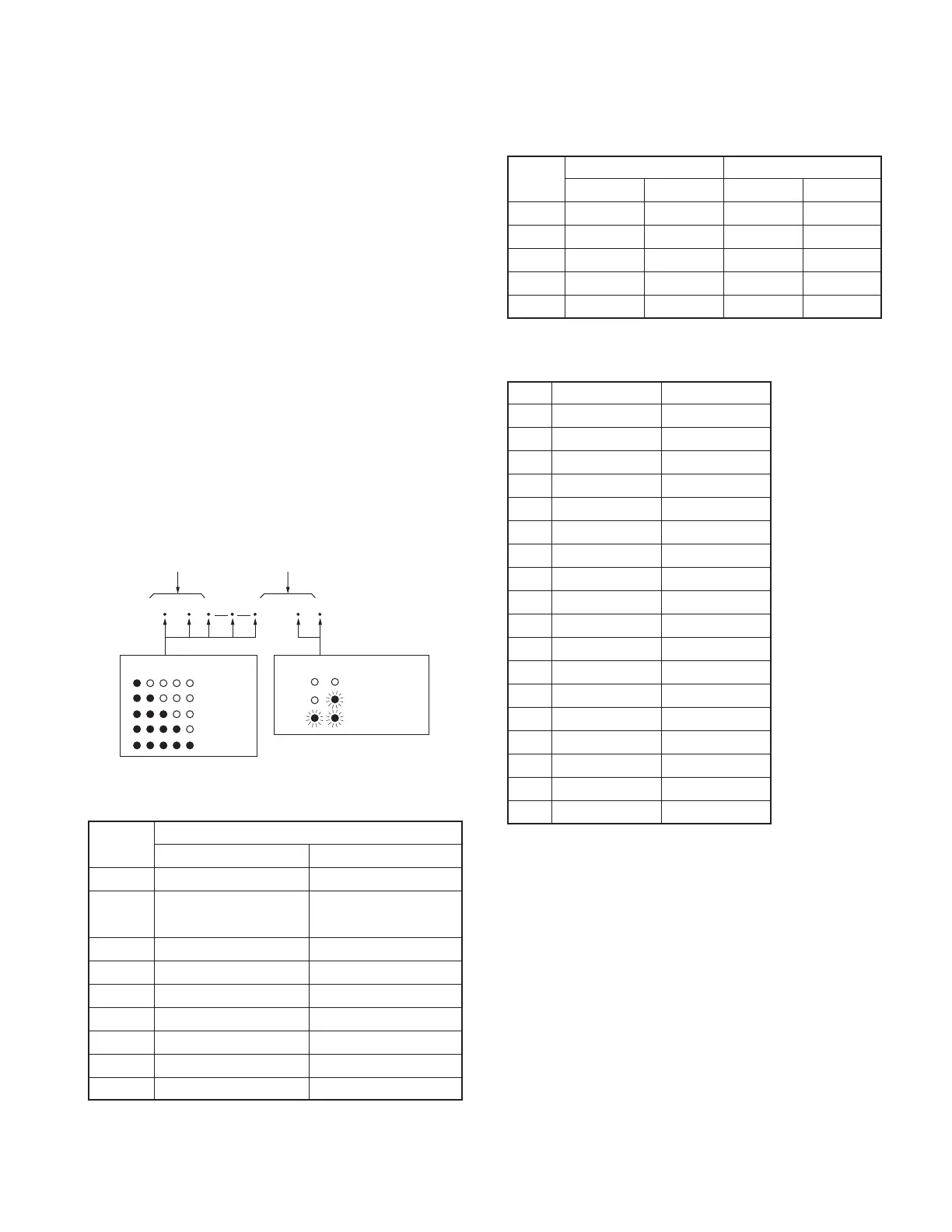
• LCD display in panel tuning mode
BAL
129
Adjustment item Adjustment value
Narrow/Wide 5k/Wide 4k
Wide 5k
3 or 5 reference level
Narrow
: Low
: Low’
: Center
: High’
: High
Wide 4k
■ 3 or 5 reference level adjustments frequency
Tuning E X2
point RX (MHz) TX (MHz) RX (MHz) TX (MHz)
Low 440.05000 440.10000 470.05000 470.10000
Low’ 447.55000 447.60000 482.55000 482.60000
Center 455.05000 455.10000 495.05000 495.10000
High’ 462.55000 462.60000 507.55000 507.60000
High 469.95000 469.90000 519.95000 519.90000
■ Adjustment item and Display
(✳✳✳ : 1~256, MSK only : 1~64)
Order Adjustment item Display
1 Frequency F R E Q_ ✳✳✳
2 High power HP WR _ ✳✳✳
3 Low power L P W R _ ✳✳✳
4 DQT balance BAL__✳✳✳
5 Max deviation DEV__✳✳✳
6 VOX 1 VX1__ ✳✳✳
7 VOX 10 V X 1 0 _ ✳✳✳
8 QT deviation QT___✳✳✳
9 DQT deviation DQT__✳✳✳
10 DTMF deviation D T M F _✳✳✳
11 MSK deviation MSK___✳✳
12 Tone deviation T O N E _✳✳✳
13 Sensitivity SENS_✳✳✳
14 Squelch SQL__✳✳✳
15 Low RSSI LRSSI ✳✳✳
16 Squelch tight S Q L T _ ✳✳✳
17 High RSSI HRSSI✳✳✳
18 Battery detection BATT_✳✳✳
ADJUSTMENT
■ Key operation
Key
Function
Push Hold (1 second)
[S]
End of panel tuning mode
-
[A] To enter 3 or 5 reference -
level adjustments
[B]
Writes the adjustment value
-
[C]
Go to next adjustment item
Back to last adjustment item
[Selector]
Adjustment value up/down
[Volume] Volume level up/down
[Side1] Squelch on/off -
[Side2] Selects Narrow, Wide -
[AUX] All segment appears -






 To Next Page