7 Settings
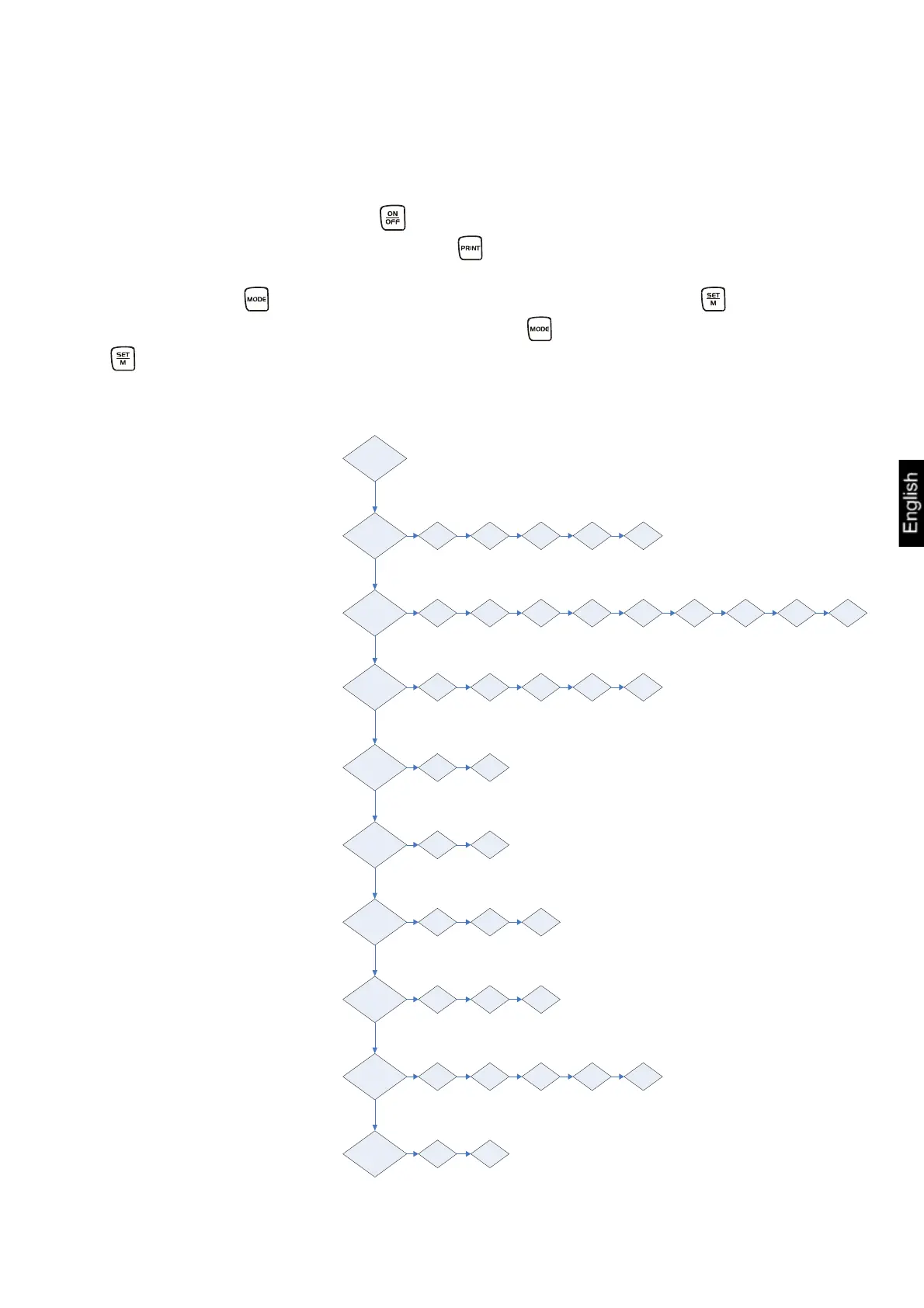
7.1 Call-up menu structure
Switch-on the balance using the key and wait for the „0“ display.
To enter into the menu structure keep the key pressed approx. 3 sec. until „UNIT“
appears.
By pressing the key the different menu items are called up. Use the key to
select a menu item. Within this menu item use the key to make your choice. If the
key is repeatedly actuated, the setting will be saved.
Press the PRINT key
Unit
3 seconds ->
DE-BA-e-1052
25
Pr
LAPr
baud
AF
tr
CAL
bl
ANL
Chapter 8.5.1
Data transfer mode
rE CR PrPC AU PC AU Pr BA Pr
rst
Hdr GrS Net tAr N7E PCS AUJ rqt FFD
19200
Chapter 8.6
Selection printed edition
Chapter 8.5.2
9600 4800 2400 1200
Baud rate
on off
on off
100 200 300 400
Chapter 6.4
Battery operation
Chapter 8.3
Zero-Tracking
on off CH
off 3 5 10 15
no yes
Chapter 8.4
Selection of adjustment
weight
Chapter 7.10
Background illumination
Chapter 7.11
Animal weighing function
Chapter 8.7
Reset to
Default setting


 To Next Page
 Loading...