Training an Operating Instruction
12
GB
Setting personal data
With regular training the “on-board computer”
helps to save personal data. For this purpose,
some data must be entered.
Guest data, which is stored under “G” on the
person key, only remains stored until the next
reset.
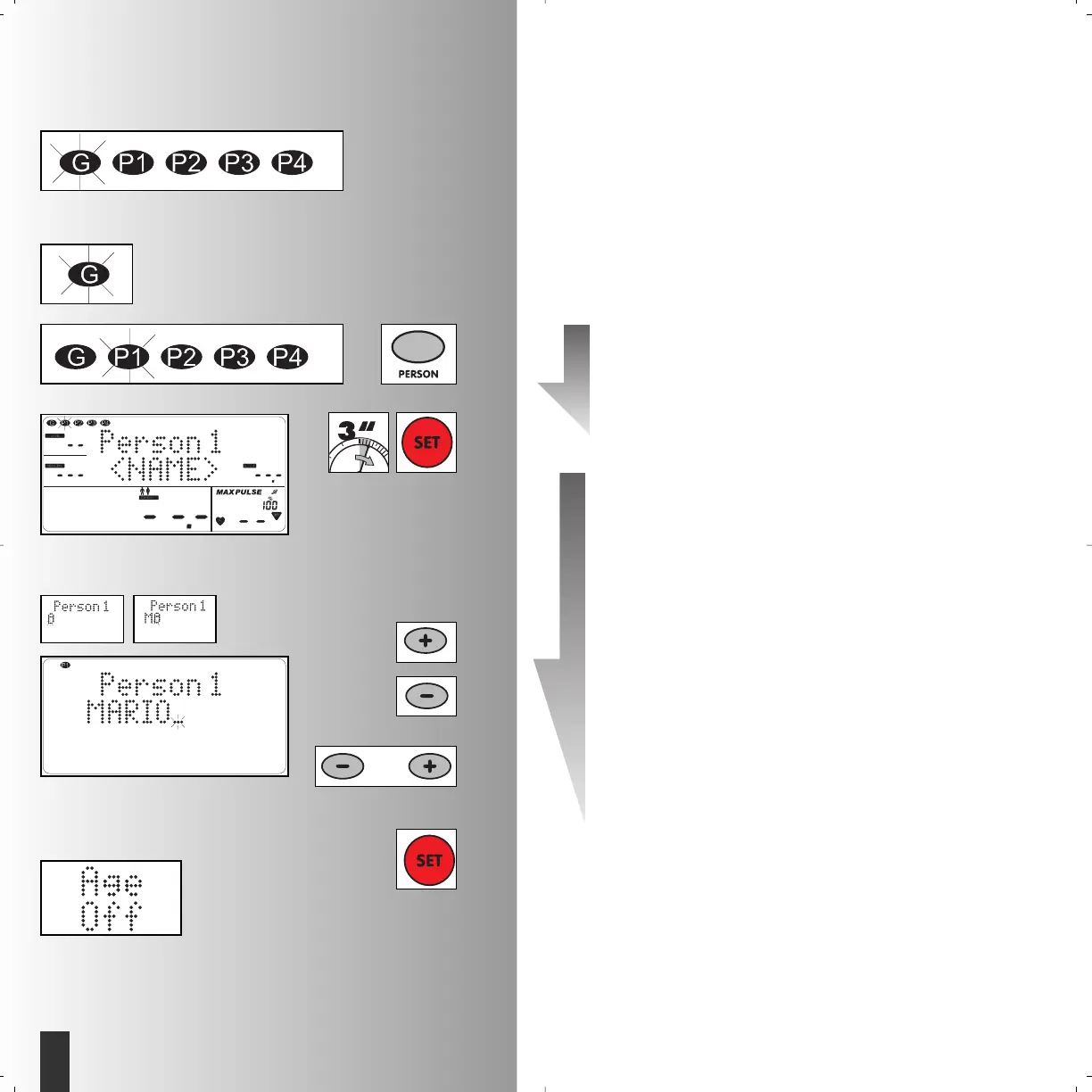
1. Select the personal memory
• Press “Person”. Display “G” = Guest
• Example: P1 selected (flashes)
2. Enter name (change)
• Press down “SET” for longer than 3
seconds
• “Plus”: Display alphabet forwards
• “Minus”: Display alphabet backwards
“Plus” and “Minus” pressed together:
Name entry begins with A
• After each letter confirm with “SET”.
• The name is 8 characters long.
With shorter names you can come direct-
ly into the next display window “Age
off” by pressing “SET” for longer than 3
seconds.
• After the 8th character confirm with
“SET”
After confirmation “Age off” appears or the last
inputted value in the window “Age”.
Example: Mario





 To Next Page