AIR CONDITIONER FEATURES(CONTINUED)
NOTE: The following instructions represent the Unit Controls, the same instructions can be used
for the Remote Control.
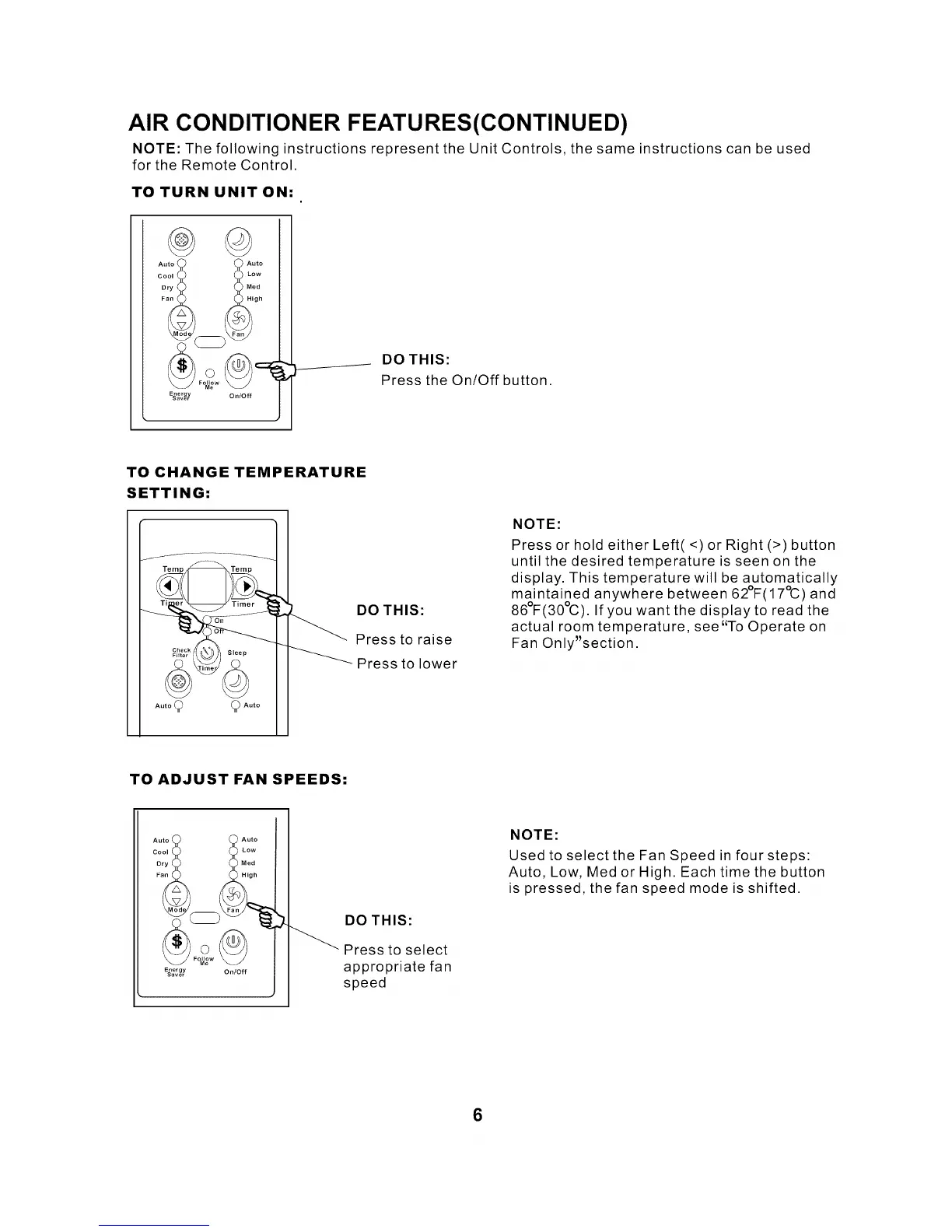
TO TURN UNIT ON:
Auto Auto
c:o: :::
@
E_aer _rY On/Off
DO THIS:
Press the On/Off button.
TO CHANGE TEMPERATURE
SETTING:
.... 9 9 ....
DO THIS:
Press to raise
Press to lower
NOTE:
Press or hold either Left(<) or Right (>) button
until the desired temperature is seen on the
display. This temperature will be automatically
maintained anywhere between 62°F(17°C) and
86°F(30%). If you want the display to read the
actual room temperature, see"To Operate on
Fan Only'section.
TO ADJUST FAN SPEEDS:
Auto Auto
c:o; :::
Fo_w
E_'er egrY On/Off
DO THIS:
_ Press to select
appropriate fan
speed
NOTE:
Used to select the Fan Speed in four steps:
Auto, Low, Med or High. Each time the button
is pressed, the fan speed mode is shifted.
6


 To Next Page