SPS Smart Profiler Hardware Guide PTG-330310-000 Rev. C
14
Hardware Status: LED Status Window
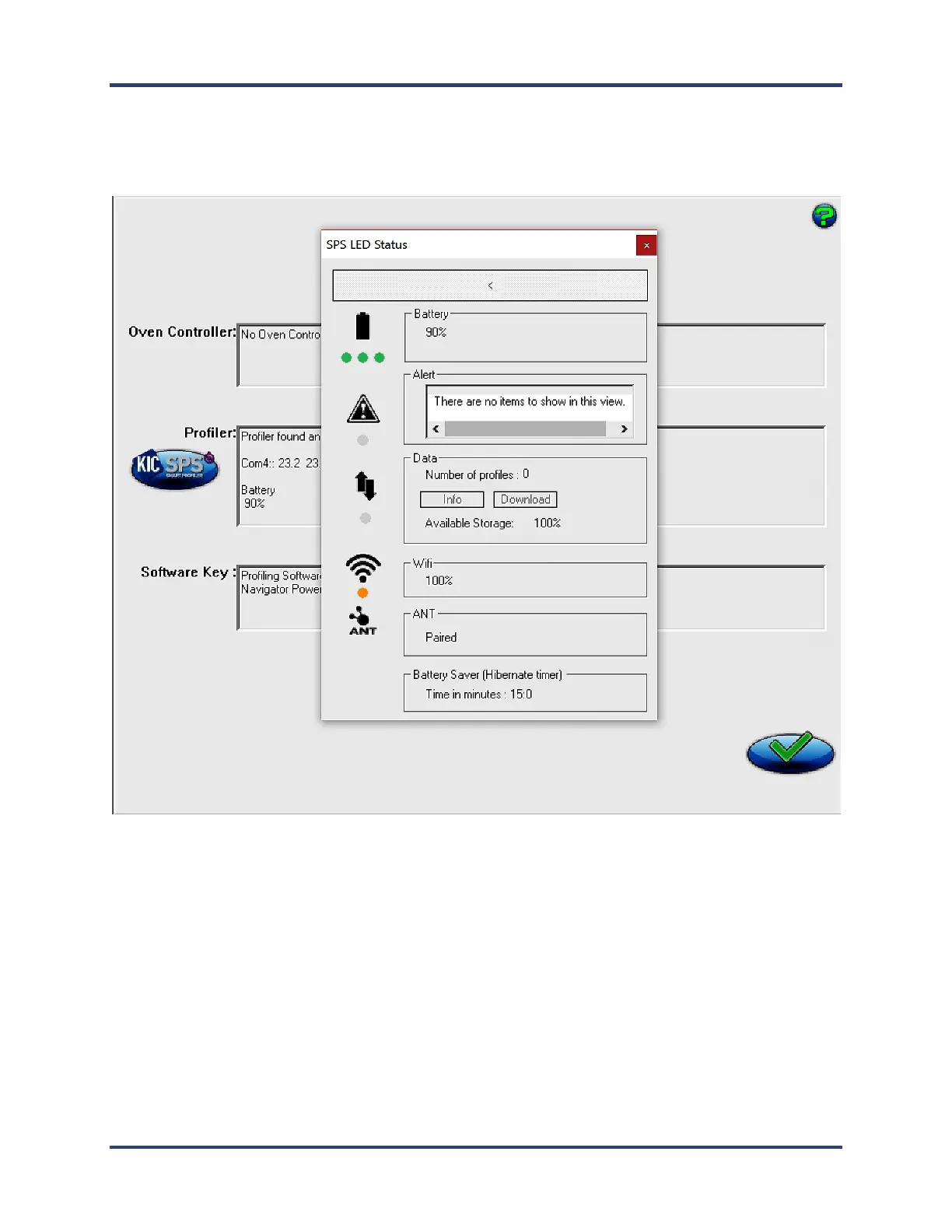
With the SPS connect you can access an LED Status Window from the Hardware Status screen. This pop up
window will indicate the matching status of the SPS LEDs on the SPS hardware, along with brief status
descriptions. This will allow you to identify the state or mode of the SPS based on the LED display.
Battery indicates percent of battery charge.
Alert (if LED is on) will list any and all alerts in the list box.
Data LED status will indicate the number of profiles currently stored in the SPS with access for information on the
stored profiles and the ability to download them. It also displays the amount of available storage (as a percentage).
Wi-Fi indicates the signal strength of the Wi-Fi connection to the Smart Dock (displayed as a percentage).
ANT will list if the SPS is paired with a Smart Dock or not.
Battery Saver indicates the time in minutes the SPS will turn off automatically if left idle.


 To Next Page