Page 16
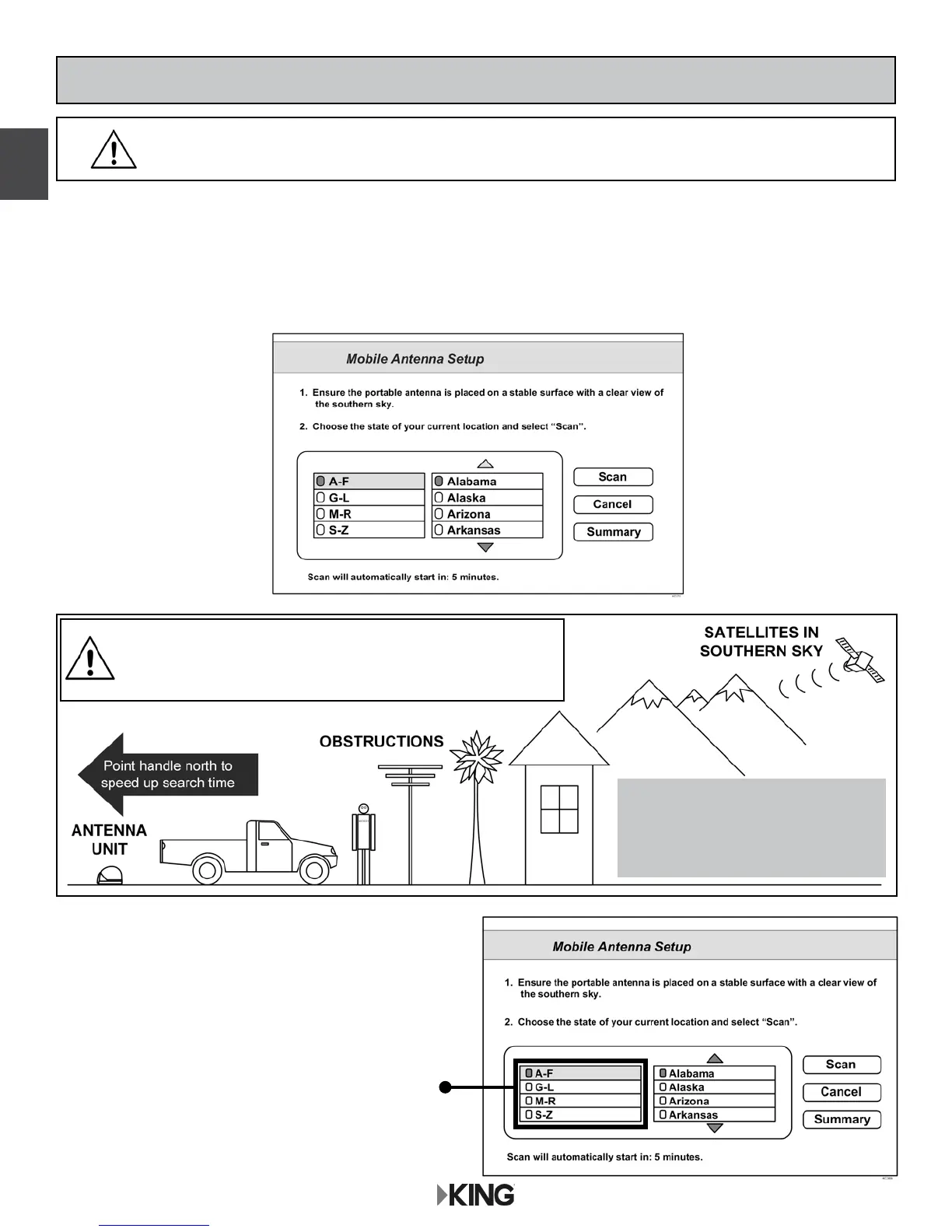
1. Use the arrow buttons on your remote to
highlight the letter group that includes the
rst letter of the state you are currently in.
Press SELECT on your remote.
After connecting and turning on your equipment, the Mobile Antenna Setup screen will display.
(It may take up to two minutes to display.)
Note: If the Mobile Antenna Setup screen does not display, press MENU, 6, 1, 1 on your
remote. Highlight the “Check Switch” button then press SELECT on your remote.
STANDARD OPERATION WITH DISH RECEIVER
IN STEPS 1-5, DO NOT BLOCK THE ANTENNA’S
LINE OF SIGHT TO THE SATELLITES IN THE
SOUTHERN SKY AT ANY TIME!
IMPORTANT!
If you move the antenna unit any
time during or after the scan,
you will have to repeat steps 1-5.
IF YOUR RECEIVER IS NEW AND UNACTIVATED, YOU MUST COMPLETE
THE STEPS ON PAGES 12-15 FIRST!
DISH


 To Next Page