7. Print 8. install software
1312
Step 1: Find the cura slicing software on the USB drive and
install it according to the instructions as follows
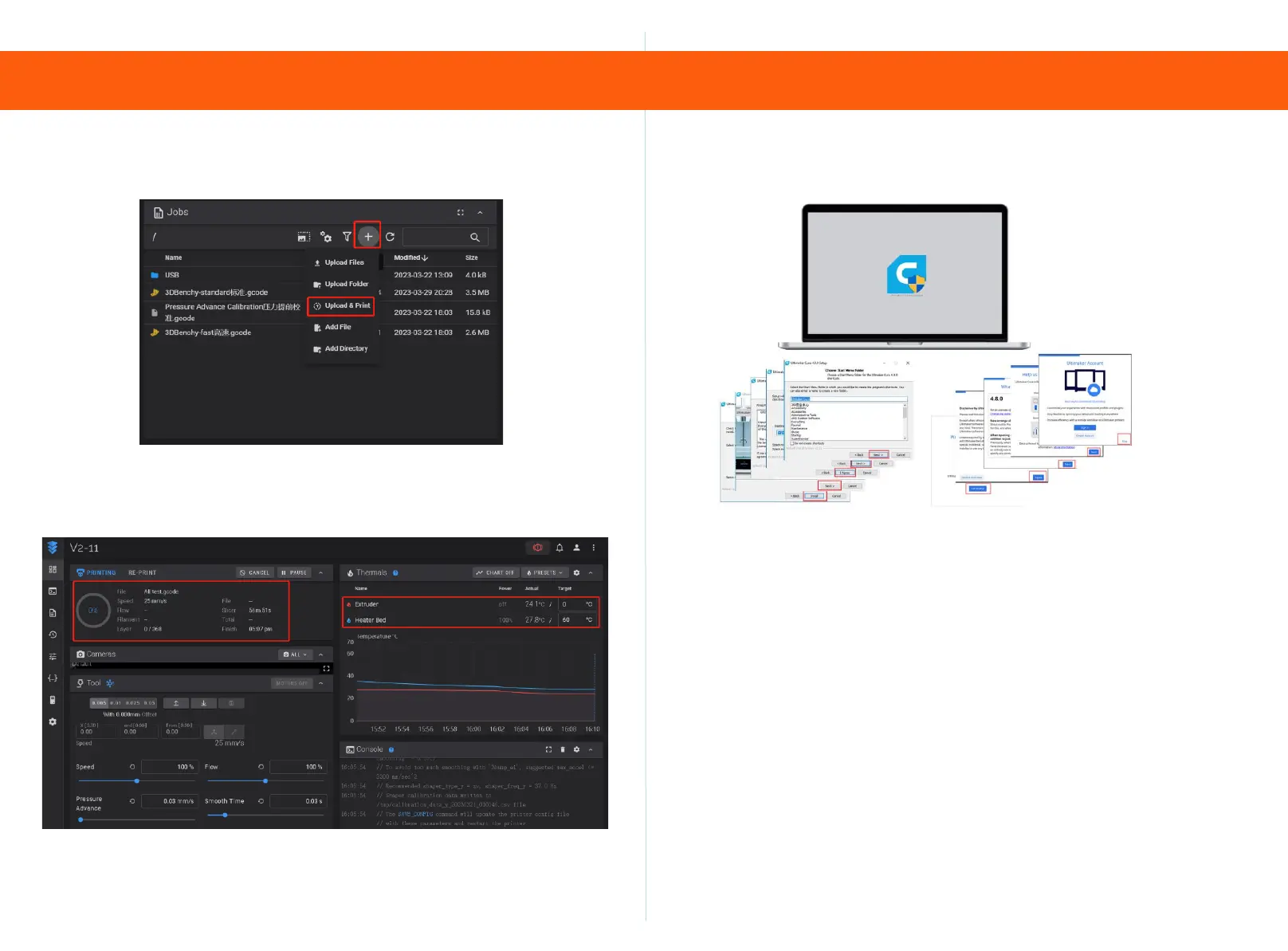
Step 9
Jobs option, click+to upload and print the file.
Step 10
Wait for the hot bed and nozzle to heat up to the specified
temperature before printing begins.
Step 2: Import the slicing configuration file from the USB drive into
Cura
1.Place the "KIINGROON_KLP1" folder in the
"share\cura\resources\quality" directory under the cura5.1 installation
path.
2. Place the "KIINGROON_KLP1. def. json" file in the
"share\cura\resources\definitions" directory in the installation path.
3. Place the "KIINGROON_KLP1_extruder_0. def. json" file in the
"share\cura\resources\extruders" directory in the installation path.
4. Place the "KIINGROON_KLP1. stl" file in the
"share\cura\resources\meshes" directory of the installation path.
5. Close all open CURA software and add KLP1 after reopening.



 To Next Page